Chapter-17: Events and Messaging with RabbitMQ
Sample code
The complete, tested code for this chapter is in samples/microservices: the outbox in order-api/src/outbox.js, order-api/src/events.js and postgresql/scripts/003-outbox.sql, the new service in notification-worker, compose.yaml, .env.example and scripts/poison-message.sh. Use it to compare against your own work.
Introduction
At the end of Chapter-16, the store was a small but complete system: separate services with their own data, an API gateway in front, and real sign-in. But every conversation between the services was a synchronous request: the Order API asks the Product API for a price and waits for the answer. That's right when the caller needs the answer to carry on. It's wrong when a service only wants to tell others that something happened.
Placing an order is exactly that case. Once the order is saved, the customer should get a confirmation email, and later the warehouse should pack it and the payment should be taken. The Order API shouldn't wait for any of that, and an order shouldn't fail because the email service is down.
In this lab, I will guide you through adding asynchronous messaging to the store. The Order API publishes an OrderPlaced event to a message broker, RabbitMQ, and a new service, the notification worker, receives it and sends the confirmation. Along the way we look at how RabbitMQ routes messages, why every message can arrive twice and what the consumer must do about it, what happens to a message nobody can process, and the one trap almost every first event-driven system falls into: saving to the database and publishing a message, as two separate steps.
Technical Scenario
As a Backend (BE) developer, you have been asked to send customers an order confirmation without slowing down or endangering the order itself. The team agreed on these rules:
- Tell, don't ask. The Order API announces that an order was placed. It doesn't know or care who listens; new listeners can be added later without changing it.
- Orders never wait for the broker. Placing an order works even when RabbitMQ or the notification worker is down. The confirmation may be late, but it is never lost.
- No event without an order, no order without an event. The order and its event are saved together, or not at all.
- Every message may arrive twice. The worker must notice a duplicate and not send a second email.
- A bad message doesn't block the queue. A message that can't be processed is parked in a dead-letter queue for a person to look at, and the worker carries on.
- Database per service still holds. The notification worker gets everything it needs from the event. It never reads the Order DB.
Objective
In this exercise, our objective is to accomplish and learn the following tasks:
- Step-1: Understand asynchronous messaging and events.
- Step-2: Understand exchanges, queues and bindings in RabbitMQ.
- Step-3: Design the
OrderPlacedevent. - Step-4: Save the order and its event in one transaction (the outbox).
- Step-5: Publish the outbox to RabbitMQ.
- Step-6: Build the notification worker.
- Step-7: Add RabbitMQ and the worker to the compose file.
- Step-8: Start the store.
- Step-9: Try it: place an order and watch the worker.
- Step-10: Try it: stop the worker and watch the queue grow.
- Step-11: Try it: send a poison message and a duplicate.
- Step-12: Try it: stop RabbitMQ.
- Step-13: Try it: prove the outbox transaction.
Prerequisites
Before starting this lab, ensure you have the following prerequisites in place:
- The store from Chapter-16:
compose.yaml, your.envfile, Keycloak and the service folders, in the folder that holds them (samples/microservicesin the sample code). - Docker Desktop (or Docker Engine 25 or later) with Docker Compose v2 or later, and about 200 MB more memory for RabbitMQ.
- Node.js 24, to add the
amqplibpackage to the Order API and create the notification worker. curland abashshell (on Windows, Git Bash or WSL).- Ports 8080, 8081 and 15672 free on your machine.
Architecture Diagram
The following diagram shows the store after this chapter. The new parts are RabbitMQ, the notification worker and the outbox table in the Order DB. The dotted arrows are asynchronous: nobody waits for an answer.
flowchart LR
  browser([Browser]) -->|"localhost:8080"| gw
  browser -.->|"sign in: localhost:8081"| kc
  you([You]) -.->|"management UI: localhost:15672"| mq
  subgraph store ["compose.yaml: network store"]
    gw["gateway<br/>nginx :8080"]
    ord["order-api<br/>Node 24"]
    prod["product-api<br/>.NET 10"]
    kc["keycloak"]
    odb[("order-db<br/>orders, order_items, outbox")]
    mq[["rabbitmq :5672<br/>exchange store.events"]]
    nw["notification-worker<br/>Node 24, amqplib"]
    gw -->|"/api/orders"| ord
    ord -->|"GET /products/id"| prod
    ord -->|"order + OrderPlaced<br/>one transaction"| odb
    ord -.->|"outbox publisher:<br/>OrderPlaced, order.placed"| mq
    mq -.->|"queue notifications.order-placed"| nw
  end
The storefront, the admin site and the databases of the Product API and Keycloak are still there, unchanged; the diagram leaves them out to keep the new path readable. Only the management UI of RabbitMQ is published to your machine. The services reach RabbitMQ on the store network at rabbitmq:5672, the AMQP port.
Step-1: Understand asynchronous messaging and events
In Chapter-14 we listed what a synchronous call costs: latency, availability coupling and partial failure. Let's look at the same three with a message broker in between.
| Synchronous call (HTTP) | Asynchronous message (broker) | |
|---|---|---|
| Coupling | The caller knows the other service's address and API, and calls it directly | The sender knows only the broker and the message format. It doesn't know who receives the message, or how many receivers there are |
| Availability | Both services must be up at the same moment. Product API down, no orders | The receiver can be down. The broker keeps the message until the receiver is back |
| Latency | The caller waits for the whole round trip | The sender waits only until the broker has the message. The work happens later |
| What you give up | Nothing extra: you get an answer or an error | An answer. The sender doesn't learn if or when the work was done, and every message can arrive more than once |
Neither style is better; they answer different questions. The Order API still asks the Product API for prices synchronously, because it needs the price before it can save the order. Sending the confirmation email is different: the order is complete without it, so nothing should wait for it.
Commands and events. Messages come in two flavors, and the name you give a message tells which one it is:
- A command asks one specific receiver to do something:
SendConfirmationEmail,ChargeCard. It is named with a verb, the sender expects it to be done, and it can be refused. - An event states a fact about the past:
OrderPlaced,PaymentReceived. It is named in the past tense, the sender doesn't care who reacts, and nobody can refuse it, because it has already happened.
OrderPlaced is an event. The Order API isn't asking anyone to send an email; it says "this order was placed". The notification worker decides on its own to send a confirmation. Tomorrow an inventory service can subscribe to the same event and reserve stock, and the Order API doesn't change at all. That's the loose coupling events buy you. The price is that the flow of the business process is no longer written in one place, so you need good names, a clear event format and logs that tell the story.
A saga: order, stock and payment
The store builds only the notification part, but the same events can drive a whole business process across services, called a saga. Placing an order in a full shop could work like this: the Order API saves the order as pending and publishes OrderPlaced; an Inventory service reserves the stock and publishes StockReserved; a Payment service charges the card and publishes PaymentSucceeded; the Order API marks the order confirmed. There is no transaction across the three databases, so when a step fails, the services undo the earlier steps with compensating actions: if the payment fails (PaymentFailed), Inventory releases the reserved stock and the Order API cancels the order. Each step is a local transaction plus an event, built with the same outbox and idempotent consumer you build in this chapter. Inventory and Payment are not part of the store; adding them with a saga is a good exercise once you have finished the book.
Step-2: Understand exchanges, queues and bindings in RabbitMQ
RabbitMQ is an open-source message broker. Our services talk to it with AMQP 0-9-1, its main protocol, and in AMQP a publisher never writes into a queue directly. Four building blocks work together:
- An exchange receives every message a publisher sends, and decides which queues get a copy.
- A queue stores messages until a consumer takes them. Each consumer reads from a queue.
- A binding connects a queue to an exchange, with a pattern that says which messages the queue wants.
- A routing key is a label the publisher puts on each message. The exchange compares it with the bindings.
flowchart LR
  pub["order-api<br/>(publisher)"] -->|"routing key order.placed"| ex{{"exchange store.events<br/>type topic"}}
  ex -->|"binding order.placed"| q[["queue<br/>notifications.order-placed"]]
  q --> w["notification-worker<br/>(consumer)"]
  q -.->|"rejected messages"| dlx{{"exchange<br/>notifications.dlx"}}
  dlx --> dlq[["queue<br/>notifications.order-placed.dlq"]]
  ex -.->|"binding order.* (example)"| q2[["queue of a future<br/>inventory service"]]
Our exchange, store.events, is a topic exchange: binding patterns can use * (one word) and # (zero or more words), so an inventory service could bind its own queue with order.* and get every order event. Every service that wants the events gets its own queue, and RabbitMQ puts a copy of each matching message in each of them. That's how one event reaches many independent receivers, and why the queue's name starts with the receiver's name: notifications.order-placed.
A few more ideas we'll use, each with the RabbitMQ term you'll meet in its documentation:
- Durable queues and persistent messages. A durable exchange or queue survives a restart of RabbitMQ; a persistent message (delivery mode 2) in a durable queue is written to disk and survives it too. We use both, so an order confirmation isn't lost when the broker restarts.
- Publisher confirms. After a publisher sends a message, RabbitMQ answers with an acknowledgement once it has taken responsibility for it; for a persistent message in a durable queue, that means after it was written to disk. Until then, the publisher must assume the message may be lost.
- Consumer acknowledgements. The consumer tells RabbitMQ when it has finished with a message (ack). Until then the message stays in the queue, marked as unacked. If the consumer's connection closes first, RabbitMQ puts the message back and delivers it again, with the
redeliveredflag set. - Prefetch. The maximum number of unacked messages RabbitMQ sends a consumer at a time. Without a limit, RabbitMQ would push the whole queue into one process.
- At-least-once delivery. Put the last points together: a consumer that finishes its work but dies before its ack reaches RabbitMQ gets the message again. The same can happen on the publishing side, as you'll see in Step-5. So a message is delivered at least once, and sometimes twice. RabbitMQ's documentation says it plainly: consumers must be prepared to handle redeliveries. A consumer that gives the same result whether it sees a message once or twice is called idempotent.
- Dead-lettering. A consumer can reject a message with
nackandrequeueset to false. If the queue has a dead-letter exchange (thex-dead-letter-exchangeargument), RabbitMQ re-publishes the rejected message there instead of dropping it, and a dead-letter queue (DLQ) bound to that exchange keeps it for a person to inspect.
Step-3: Design the OrderPlaced event
An event is a contract between teams, just like an API. The consumers can't ask the Order API for anything later (the notification worker has no access to the Order DB, and shouldn't call the Order API for every event), so the event must carry what they need:
| Field | Example | Why it is there |
|---|---|---|
eventId |
"e4b79fbf-..." |
A unique id for this event, so a consumer can recognize a duplicate |
version |
1 |
The version of the event's format |
occurredAt |
"2026-11-16T04:06:53.181Z" |
When the order was placed |
orderId |
"159e57df-..." |
Which order |
customerId |
"b1901bed-..." |
Who placed it: the sub from the access token |
customerEmail |
"alice@example.com" |
Where to send the confirmation: the email claim from the access token (Chapter-16) |
total |
19.98 |
The order total |
items |
[{ "productId": 1, "name": "Coffee mug", "quantity": 2 }] |
What was ordered |
Versioning. Events live longer than you think: messages wait in queues, and old consumers keep running while new publishers are deployed. The rules we follow:
- Additive changes keep the version. A new field (say
currency) is still version 1. Consumers ignore fields they don't know, so old consumers keep working. - Breaking changes get a new version. Removing or renaming a field, or changing its meaning or type, is version 2. Usually the publisher then sends both versions for a while (or two event types), until every consumer has moved on.
- Consumers check the version. Our worker accepts version 1 and dead-letters anything else, so a format it doesn't understand is parked, not misread.
Create src/events.js in the Order API:
import { randomUUID } from 'node:crypto';

// The events the Order API publishes (Chapter-17). An event says that something
// has happened; any service may react to it, and the Order API doesn't wait.

// OrderPlaced, version 1. New fields may be added without a new version;
// removing or renaming a field, or changing its meaning, needs version 2.
export function orderPlaced(order, customerEmail) {
  return {
    type: 'OrderPlaced',
    payload: {
      eventId: randomUUID(),
      version: 1,
      occurredAt: order.createdAt,
      orderId: order.id,
      customerId: order.customerId,
      // From the access token (Chapter-16); null when sign-in is off
      customerEmail: customerEmail ?? null,
      total: order.total,
      items: order.items.map(({ productId, name, quantity }) => ({ productId, name, quantity })),
    },
  };
}
The email comes from the token because that's where we trust it from: in Chapter-16 we saw that the Order API ignores a customerEmail sent in the request body.
Step-4: Save the order and its event in one transaction (the outbox)
The obvious way to publish the event is to save the order, then publish to RabbitMQ:
await saveOrder(order);          // 1. write to PostgreSQL
await publish('OrderPlaced');    // 2. write to RabbitMQ  -- what if this fails?
That's two writes to two different systems, and there is no transaction that covers both. This is called the dual-write problem, and it goes wrong in both directions:
- The order is saved, then RabbitMQ is down or the process crashes before step 2. The customer has an order but never gets a confirmation, and no other service hears about it.
- Swap the two lines, and the event is published, but the database insert fails. Now everyone reacts to an order that doesn't exist.
Retrying step 2 doesn't fix it either: the API can crash between the two steps, and then nobody is left to retry.
The fix is the transactional outbox pattern. The Order API doesn't publish anything while it saves the order. It writes the event as a row into an outbox table in its own database, in the same transaction as the order. A transaction is all or nothing, so either the order and its event are both saved, or neither is. A separate loop then reads the outbox and publishes the rows to RabbitMQ (Step-5). If RabbitMQ is down, the rows simply wait.
Add a third script to the Order DB's numbered scripts from Chapter-9 and Chapter-12:
-- 003: the outbox for the Order API's events (chapter 17).
-- POST /orders writes the order, its items and one OrderPlaced row here in the
-- same transaction. A loop in the Order API publishes unpublished rows to
-- RabbitMQ and then sets published_at.

CREATE TABLE outbox (
    id           uuid         PRIMARY KEY,  -- the event's eventId
    type         varchar(100) NOT NULL,     -- for example OrderPlaced
    payload      jsonb        NOT NULL,     -- the event as it is published
    created_at   timestamptz  NOT NULL DEFAULT now(),
    published_at timestamptz  NULL         -- NULL until RabbitMQ has confirmed it
);

-- The publisher looks only for unpublished rows, oldest first
CREATE INDEX ix_outbox_unpublished ON outbox (created_at) WHERE published_at IS NULL;
idis the event'seventId, so the same event can never be in the outbox twice.payloadisjsonb, PostgreSQL's binary JSON type. You can query inside it (payload->>'orderId'), as we'll do in the Try-it steps. One side effect:jsonbdoesn't keep the order of the keys, so the published JSON lists them in a different order thanevents.jsbuilds them. JSON objects have no order, so that's harmless.- The partial index covers only the rows the publisher looks for, the unpublished ones, so it stays small however many events have been published.
Existing Order DB
PostgreSQL runs the scripts in /docker-entrypoint-initdb.d only on the first start, with an empty volume. If your order-db-data volume is from an earlier chapter, either run the new script once by hand, docker compose exec -T order-db psql -U orders -d orderdb < postgresql/scripts/003-outbox.sql, or start fresh with docker compose down -v (this deletes the data of every database in the store).
Now extend saveOrder in src/pg-store.js. It takes the events as a second argument and inserts them after the order and its items, before COMMIT:
// Saves the order, its items and its events in one transaction: either all
// rows are written or none are. The events go into the outbox table, so an
// order is never saved without its OrderPlaced event, or the other way round
// (Chapter-17). Every value goes in as a parameter ($1, $2, ...), never pasted
// into the SQL text, so input can't change the query.
export async function saveOrder(order, events = []) {
  const client = await pool.connect();
  try {
    await client.query('BEGIN');
    await client.query(
      `INSERT INTO orders (id, customer_id, status, total, created_at)
       VALUES ($1, $2, $3, $4, $5)`,
      [order.id, order.customerId, order.status, order.total, order.createdAt]);
    for (const [index, item] of order.items.entries()) {
      await client.query(
        `INSERT INTO order_items (order_id, line_no, product_id, name, unit_price, quantity)
         VALUES ($1, $2, $3, $4, $5, $6)`,
        [order.id, index + 1, item.productId, item.name, item.unitPrice, item.quantity]);
    }
    for (const event of events) {
      await client.query(
        `INSERT INTO outbox (id, type, payload, created_at) VALUES ($1, $2, $3, $4)`,
        [event.payload.eventId, event.type, event.payload, event.payload.occurredAt]);
    }
    await client.query('COMMIT');
    return order;
  } catch (err) {
    await client.query('ROLLBACK');
    throw err;
  } finally {
    client.release();
  }
}
The in-memory store from Chapter-5 accepts the same argument and ignores it, because there is no database to put an outbox in (see the sample code's src/memory-store.js).
In src/orders.js, build the event and pass it with the order (and add import { orderPlaced } from './events.js'; at the top):
  const order = {
    id: randomUUID(),
    customerId: currentCustomerId(req),
    status: 'Placed',
    total: totalCents / 100,
    createdAt: new Date().toISOString(),
    items,
  };

  // Save the order together with its OrderPlaced event (Chapter-17). The event
  // only goes into the outbox table here; RabbitMQ is not involved yet, so an
  // order never waits for, or fails because of, the message broker.
  await saveOrder(order, [orderPlaced(order, req.user.email)]);
Notice what is not in this handler: RabbitMQ. Placing an order touches only the Product API (for prices) and the Order DB, exactly as before. The order is as fast and as available as it was in Chapter-16.
Step-5: Publish the outbox to RabbitMQ
Now something has to move the events from the outbox to RabbitMQ. In the outbox pattern this is called the message relay. Ours is a loop inside the Order API process. Add the RabbitMQ client for Node.js, amqplib:
First, two functions for the outbox table in src/pg-store.js:
// Hands up to `limit` unpublished events, oldest first, to publish(), and marks
// the ones whose ids it returns as published, all in one transaction (Chapter-17).
// FOR UPDATE locks the rows until COMMIT, so a second Order API instance can't
// publish them at the same time; SKIP LOCKED lets it take the next rows instead
// of waiting. If publish() throws, ROLLBACK leaves the rows for the next try.
export async function publishPendingEvents(limit, publish) {
  const client = await pool.connect();
  try {
    await client.query('BEGIN');
    const { rows } = await client.query(
      `SELECT id, type, payload
         FROM outbox
        WHERE published_at IS NULL
        ORDER BY created_at
        LIMIT $1
          FOR UPDATE SKIP LOCKED`,
      [limit]);
    const published = rows.length > 0 ? await publish(rows) : [];
    if (published.length > 0) {
      await client.query(
        'UPDATE outbox SET published_at = now() WHERE id = ANY($1::uuid[])', [published]);
    }
    await client.query('COMMIT');
    return { claimed: rows.length, published: published.length };
  } catch (err) {
    await client.query('ROLLBACK').catch(() => {});
    throw err;
  } finally {
    client.release();
  }
}
// How many events still wait in the outbox, and since when (GET /health/outbox)
export async function outboxStatus() {
  const { rows } = await pool.query(
    `SELECT count(*)::int AS pending, min(created_at) AS oldest
       FROM outbox
      WHERE published_at IS NULL`);
  return { pending: rows[0].pending, oldestCreatedAt: rows[0].oldest?.toISOString() ?? null };
}
publishPendingEvents claims a batch of rows and keeps them locked while it publishes:
FOR UPDATElocks the selected rows until the transaction ends. If you run two copies of the Order API, both run this loop, and without the lock both would publish the same events.SKIP LOCKEDmakes the second copy skip rows that the first one has locked, instead of waiting for them. PostgreSQL's documentation describes exactly this use: avoiding lock contention when several consumers read a queue-like table.- Only the ids that
publish()returns are marked as published. Ifpublish()throws,ROLLBACKreleases the rows unchanged, and the next round tries again.
The memory store gets matching stubs (hasOutbox = false, and functions that do nothing), and src/store.js exports the new functions next to the old ones; see the sample code.
Then the loop itself, src/outbox.js:
// Publishes the events in the outbox table to RabbitMQ (Chapter-17).
//
// POST /orders only writes the event into the outbox, in the same transaction
// as the order. This loop runs next to the API: every second it takes up to 20
// unpublished events, publishes them to the exchange store.events, waits until
// RabbitMQ confirms it has them, and only then marks them as published. If
// RabbitMQ is down, orders still succeed and the events wait in the outbox.
import amqp from 'amqplib';
import { hasOutbox, publishPendingEvents } from './store.js';

// amqp://store:<password>@rabbitmq:5672 in compose; never logged, it has a password
const url = process.env.RABBITMQ_URL;

export const EXCHANGE = 'store.events';
const ROUTING_KEYS = { OrderPlaced: 'order.placed' };

const BATCH_SIZE = 20;
const INTERVAL_MS = 1000;
const MAX_RETRY_DELAY_MS = 10_000;
const CONFIRM_TIMEOUT_MS = 10_000;

export const outboxEnabled = Boolean(url) && hasOutbox;

export function outboxDescription() {
  if (!hasOutbox) return 'OFF, orders in memory have no outbox (set DATABASE_URL)';
  if (!url) return 'OFF, events stay in the outbox table (set RABBITMQ_URL to publish them)';
  return `outbox to RabbitMQ at ${new URL(url).host}, exchange ${EXCHANGE}`;
}

let connection;
let channel;
let stopping = false;
let wakeUp = () => {};
let running;
// Ids of messages RabbitMQ sent back because no queue was bound to receive them
const returned = new Set();

// Opens the connection and a confirm channel, if they aren't open already.
async function ensureChannel() {
  if (!connection) {
    // timeout: give up on a connection attempt after 5 seconds
    const conn = await amqp.connect(url, {
      timeout: 5000,
      clientProperties: { connection_name: 'order-api outbox' },
    });
    // Without an error listener a lost connection would crash the process;
    // the close event that follows makes the loop reconnect.
    conn.on('error', (err) => console.warn(`outbox: RabbitMQ connection error: ${err.message}`));
    conn.on('close', () => {
      connection = undefined;
      channel = undefined;
    });
    connection = conn;
    console.log(`outbox: connected to RabbitMQ at ${new URL(url).host}`);
  }
  if (!channel) {
    // A confirm channel: RabbitMQ acknowledges every message once it has
    // taken responsibility for it (written to disk for a persistent message
    // in a durable queue), so we know when it's safe to mark it as published.
    const ch = await connection.createConfirmChannel();
    ch.on('error', (err) => console.warn(`outbox: RabbitMQ channel error: ${err.message}`));
    ch.on('close', () => {
      if (channel === ch) channel = undefined;
    });
    // A mandatory message that reaches no queue comes back as a "return",
    // just before its confirm. It isn't lost, but nobody received it either.
    ch.on('return', (message) => returned.add(message.properties.messageId));
    // Declaring is idempotent: it creates the exchange only if it doesn't exist
    await ch.assertExchange(EXCHANGE, 'topic', { durable: true });
    channel = ch;
  }
  return channel;
}

// Publishes the claimed outbox rows and returns the ids RabbitMQ confirmed
// and routed to at least one queue.
async function publish(rows) {
  const ch = channel;
  returned.clear();
  for (const row of rows) {
    ch.publish(EXCHANGE, ROUTING_KEYS[row.type], Buffer.from(JSON.stringify(row.payload)), {
      persistent: true,       // written to disk in a durable queue, survives a broker restart
      mandatory: true,        // send it back if no queue is bound for it
      contentType: 'application/json',
      type: row.type,
      messageId: row.id,      // the eventId, so consumers can spot duplicates
      appId: 'order-api',
    });
  }
  // Resolves when RabbitMQ has confirmed every message on the channel, rejects
  // if it refused one (nack) or the channel closed first.
  let timer;
  try {
    await Promise.race([
      ch.waitForConfirms(),
      new Promise((resolve, reject) => {
        timer = setTimeout(() => reject(new Error('no confirm from RabbitMQ within 10 s')), CONFIRM_TIMEOUT_MS);
      }),
    ]);
  } catch (err) {
    err.fromRabbitMq = true;
    throw err;
  } finally {
    clearTimeout(timer);
  }

  const published = rows.filter((row) => !returned.has(row.id));
  for (const row of published) {
    console.log(`outbox: published ${row.type} ${row.id} for order ${row.payload.orderId}`);
  }
  if (published.length < rows.length) {
    console.warn(`outbox: ${rows.length - published.length} event(s) reached no queue; they stay in the outbox`);
  }
  return published.map((row) => row.id);
}

// Closes a broken or stuck connection, so the next round opens a new one
async function reset() {
  const conn = connection;
  connection = undefined;
  channel = undefined;
  await conn?.close().catch(() => {});
}

function sleep(ms) {
  return new Promise((resolve) => {
    const timer = setTimeout(resolve, ms);
    wakeUp = () => {
      clearTimeout(timer);
      resolve();
    };
  });
}

// The loop: publish, wait a second, repeat. After a failure, wait longer each
// time (1, 2, 4, 8, then every 10 seconds) so a broker that is down isn't
// flooded with connection attempts, and start again at 1 second once it works.
async function run() {
  let retryDelay = INTERVAL_MS;
  while (!stopping) {
    let wait = INTERVAL_MS;
    try {
      await ensureChannel();
      const { claimed, published } = await publishPendingEvents(BATCH_SIZE, publish);
      if (published < claimed) {
        wait = retryDelay;
        retryDelay = Math.min(retryDelay * 2, MAX_RETRY_DELAY_MS);
      } else {
        retryDelay = INTERVAL_MS;
        // A full batch: there may be more, so go again straight away
        if (claimed === BATCH_SIZE) wait = 0;
      }
    } catch (err) {
      const reason = err.code && !err.message.includes(err.code) ? `${err.code} ${err.message}` : err.message;
      console.warn(`outbox: publishing failed (${reason}); next try in ${retryDelay / 1000}s`);
      if (err.fromRabbitMq || !channel) await reset();
      wait = retryDelay;
      retryDelay = Math.min(retryDelay * 2, MAX_RETRY_DELAY_MS);
    }
    if (!stopping && wait > 0) await sleep(wait);
  }
}

export function startOutboxPublisher() {
  if (!outboxEnabled) return;
  running = run();
}

// On shutdown: finish the current round, then close the connection
export async function stopOutboxPublisher() {
  stopping = true;
  wakeUp();
  await running;
  await reset();
}
This is the heart of the chapter, so let's walk through it:
- One connection, kept open. Opening an AMQP connection is expensive, so the loop opens one, with a confirm channel on it, and reuses it. The
errorhandlers matter: anEventEmitterthat emitserrorwithout a listener crashes Node.js. When the connection closes, theclosehandler forgets it, and the next round opens a new one. assertExchangedeclaresstore.eventsas a durable topic exchange. Declaring is idempotent: it creates the exchange if it doesn't exist, and does nothing if it already exists with the same settings. So the publisher can't fail just because it starts before anything else.persistent: trueasks RabbitMQ to write the message to disk, so it survives a broker restart in a durable queue.messageIdis the event id, so consumers can recognize duplicates without parsing the body.- Publisher confirms.
waitForConfirms()resolves once RabbitMQ has confirmed every message on the channel, and rejects if it refused one or the channel closed. Only then are the rows marked as published. The 10-second timeout covers a broker that accepts the connection but never answers. mandatory: trueand returns. If no queue is bound to the routing key (for example, the notification worker has never started, so its queue doesn't exist yet), RabbitMQ would confirm the message and then drop it: confirmed, but received by nobody. Withmandatory, RabbitMQ sends such a message back as a return, and it sends the return before the confirm. The loop remembers returned ids and leaves those rows in the outbox for later.- Backoff. When RabbitMQ is unreachable, the loop waits 1, 2, 4, 8 and then 10 seconds between attempts, and goes back to 1 second once it works. A broker that is down isn't flooded with connection attempts, and one that comes back is used within 10 seconds.
- Batches. Up to 20 events per round, every second; a full batch means there may be more, so the next round starts straight away.
Where duplicates come from. Look at the order of the steps: publish, wait for the confirms, then UPDATE ... SET published_at and COMMIT. If the Order API crashes, or the database connection breaks, after RabbitMQ confirmed the messages but before the COMMIT, the rows are still unpublished, and the next round publishes them again. The outbox guarantees that every event is published at least once, never exactly once. That's the trade-off of the pattern, and it's why the consumer must be idempotent (Step-6).
Order. Events are published oldest first, but with several Order API copies, or a retry after a failure, a later event can overtake an earlier one. Our worker treats each event on its own, so that doesn't matter here; consumers that care about order compare the occurredAt or a version number per order.
Finally, wire it in. src/server.js logs where the events go, starts the loop after the database is reachable, and stops it on shutdown:
// Where the events go (Chapter-17)
console.log(`events: ${outboxDescription()}`);

// Reach the database (if any) before taking requests; connect() retries with backoff.
await connect();

// Publish the events from the outbox in the background. If RabbitMQ is down,
// the loop keeps trying; the API doesn't wait for it.
startOutboxPublisher();
(The shutdown handler now calls await stopOutboxPublisher(); before await close();, so the current round can finish before the database pool closes.)
src/app.js gets one more health endpoint, so you can see the outbox from outside:
// How many events wait in the outbox to be published (Chapter-17), for demos
// and monitoring. Not part of readiness: RabbitMQ being down must not stop
// the Order API from taking orders.
app.get('/health/outbox', async (req, res) => {
  const status = await outboxStatus();
  if (!status) return sendProblem(res, 404, 'There is no outbox: orders are kept in memory.');
  res.json(status);
});
Readiness doesn't include RabbitMQ
/health/ready still checks only the Order DB. That's deliberate, for the same reason as in Chapter-14: readiness answers "can this service do its own job?". The Order API's job is to take orders, and it can do that without RabbitMQ; the events wait in the outbox. If readiness checked RabbitMQ, a broker outage would mark the Order API unhealthy, a platform like Kubernetes would stop sending it traffic, and customers couldn't order at all: exactly the coupling the outbox removes. /health/outbox is for people and monitoring: a pending count that keeps growing means the events are stuck.
Step-6: Build the notification worker
The notification worker is a new service: a Node.js process with no HTTP API and no database. Its only input is a queue. Create the folder notification-worker next to the other services, and in it a package.json:
{
  "name": "notification-worker",
  "version": "1.0.0",
  "description": "Sends order confirmations for OrderPlaced events from RabbitMQ",
  "private": true,
  "type": "module",
  "main": "src/worker.js",
  "scripts": {
    "start": "node src/worker.js"
  },
  "dependencies": {
    "amqplib": "^2.3.3"
  }
}
Run npm install to create package-lock.json. The worker has three source files. First, a tiny logger, src/log.js. The worker writes one JSON object per line, so a log collector can search by orderId or eventId; the chapter on resilience and observability (Chapter-18, being added) moves the other services to the same format:
// One JSON object per log line, so a log collector can search by field
// (orderId, eventId, ...) instead of parsing text.
export function log(level, message, fields = {}) {
  const line = JSON.stringify({
    time: new Date().toISOString(),
    level,
    service: 'notification-worker',
    message,
    ...fields,
  });
  if (level === 'error') console.error(line);
  else console.log(line);
}
Then what the worker does with one event, src/order-placed.js:
// What the worker does with one OrderPlaced event (Chapter-17).
import { log } from './log.js';

// A message that can never be processed, however often we try: not JSON,
// not an OrderPlaced event, or a version this worker doesn't understand.
// It goes to the dead-letter queue straight away, without retries.
export class InvalidMessageError extends Error {}

// Reads and checks an OrderPlaced event. Version 1 only: fields added later
// to version 1 are simply ignored, a version 2 needs a new worker.
export function parseOrderPlaced(content) {
  let event;
  try {
    event = JSON.parse(content.toString('utf8'));
  } catch {
    throw new InvalidMessageError('the message is not valid JSON');
  }
  if (typeof event !== 'object' || event === null || Array.isArray(event)) {
    throw new InvalidMessageError('the message is not a JSON object');
  }
  if (event.version !== 1) {
    throw new InvalidMessageError(`unsupported OrderPlaced version ${JSON.stringify(event.version)}`);
  }
  for (const field of ['eventId', 'orderId']) {
    if (typeof event[field] !== 'string' || event[field] === '') {
      throw new InvalidMessageError(`${field} is missing`);
    }
  }
  return event;
}

// The ids of the last 1,000 events this worker has processed. RabbitMQ
// delivers every message at least once, so the same event can arrive twice
// (for example after the worker crashed before its ack reached RabbitMQ).
// A Set keeps insertion order, so the oldest id is the first one.
// DEMO ONLY: the ids are lost when the worker restarts, and every copy of the
// worker has its own Set. A real consumer keeps them in its own durable store.
const MAX_REMEMBERED = 1000;
const processed = new Set();

export function alreadyProcessed(eventId) {
  return processed.has(eventId);
}

export function rememberProcessed(eventId) {
  processed.add(eventId);
  if (processed.size > MAX_REMEMBERED) {
    processed.delete(processed.values().next().value);
  }
}

// "Sends" the order confirmation. This demo writes one log line instead of an
// email; a real worker would call an email service here, which can fail.
export async function sendConfirmation(event) {
  if (!event.customerEmail) {
    log('warn', `no email address for order ${event.orderId}, nothing sent`,
      { eventId: event.eventId, orderId: event.orderId });
    return;
  }
  log('info', `email sent to ${event.customerEmail} for order ${event.orderId}`,
    { eventId: event.eventId, orderId: event.orderId });
}
parseOrderPlacedchecks the message before trusting it. A message that isn't JSON, or has an unknown version, throwsInvalidMessageError: such a message will never work, however often it is retried.- The idempotent consumer.
alreadyProcessedandrememberProcessedkeep the ids of the last 1,000 processed events in aSet. Before the worker sends an email, it checks whether it has seen the event id; after sending, it remembers it. sendConfirmationwrites the lineemail sent to <customerEmail> for order <orderId>instead of sending an email. A real worker would call an email service here, which can fail; that's what the retries below are for.
Limits of the in-memory duplicate check
The Set is a demo. It is lost when the worker restarts, so a duplicate that arrives after a restart is sent again (you'll see that in Step-11), and if you run two copies of the worker, each has its own Set and neither sees the other's ids. A production consumer keeps the processed ids in its own durable store, for example Redis with an expiry, or a table in the consumer's own database, written in the same transaction as the work when the work is itself a database change. What it must never do is read the Order DB to find out whether the order was handled: that's the Order API's private data (database per service, Chapter-12).
And the worker itself, src/worker.js:
// The notification worker (Chapter-17): receives every OrderPlaced event from
// RabbitMQ and sends the customer an order confirmation. It has no HTTP API and
// no database; its only input is the queue notifications.order-placed.
import { createServer } from 'node:http';
import amqp from 'amqplib';
import { log } from './log.js';
import {
  alreadyProcessed, InvalidMessageError, parseOrderPlaced, rememberProcessed, sendConfirmation,
} from './order-placed.js';

// amqp://store:<password>@rabbitmq:5672 in compose; never logged, it has a password
const url = process.env.RABBITMQ_URL;
const healthPort = Number(process.env.HEALTH_PORT ?? 3001);

// The names every service of the store agrees on (Chapter-17)
const EXCHANGE = 'store.events';                       // topic exchange, owned by the Order API
const ROUTING_KEY = 'order.placed';
const QUEUE = 'notifications.order-placed';            // this worker's queue
const DEAD_LETTER_EXCHANGE = 'notifications.dlx';      // where rejected messages go...
const DEAD_LETTER_QUEUE = 'notifications.order-placed.dlq'; // ...and where they stay

const PREFETCH = 10;          // at most 10 unacknowledged messages at a time
const RETRIES = 3;            // after the first attempt; waits 1, 2 and 4 seconds
const MAX_RECONNECT_DELAY_MS = 10_000;

let connection;
let consuming = false;
let stopping = false;

if (!url) {
  log('error', 'RABBITMQ_URL is not set, so there is nothing to consume');
  process.exit(1);
}

// Creates the exchanges, queues and bindings if they don't exist yet. Declaring
// is idempotent, so every start of the worker can do it, and the topology can
// be read right here in the code.
async function declareTopology(channel) {
  await channel.assertExchange(EXCHANGE, 'topic', { durable: true });
  await channel.assertExchange(DEAD_LETTER_EXCHANGE, 'fanout', { durable: true });
  await channel.assertQueue(DEAD_LETTER_QUEUE, { durable: true });
  await channel.bindQueue(DEAD_LETTER_QUEUE, DEAD_LETTER_EXCHANGE, '');
  await channel.assertQueue(QUEUE, {
    durable: true,                             // the queue survives a broker restart
    deadLetterExchange: DEAD_LETTER_EXCHANGE,  // x-dead-letter-exchange: rejected messages go here
  });
  await channel.bindQueue(QUEUE, EXCHANGE, ROUTING_KEY);
}

const sleep = (ms) => new Promise((resolve) => setTimeout(resolve, ms));

// Handles one message. Ack only after the work is done: if the worker dies
// before that, RabbitMQ delivers the message again (at-least-once delivery).
async function handle(channel, message) {
  const ack = () => settle(() => channel.ack(message));
  const reject = () => settle(() => channel.nack(message, false, false)); // requeue false: dead-letter it

  let event;
  try {
    event = parseOrderPlaced(message.content);
  } catch (err) {
    if (!(err instanceof InvalidMessageError)) throw err;
    log('error', `rejected a message: ${err.message}; moved to ${DEAD_LETTER_QUEUE}`,
      { messageId: message.properties.messageId ?? null });
    return reject();
  }

  const fields = { eventId: event.eventId, orderId: event.orderId };
  if (alreadyProcessed(event.eventId)) {
    log('info', `duplicate event skipped for order ${event.orderId}`, fields);
    return ack();
  }

  for (let attempt = 1; ; attempt++) {
    try {
      await sendConfirmation(event);
      rememberProcessed(event.eventId);
      return ack();
    } catch (err) {
      if (attempt > RETRIES) {
        log('error', `giving up after ${attempt} attempts: ${err.message}; moved to ${DEAD_LETTER_QUEUE}`, fields);
        return reject();
      }
      const delay = 1000 * 2 ** (attempt - 1);
      log('warn', `attempt ${attempt} failed: ${err.message}; retry in ${delay / 1000}s`, fields);
      await sleep(delay);
    }
  }
}

// ack and nack throw if the channel closed in the meantime. RabbitMQ then
// delivers the message again on the next connection, so there's nothing to do.
function settle(action) {
  try {
    action();
  } catch (err) {
    log('warn', `could not acknowledge a message (${err.message}); RabbitMQ will deliver it again`);
  }
}

async function connectAndConsume() {
  const conn = await amqp.connect(url, {
    timeout: 5000,
    clientProperties: { connection_name: 'notification-worker' },
  });
  connection = conn;
  conn.on('error', (err) => log('warn', `RabbitMQ connection error: ${err.message}`));
  const closed = new Promise((resolve) => conn.on('close', resolve));

  const channel = await conn.createChannel();
  channel.on('error', (err) => log('warn', `RabbitMQ channel error: ${err.message}`));
  channel.on('close', () => conn.close().catch(() => {}));
  await declareTopology(channel);
  // Without a limit RabbitMQ would push the whole queue into this process at once
  await channel.prefetch(PREFETCH);
  log('info', `consuming ${QUEUE} from ${new URL(url).host}`, { prefetch: PREFETCH });
  await channel.consume(QUEUE, (message) => {
    if (message === null) {
      // The queue was deleted: reconnect, which declares it again
      log('warn', 'RabbitMQ cancelled the consumer');
      conn.close().catch(() => {});
      return;
    }
    handle(channel, message).catch((err) => {
      log('error', `unexpected error: ${err.message}`);
      settle(() => channel.nack(message, false, false));
    });
  }, { noAck: false }); // manual acknowledgements

  consuming = true;
  await closed;
  consuming = false;
  connection = undefined;
}

// Keeps the worker connected: when the connection fails or is lost, wait
// (1, 2, 4, 8, then every 10 seconds) and connect again.
async function run() {
  let delay = 1000;
  while (!stopping) {
    const started = Date.now();
    try {
      await connectAndConsume();
      if (stopping) return;
      log('warn', 'lost the connection to RabbitMQ');
    } catch (err) {
      log('warn', `connecting to RabbitMQ failed: ${err.message}`);
    }
    // A connection that lasted a while starts the backoff from the beginning
    if (Date.now() - started > 30_000) delay = 1000;
    log('info', `reconnecting in ${delay / 1000}s`);
    await sleep(delay);
    delay = Math.min(delay * 2, MAX_RECONNECT_DELAY_MS);
  }
}

// Health: live = the process is up; ready = connected and consuming.
const health = createServer((req, res) => {
  if (req.url === '/health/live') {
    res.writeHead(200, { 'Content-Type': 'text/plain' }).end('Healthy');
  } else if (req.url === '/health/ready') {
    res.writeHead(consuming ? 200 : 503, { 'Content-Type': 'text/plain' })
      .end(consuming ? 'Healthy' : 'Unhealthy');
  } else {
    res.writeHead(404).end();
  }
});
health.listen(healthPort, () => log('info', `health endpoints on port ${healthPort}`));

// docker stop: close the connection. Messages that were delivered but not
// acknowledged yet go back to the queue, and another worker (or this one,
// after a restart) gets them.
for (const signal of ['SIGTERM', 'SIGINT']) {
  process.on(signal, async () => {
    log('info', `${signal} received, shutting down`);
    stopping = true;
    await connection?.close().catch(() => {});
    health.close();
    process.exit(0);
  });
}

await run();
Here is what it does, from the bottom up:
run()keeps the worker connected. When RabbitMQ is unreachable or the connection is lost, it waits 1, 2, 4, 8 and then 10 seconds before it tries again, like the Order API's publisher.declareTopology()declares everything the worker relies on: the exchange, its own queue, the binding with the routing keyorder.placed, and the dead-letter exchange and queue. The main queue gets the argumentx-dead-letter-exchange: notifications.dlx(amqplib'sdeadLetterExchangeoption), so RabbitMQ re-publishes every message the worker rejects to that exchange, and the fanout exchange puts it innotifications.order-placed.dlq. The consumer owns its queue, so the consumer declares it.prefetch(10)lets RabbitMQ hand this consumer at most 10 unacknowledged messages at a time. (In RabbitMQ, a prefetch without theglobalflag applies per consumer.)consume(..., { noAck: false })turns on manual acknowledgements: RabbitMQ keeps every message until the worker acks it.handle()decides what happens to each message:
| What happened | What the worker does | Where the message goes |
|---|---|---|
| Email sent | ack |
Removed from the queue |
| Event id seen before | ack, log duplicate event skipped |
Removed, no second email |
| Not JSON, unknown version, no ids | nack with requeue false, right away |
Dead-letter queue |
| Sending failed | Retry after 1, 2 and 4 seconds; after the 3rd retry, nack with requeue false |
Dead-letter queue |
| Worker crashed or its connection broke before the ack | Nothing (it can't) | RabbitMQ delivers it again |
Why not nack with requeue true for a failure? The message would go straight back to the queue and come back a moment later, again and again: a poison message would keep the worker busy forever. Retrying a few times with a growing delay, then parking the message, fixes a short hiccup and stops an endless loop.
- Health on port 3001. The worker has no API, but compose and orchestrators still need to know if it works.
/health/liveanswers while the process runs;/health/readyonly while it is connected and consuming. For the worker, unlike the Order API, RabbitMQ is its job, so it belongs in readiness. - Shutdown.
docker stopsendsSIGTERM; the worker closes its connection, and RabbitMQ puts any delivered but unacknowledged message back in the queue for the next worker.
Topology in code or in RabbitMQ
Declaring queues from the code keeps this lab self-contained: you can read the whole topology in declareTopology(). RabbitMQ's documentation recommends setting the dead-letter exchange with a policy rather than a queue argument in production, because a policy can be changed at any time, while a queue argument can only be changed by deleting and declaring the queue again. Many teams also create exchanges and queues ahead of time, with a definitions file or infrastructure code, and give the services permission only to publish and consume.
Finally, the Dockerfile, the same pattern as the Order API's from Chapter-5, with a non-root user:
# The notification worker (chapter 17): a Node.js process that consumes
# OrderPlaced events from RabbitMQ. No password in this image: RABBITMQ_URL
# is passed when the container starts.
FROM node:24-alpine

WORKDIR /app

# Install dependencies first so this layer is cached until the package files change
COPY package.json package-lock.json ./
RUN npm ci --omit=dev

COPY src/ ./src/

ENV NODE_ENV=production
# Health endpoints only (/health/live, /health/ready); the worker has no API
EXPOSE 3001
USER node
CMD ["node", "src/worker.js"]
and a .dockerignore with node_modules, npm-debug.log and .env, so none of them end up in the image.
Step-7: Add RabbitMQ and the worker to the compose file
Add the password to .env.example (and to your .env):
# RabbitMQ (chapter 17). Password of the user "store", which the Order API and the
# notification worker connect with, and which signs in to the management UI
# (http://localhost:15672). RabbitMQ sets it only on its first start.
# The value is used inside a URL (RABBITMQ_URL), so stick to letters, digits and - _ . ~
RABBITMQ_PASSWORD=replaceme
Then add two services to compose.yaml, and the address of RabbitMQ to the Order API:
  # Sends the order confirmation for every OrderPlaced event (chapter 17)
  notification-worker:
    build: ./notification-worker
    image: sample/notification-worker
    environment:
      RABBITMQ_URL: "amqp://store:${RABBITMQ_PASSWORD:?copy .env.example to .env and set it}@rabbitmq:5672"
    depends_on:
      rabbitmq:
        condition: service_healthy
    healthcheck:
      # Ready means connected to RabbitMQ and consuming its queue
      test: ["CMD", "node", "-e", "fetch('http://127.0.0.1:3001/health/ready').then(r => process.exit(r.ok ? 0 : 1), () => process.exit(1))"]
      interval: 10s
      timeout: 5s
      retries: 3
      start_period: 30s
      start_interval: 2s
    restart: unless-stopped
    networks: [store]

  # The message broker (chapter 17)
  rabbitmq:
    image: rabbitmq:4-management
    # RabbitMQ keeps its data in a folder named after the node, rabbit@<hostname>.
    # A fixed hostname keeps the queues and messages when the container is recreated.
    hostname: rabbitmq
    environment:
      # Created on the first start, with an empty volume. The services connect
      # with this user, and you sign in to the management UI with it.
      RABBITMQ_DEFAULT_USER: store
      RABBITMQ_DEFAULT_PASS: ${RABBITMQ_PASSWORD:?copy .env.example to .env and set it}
    volumes:
      - rabbitmq-data:/var/lib/rabbitmq
    ports:
      # The management UI only. AMQP (5672) stays on the store network.
      - "127.0.0.1:15672:15672"
    healthcheck:
      # The check runs as root, and rabbitmq-diagnostics creates the Erlang cookie
      # file if it doesn't exist yet. Created by root before RabbitMQ (which runs
      # as the user rabbitmq) creates it, the file can't be read by RabbitMQ, and
      # its first start fails. So ping only once RabbitMQ has made the file.
      test: ["CMD-SHELL", "test -f /var/lib/rabbitmq/.erlang.cookie && rabbitmq-diagnostics -q ping"]
      interval: 10s
      timeout: 10s
      retries: 3
      start_period: 30s
      start_interval: 2s
    restart: unless-stopped
    networks: [store]
and, in the order-api service's environment and in the volumes list at the end:
  order-api:
    environment:
      # ...the settings from Chapter-14 and Chapter-16, then:
      # The Order API publishes OrderPlaced events from its outbox (chapter 17).
      # No depends_on for RabbitMQ: orders work without it, and the events wait.
      RABBITMQ_URL: "amqp://store:${RABBITMQ_PASSWORD:?copy .env.example to .env and set it}@rabbitmq:5672"

volumes:
  # ...the volumes from before, and:
  rabbitmq-data:
rabbitmq:4-managementis the official RabbitMQ 4 image with the management plugin enabled: the web UI and HTTP API on port 15672, and therabbitmqadmincommand-line tool.hostname: rabbitmq. RabbitMQ stores its data under its node name,rabbit@<hostname>. Without a fixed hostname, Docker gives each new container a random one, and afterdocker compose uprecreates the container, RabbitMQ starts with an empty data folder and your queues and messages seem to be gone.RABBITMQ_DEFAULT_USERandRABBITMQ_DEFAULT_PASScreate the userstoreon the first start (the built-inguestuser may only connect from inside the container). Like the database passwords, the password is set only once, when therabbitmq-datavolume is empty.- Only the management UI is published, on
127.0.0.1. AMQP, port 5672, stays on thestorenetwork. - No
depends_onfromorder-apitorabbitmq. That's the point of the outbox: the Order API starts and takes orders without the broker. The worker, on the other hand, waits for a healthy RabbitMQ, and retries anyway, because "healthy" isn't quite "ready" (see below). RABBITMQ_URLcarries the user and password, so it's built from.envin compose and never logged by the services.
The health check. RabbitMQ's documentation suggests rabbitmq-diagnostics -q ping as the most basic check: it confirms that the Erlang runtime is running and that the CLI tools can talk to it. On my first start it failed in a surprising way. The check runs as root, and if it ran before RabbitMQ had created its Erlang cookie file (/var/lib/rabbitmq/.erlang.cookie, the shared secret CLI tools use to talk to the node), the file ended up owned by root. RabbitMQ, which runs as the user rabbitmq, then couldn't read it, and its first start crashed with:
Docker restarted the container, the image's entrypoint fixed the file's owner and the second start worked, but docker compose up --wait had already given up with dependency failed to start: container store-rabbitmq-1 is unhealthy. That's why the check first waits for RabbitMQ to create the file: test -f /var/lib/rabbitmq/.erlang.cookie && rabbitmq-diagnostics -q ping.
Note also what ping doesn't check: whether RabbitMQ already accepts AMQP connections. In Step-8 you'll see the worker's first connection refused a moment after RabbitMQ was reported healthy. The worker simply retries. RabbitMQ has stronger checks (check_running, check_local_alarms, check_port_connectivity) if you need a stricter health check.
Step-8: Start the store
Build the two changed images and start everything:
docker compose up -d --build --wait

# output (trimmed)
 Image sample/notification-worker Built
 Image sample/order-api Built
 Container store-rabbitmq-1 Started
 Container store-rabbitmq-1 Healthy
 Container store-notification-worker-1 Started
 Container store-order-api-1 Started
 Container store-order-api-1 Healthy
 Container store-notification-worker-1 Healthy
List the services:
docker compose ps --format 'table {{.Service}}\t{{.Status}}\t{{.Ports}}'

# output
SERVICE               STATUS                        PORTS
admin                 Up About a minute (healthy)   8080/tcp
gateway               Up 35 seconds (healthy)       127.0.0.1:8080->8080/tcp
keycloak              Up 58 seconds (healthy)       127.0.0.1:8081->8080/tcp
keycloak-db           Up About a minute (healthy)   5432/tcp
notification-worker   Up 55 seconds (healthy)       3001/tcp
order-api             Up 38 seconds (healthy)       3000/tcp
order-db              Up About a minute (healthy)   5432/tcp
product-api           Up 42 seconds (healthy)       8080/tcp
product-db            Up About a minute (healthy)   1433/tcp
rabbitmq              Up About a minute (healthy)   127.0.0.1:15672->15672/tcp
storefront            Up About a minute (healthy)   8080/tcp
The new rabbitmq service publishes only 127.0.0.1:15672, and the worker shows its health port 3001, which isn't published. Look at the logs of the Order API's outbox and the worker:
docker compose logs order-api | grep -E "events:|outbox:"
docker compose logs notification-worker | cut -c1-200

# output
order-api-1  | events: outbox to RabbitMQ at rabbitmq:5672, exchange store.events
order-api-1  | outbox: connected to RabbitMQ at rabbitmq:5672
notification-worker-1  | {"time":"2026-11-16T04:05:43.884Z","level":"info","service":"notification-worker","message":"health endpoints on port 3001"}
notification-worker-1  | {"time":"2026-11-16T04:05:43.899Z","level":"warn","service":"notification-worker","message":"connecting to RabbitMQ failed: connect ECONNREFUSED 172.20.0.7:5672"}
notification-worker-1  | {"time":"2026-11-16T04:05:43.899Z","level":"info","service":"notification-worker","message":"reconnecting in 1s"}
notification-worker-1  | {"time":"2026-11-16T04:05:44.908Z","level":"warn","service":"notification-worker","message":"connecting to RabbitMQ failed: connect ECONNREFUSED 172.20.0.7:5672"}
notification-worker-1  | {"time":"2026-11-16T04:05:44.909Z","level":"info","service":"notification-worker","message":"reconnecting in 2s"}
notification-worker-1  | {"time":"2026-11-16T04:05:46.916Z","level":"warn","service":"notification-worker","message":"connecting to RabbitMQ failed: connect ECONNREFUSED 172.20.0.7:5672"}
notification-worker-1  | {"time":"2026-11-16T04:05:46.917Z","level":"info","service":"notification-worker","message":"reconnecting in 4s"}
notification-worker-1  | {"time":"2026-11-16T04:05:51.146Z","level":"info","service":"notification-worker","message":"consuming notifications.order-placed from rabbitmq:5672","prefetch":10}
The Order API connected to RabbitMQ as soon as it started. The worker's first attempts were refused, because RabbitMQ was healthy (its runtime was up) but not yet accepting connections; a few seconds later it connected and declared its queues. Ask RabbitMQ what exists now:
docker compose exec rabbitmq rabbitmqctl list_queues name durable messages consumers arguments

# output
Timeout: 60.0 seconds ...
Listing queues for vhost / ...
name    durable messages    consumers   arguments
notifications.order-placed.dlq  true    0   0   [{"x-queue-type","classic"}]
notifications.order-placed  true    0   1   [{"x-dead-letter-exchange","notifications.dlx"},{"x-queue-type","classic"}]
docker compose exec rabbitmq rabbitmqctl list_bindings source_name destination_name routing_key | grep -v "^ "

# output
Listing bindings for vhost /...
source_name destination_name    routing_key
    notifications.order-placed.dlq  notifications.order-placed.dlq
    notifications.order-placed  notifications.order-placed
store.events    notifications.order-placed  order.placed
notifications.dlx   notifications.order-placed.dlq
The binding without a source name is RabbitMQ's default exchange, which binds every queue under its own name; ignore those. The two that matter: store.events sends order.placed to the worker's queue, and notifications.dlx sends everything to the dead-letter queue.
Open the management UI at http://localhost:15672 and sign in as store with the RABBITMQ_PASSWORD from your .env. The Queues and Streams tab shows both queues, and Exchanges shows store.events and notifications.dlx.
Step-9: Try it: place an order and watch the worker
Place an order as alice, with a token from the test-only script of Chapter-16:
TOKEN=$(bash scripts/test-token.sh alice)
curl -s -X POST http://localhost:8080/api/orders/ \
  -H "Authorization: Bearer $TOKEN" -H "Content-Type: application/json" \
  -d '{"items":[{"productId":1,"quantity":2}]}' -w '\n'

# output
{"id":"159e57df-6d24-431a-98d0-820611ce5cb7","customerId":"b1901bed-ee10-469c-a4fa-7ce3d1094f4f","status":"Placed","total":19.98,"createdAt":"2026-11-16T04:06:53.181Z","items":[{"productId":1,"name":"Coffee mug","unitPrice":9.99,"quantity":2}]}
Now follow that order id through the logs of both services:
docker compose logs order-api notification-worker | grep 159e57df-6d24-431a-98d0-820611ce5cb7

# output
notification-worker-1  | {"time":"2026-11-16T04:06:54.172Z","level":"info","service":"notification-worker","message":"email sent to alice@example.com for order 159e57df-6d24-431a-98d0-820611ce5cb7","eventId":"e4b79fbf-199e-47e1-9bf7-9cc4eb29f442","orderId":"159e57df-6d24-431a-98d0-820611ce5cb7"}
order-api-1            | outbox: published OrderPlaced e4b79fbf-199e-47e1-9bf7-9cc4eb29f442 for order 159e57df-6d24-431a-98d0-820611ce5cb7
The Order API saved the order and its event, the outbox loop published the event, and the worker sent the confirmation, within about a second (the outbox loop looks for new rows once a second), while the customer already had the 201. (docker compose logs groups the lines by container, so the worker's line can come first; the times in the outbox row below show the real order.) Your ids will be different. The outbox row shows when the event was saved and when RabbitMQ confirmed it:
docker compose exec order-db psql -U orders -d orderdb \
  -c "SELECT id, type, created_at, published_at FROM outbox WHERE payload->>'orderId' = '159e57df-6d24-431a-98d0-820611ce5cb7';"

# output
                  id                  |    type     |         created_at         |         published_at
--------------------------------------+-------------+----------------------------+-------------------------------
 e4b79fbf-199e-47e1-9bf7-9cc4eb29f442 | OrderPlaced | 2026-11-16 04:06:53.181+00 | 2026-11-16 04:06:54.161748+00
(1 row)
And this is the event itself, as it was published (jsonb reordered the keys):
docker compose exec order-db psql -U orders -d orderdb -At \
  -c "SELECT payload FROM outbox WHERE payload->>'orderId' = '159e57df-6d24-431a-98d0-820611ce5cb7';"

# output
{"items": [{"name": "Coffee mug", "quantity": 2, "productId": 1}], "total": 19.98, "eventId": "e4b79fbf-199e-47e1-9bf7-9cc4eb29f442", "orderId": "159e57df-6d24-431a-98d0-820611ce5cb7", "version": 1, "customerId": "b1901bed-ee10-469c-a4fa-7ce3d1094f4f", "occurredAt": "2026-11-16T04:06:53.181Z", "customerEmail": "alice@example.com"}
Step-10: Try it: stop the worker and watch the queue grow
What if the notification worker is down, for example during a deployment? Stop it and place three orders:
docker compose stop notification-worker
for product in 2 3 4; do
  TOKEN=$(bash scripts/test-token.sh alice)
  curl -s -o /dev/null -w "HTTP %{http_code}\n" -X POST http://localhost:8080/api/orders/ \
    -H "Authorization: Bearer $TOKEN" -H "Content-Type: application/json" \
    -d "{\"items\":[{\"productId\":$product,\"quantity\":1}]}"
done

# output
 Container store-notification-worker-1 Stopping
 Container store-notification-worker-1 Stopped
HTTP 201
HTTP 201
HTTP 201
The orders don't notice: the Order API never talks to the worker. The events wait in the worker's queue:
docker compose exec rabbitmq rabbitmqctl list_queues name messages consumers

# output
Timeout: 60.0 seconds ...
Listing queues for vhost / ...
name    messages    consumers
notifications.order-placed.dlq  0   0
notifications.order-placed  3   0
The management UI shows the same, three messages Ready and nobody consuming:
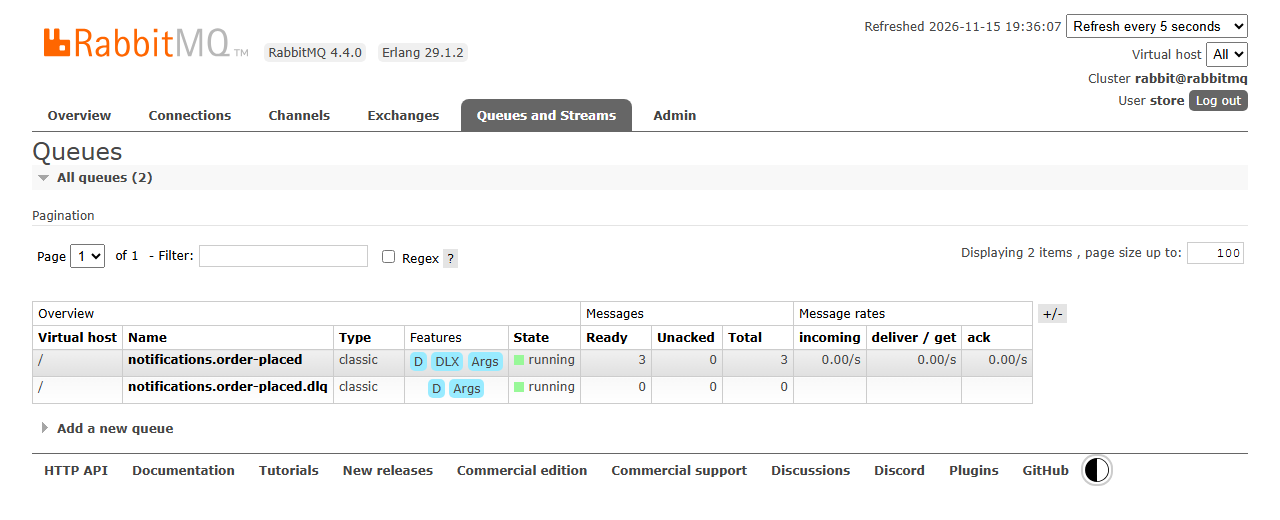
The D next to each queue means durable, and DLX shows that the worker's queue has a dead-letter exchange. Start the worker again:
docker compose start notification-worker
sleep 5
docker compose logs notification-worker --since 10s | cut -c1-200

# output
 Container store-rabbitmq-1 Waiting
 Container store-rabbitmq-1 Healthy
 Container store-notification-worker-1 Starting
 Container store-notification-worker-1 Started
notification-worker-1  | {"time":"2026-11-16T04:07:23.620Z","level":"info","service":"notification-worker","message":"health endpoints on port 3001"}
notification-worker-1  | {"time":"2026-11-16T04:07:23.713Z","level":"info","service":"notification-worker","message":"consuming notifications.order-placed from rabbitmq:5672","prefetch":10}
notification-worker-1  | {"time":"2026-11-16T04:07:23.719Z","level":"info","service":"notification-worker","message":"email sent to alice@example.com for order b29fad6f-f717-455d-922f-5e2198cf8067","e
notification-worker-1  | {"time":"2026-11-16T04:07:23.719Z","level":"info","service":"notification-worker","message":"email sent to alice@example.com for order e07f3903-e35a-42b4-9fdc-1a54ce32d46e","e
notification-worker-1  | {"time":"2026-11-16T04:07:23.719Z","level":"info","service":"notification-worker","message":"email sent to alice@example.com for order ba1286a5-17e8-4dcd-83a6-55daff3622b3","e
All three confirmations arrive as soon as the worker is back, and the queue is empty again:
docker compose exec rabbitmq rabbitmqctl list_queues name messages consumers

# output
Timeout: 60.0 seconds ...
Listing queues for vhost / ...
name    messages    consumers
notifications.order-placed.dlq  0   0
notifications.order-placed  0   1
None was lost and none was sent twice. This is the availability gain from Step-1: the store kept taking orders while one of its services was down, and the work caught up by itself.
Step-11: Try it: send a poison message and a duplicate
A poison message is one that a consumer can never process: broken JSON, a missing field, a format from a newer publisher. Without a plan, it fails, goes back to the queue, fails again, and blocks the queue or burns CPU forever. Create scripts/poison-message.sh, which publishes any message to store.events as if the Order API had sent it, by default a broken one:
#!/usr/bin/env bash
# Publishes one message to the store's events exchange (chapter 17), as if the
# Order API had sent it. By default it is a malformed OrderPlaced event (a
# "poison message"): the notification worker rejects it, and RabbitMQ moves it
# to the dead-letter queue notifications.order-placed.dlq. Start the store first:
#
#   docker compose up -d --build --wait
#   bash scripts/poison-message.sh                  # a message that is not JSON
#   bash scripts/poison-message.sh '{"version":2}'  # any payload you like
#
# Then look at the queues:
#   docker compose exec rabbitmq rabbitmqctl list_queues name messages consumers
#
# It runs rabbitmqadmin inside the rabbitmq container, which talks to the
# management API with the user and password the container was started with,
# so no password appears here.
set -euo pipefail

payload=${1:-'this is not an OrderPlaced event'}

docker compose exec -T rabbitmq sh -c '
  rabbitmqadmin --non-interactive \
    --username "$RABBITMQ_DEFAULT_USER" --password "$RABBITMQ_DEFAULT_PASS" \
    publish message --exchange store.events --routing-key order.placed \
    --properties "{\"content_type\":\"application/json\",\"delivery_mode\":2}" \
    --payload "$1"' sh "$payload"
rabbitmqadmin is the management plugin's command-line tool. It runs inside the rabbitmq container and uses the user and password the container was started with, so the script contains no password. Send the poison message:
bash scripts/poison-message.sh
sleep 2
docker compose logs notification-worker --tail 1
docker compose exec rabbitmq rabbitmqctl list_queues name messages consumers
docker compose ps notification-worker --format '{{.Service}} {{.Status}}'

# output
Message published and routed successfully
notification-worker-1  | {"time":"2026-11-16T04:07:33.859Z","level":"error","service":"notification-worker","message":"rejected a message: the message is not valid JSON; moved to notifications.order-placed.dlq","messageId":null}
Timeout: 60.0 seconds ...
Listing queues for vhost / ...
name    messages    consumers
notifications.order-placed.dlq  1   0
notifications.order-placed  0   1
notification-worker Up 18 seconds (healthy)
The worker rejected the message at once (there's no point in retrying broken JSON), RabbitMQ moved it to the dead-letter queue, and the worker is still running and healthy. The Queues and Streams tab now shows it there:
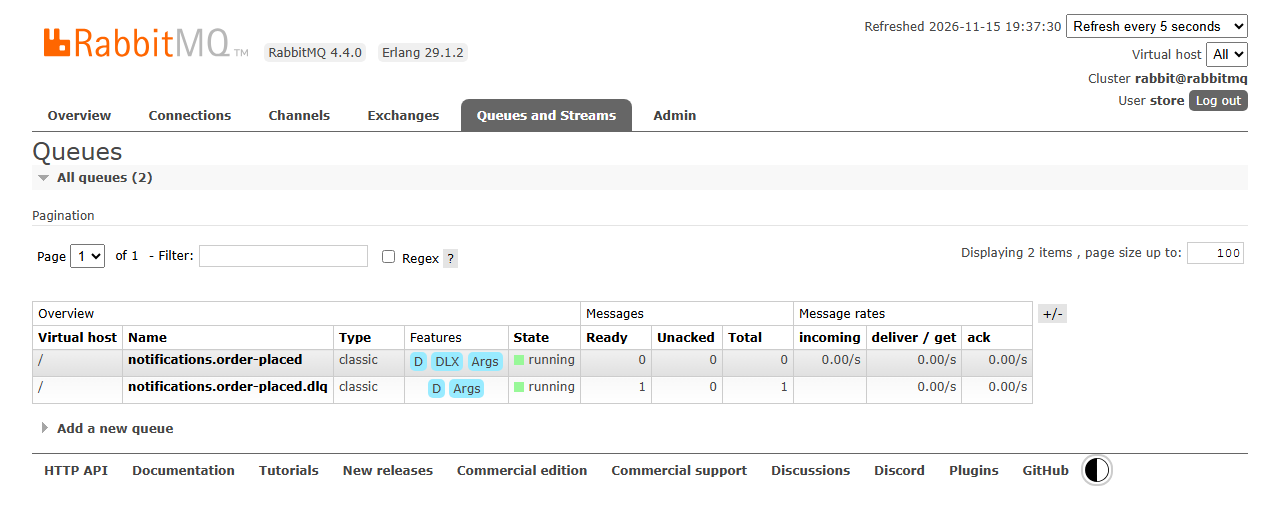
Look at the message without removing it from the queue (ack_requeue_true puts it back):
docker compose exec rabbitmq sh -c 'rabbitmqadmin --non-interactive \
  --username "$RABBITMQ_DEFAULT_USER" --password "$RABBITMQ_DEFAULT_PASS" \
  get messages --queue notifications.order-placed.dlq --ack-mode ack_requeue_true'

# output
32  false  notifications.dlx  order.placed  0  content_type: "application/json",delivery_mode: 2,headers: {"x-death":[{"count":1,"exchange":"store.events","queue":"notifications.order-placed","reason":"rejected","routing-keys":["order.placed"],"time":1794802053}],"x-first-death-exchange":"store.events","x-first-death-queue":"notifications.order-placed","x-first-death-reason":"rejected","x-last-death-exchange":"store.events","x-last-death-queue":"notifications.order-placed","x-last-death-reason":"rejected"},  this is not an OrderPlaced event  string
RabbitMQ added an x-death header: which queue the message came from, the reason (rejected) and how often it happened. In the UI, open the queue and click Get Message(s) to see the same. Someone can now fix the cause and move the message back to the main queue (the management UI's Move messages, from the Shovel plugin), or delete it.
A duplicate. Now send the event of the last order from Step-10 a second time, exactly as it is stored in the outbox, as if the publisher had published it twice. The worker that is running now has already sent its confirmation:
EVENT=$(docker compose exec order-db psql -U orders -d orderdb -At \
  -c "SELECT payload FROM outbox WHERE payload->>'orderId' = 'ba1286a5-17e8-4dcd-83a6-55daff3622b3';")
bash scripts/poison-message.sh "$EVENT"
sleep 2
docker compose logs notification-worker --tail 1

# output
Message published and routed successfully
notification-worker-1  | {"time":"2026-11-16T04:07:57.895Z","level":"info","service":"notification-worker","message":"duplicate event skipped for order ba1286a5-17e8-4dcd-83a6-55daff3622b3","eventId":"1418b397-efcf-4d8d-9d5b-9b2173564f51","orderId":"ba1286a5-17e8-4dcd-83a6-55daff3622b3"}
The worker recognized the eventId and acknowledged the message without sending a second email. Now restart the worker and send the same event once more:
docker compose restart notification-worker
sleep 3
EVENT=$(docker compose exec order-db psql -U orders -d orderdb -At \
  -c "SELECT payload FROM outbox WHERE payload->>'orderId' = 'ba1286a5-17e8-4dcd-83a6-55daff3622b3';")
bash scripts/poison-message.sh "$EVENT"
sleep 2
docker compose logs notification-worker --tail 1

# output
 Container store-notification-worker-1 Restarting
 Container store-notification-worker-1 Started
Message published and routed successfully
notification-worker-1  | {"time":"2026-11-16T04:08:08.511Z","level":"info","service":"notification-worker","message":"email sent to alice@example.com for order ba1286a5-17e8-4dcd-83a6-55daff3622b3","eventId":"1418b397-efcf-4d8d-9d5b-9b2173564f51","orderId":"ba1286a5-17e8-4dcd-83a6-55daff3622b3"}
The worker sent the confirmation again. Its memory of processed ids was empty after the restart. That's the limit of the demo explained in Step-6, and the reason a real consumer keeps those ids in a durable store.
Step-12: Try it: stop RabbitMQ
Now the broker itself. Stop RabbitMQ and place an order:
docker compose stop rabbitmq
TOKEN=$(bash scripts/test-token.sh alice)
curl -s -X POST http://localhost:8080/api/orders/ \
  -H "Authorization: Bearer $TOKEN" -H "Content-Type: application/json" \
  -d '{"items":[{"productId":5,"quantity":1}]}' -w '\nHTTP %{http_code}\n'

# output
 Container store-rabbitmq-1 Stopping
 Container store-rabbitmq-1 Stopped
{"id":"56b05e92-6469-45d3-abe8-4da2bbd229d9","customerId":"b1901bed-ee10-469c-a4fa-7ce3d1094f4f","status":"Placed","total":24.95,"createdAt":"2026-11-16T04:08:15.653Z","items":[{"productId":5,"name":"Water bottle","unitPrice":24.95,"quantity":1}]}
HTTP 201
The order succeeded as quickly as always. Its event is waiting in the outbox, and the Order API is still ready:
docker compose exec order-api wget -qO- http://127.0.0.1:3000/health/outbox; echo
docker compose exec order-api wget -qO- http://127.0.0.1:3000/health/ready; echo

# output
{"pending":1,"oldestCreatedAt":"2026-11-16T04:08:15.653Z"}
Healthy
Meanwhile the outbox loop keeps trying, waiting longer each time:
docker compose logs order-api --since 30s | grep outbox

# output
order-api-1  | outbox: publishing failed (connect ETIMEDOUT); next try in 1s
order-api-1  | outbox: publishing failed (connect ETIMEDOUT); next try in 2s
order-api-1  | outbox: publishing failed (connect ETIMEDOUT); next try in 4s
order-api-1  | outbox: publishing failed (getaddrinfo ENOTFOUND rabbitmq); next try in 8s
With the container stopped, the name rabbitmq no longer exists on the store network, so a connection attempt fails with a name lookup error (EAI_AGAIN or ENOTFOUND) or a timeout (ETIMEDOUT). Start RabbitMQ again and wait for the outbox to empty:
docker compose start rabbitmq
for i in $(seq 60); do
  pending=$(docker compose exec order-api wget -qO- http://127.0.0.1:3000/health/outbox)
  case "$pending" in *'"pending":0'*) break ;; esac
  sleep 1
done
echo "$pending"

# output
 Container store-rabbitmq-1 Starting
 Container store-rabbitmq-1 Started
{"pending":0,"oldestCreatedAt":null}
docker compose logs order-api --since 40s | grep outbox | tail -2
docker compose logs notification-worker | grep 56b05e92-6469-45d3-abe8-4da2bbd229d9 | cut -c1-200

# output
order-api-1  | outbox: connected to RabbitMQ at rabbitmq:5672
order-api-1  | outbox: published OrderPlaced 00e96eab-9f0f-47b8-9f7b-312443675f7b for order 56b05e92-6469-45d3-abe8-4da2bbd229d9
notification-worker-1  | {"time":"2026-11-16T04:08:57.484Z","level":"info","service":"notification-worker","message":"email sent to alice@example.com for order 56b05e92-6469-45d3-abe8-4da2bbd229d9","e
Within a few seconds of RabbitMQ coming back, the outbox loop reconnected and published the waiting event, the worker reconnected and sent the confirmation, and the outbox is empty. Nobody had to do anything. The messages in the durable queues also survived the restart: the poison message from Step-11 is still in the dead-letter queue.
Step-13: Try it: prove the outbox transaction
The whole design rests on one claim: the order and its outbox row are written in one transaction. Let's break the outbox insert on purpose and see what happens to the order. Count the rows first:
docker compose exec order-db psql -U orders -d orderdb \
  -c "SELECT (SELECT count(*) FROM orders) AS orders, (SELECT count(*) FROM outbox) AS outbox;"

# output
 orders | outbox
--------+--------
      6 |      5
(1 row)
There is one order more than outbox rows: the example order from 002-seed.sql was created without an event.
Add a constraint that makes every new OrderPlaced row fail (NOT VALID skips the check for the existing rows), and place an order:
docker compose exec order-db psql -U orders -d orderdb \
  -c "ALTER TABLE outbox ADD CONSTRAINT break_the_outbox CHECK (type <> 'OrderPlaced') NOT VALID;"
TOKEN=$(bash scripts/test-token.sh alice)
curl -s -X POST http://localhost:8080/api/orders/ \
  -H "Authorization: Bearer $TOKEN" -H "Content-Type: application/json" \
  -d '{"items":[{"productId":1,"quantity":1}]}' -w '\nHTTP %{http_code}\n'

# output
ALTER TABLE
{"type":"about:blank","title":"Internal Server Error","status":500,"detail":"Something went wrong. Try again later."}
HTTP 500
The Product API priced the order and the INSERT INTO orders and order_items ran, but the outbox insert after them failed, so the API answered 500. Count again:
docker compose exec order-db psql -U orders -d orderdb \
  -c "SELECT (SELECT count(*) FROM orders) AS orders, (SELECT count(*) FROM outbox) AS outbox;"
docker compose logs order-db --since 30s | grep -E "ERROR|STATEMENT"

# output
 orders | outbox
--------+--------
      6 |      5
(1 row)

order-db-1  | 2026-11-16 04:09:06.139 UTC [374] ERROR:  new row for relation "outbox" violates check constraint "break_the_outbox"
order-db-1  | 2026-11-16 04:09:06.139 UTC [374] STATEMENT:  INSERT INTO outbox (id, type, payload, created_at) VALUES ($1, $2, $3, $4)
Neither the order nor the outbox row exists: PostgreSQL rolled back the whole transaction, including the order rows that had already been inserted. There is no order without its event. Remove the constraint again:
docker compose exec order-db psql -U orders -d orderdb -c "ALTER TABLE outbox DROP CONSTRAINT break_the_outbox;"

# output
ALTER TABLE
Going to production
The lab shows the patterns on one machine. Before anything like it goes live:
- Replicated queues. One RabbitMQ container is a single point of failure for the events (not for the orders, thanks to the outbox). In production, run a RabbitMQ cluster of three nodes, or a managed broker, and use quorum queues, which RabbitMQ recommends as the default for replicated, highly available queues. Quorum queues also have a built-in delivery limit (20 by default since RabbitMQ 4.0) that dead-letters a message that keeps failing.
- One user per service. Give the Order API a user that may only publish to
store.events, and the worker one that may only consume its queues, and keep the passwords in a secret store. Use TLS for AMQP (port 5671) and the management UI. - A durable idempotency store. Keep processed event ids in Redis or the consumer's own database, not in memory (Step-6).
- Watch the outbox and the DLQ. Alert when the outbox's
pendingcount or its oldest row keeps growing, and when a dead-letter queue isn't empty. Delete or archive published outbox rows after some days, so the table doesn't grow forever. - Topology as configuration. Set dead-lettering with policies, and create exchanges and queues ahead of time (Step-6 note).
- Change data capture is an alternative to the polling loop: a tool such as Debezium reads the outbox rows from PostgreSQL's write-ahead log and publishes them, with less load on the database and lower latency. The outbox table and the idempotent consumer stay the same.
- Managed brokers. On Azure, Azure Service Bus offers queues, topics and dead-lettering as a service. The concepts in this chapter carry over; the client library and the names change.
Troubleshooting
| Problem | What to do |
|---|---|
--wait fails with container store-rabbitmq-1 is unhealthy, and the RabbitMQ log says .erlang.cookie: eacces |
The health check created the Erlang cookie as root before RabbitMQ did (Step-7). Use the health check from the sample, then docker compose down -v and start again |
relation "outbox" does not exist in the Order API log, and every order answers 500 |
The Order DB was created before 003-outbox.sql existed. Run the script once by hand, or docker compose down -v (see the warning in Step-4) |
ACCESS_REFUSED or Login was refused in the Order API or worker log |
RABBITMQ_PASSWORD changed after the rabbitmq-data volume was created; RabbitMQ keeps the password from its first start. Put the old one back, or docker compose down -v |
The outbox's pending count grows and the log says reached no queue |
No queue is bound to order.placed: the notification worker has never started. Start it; the events are published as soon as its queue exists |
PRECONDITION_FAILED - inequivalent arg 'x-dead-letter-exchange' in the worker log |
The queue already exists with other arguments, for example from an earlier version of the worker. Delete the queue in the management UI (its messages are lost) and restart the worker |
Queues and messages are gone after docker compose up |
RabbitMQ's hostname changed, so it started with a new data folder. Set hostname: rabbitmq (Step-7) |
The worker log shows connecting to RabbitMQ failed: connect ECONNREFUSED right after start-up |
Normal: RabbitMQ is healthy a moment before it accepts connections, and the worker retries |
| You can't sign in to http://localhost:15672 | Use the user store and the RABBITMQ_PASSWORD from .env; guest only works from inside the container |
Conclusion
In this chapter, the store learned to talk asynchronously. Placing an order now saves the order, its items and an OrderPlaced event in one PostgreSQL transaction (the transactional outbox), so there is never an order without its event, or an event without its order. A loop in the Order API publishes the outbox to RabbitMQ's store.events topic exchange with persistent messages, publisher confirms and returns for messages that reach no queue, and backs off while the broker is down, so orders never wait for RabbitMQ. The new notification worker declares its own durable queue and dead-letter queue, takes at most 10 messages at a time, acknowledges each one only after its work is done, skips duplicates by eventId, retries failures with a growing delay and parks poison messages in the dead-letter queue. And we saw each promise kept: confirmations caught up after the worker and RabbitMQ were stopped, a broken message didn't stop the worker, and a failed outbox insert took the order with it.
We also met the honest limits: delivery is at least once, not exactly once, so consumers must be idempotent, and our in-memory duplicate check forgets after a restart.
The store now has synchronous calls, events, a gateway and sign-in. When something goes wrong in a system like this, the hard part is finding out where. In the next chapter, resilience and observability (Chapter-18, being added), we add structured logs, traces that follow one order from the gateway through the Order API and RabbitMQ to the worker, and retries and circuit breakers for the synchronous calls.
References
- RabbitMQ - AMQP 0-9-1 Model Explained (exchanges, queues, bindings)
- RabbitMQ - Consumer Acknowledgements and Publisher Confirms
- RabbitMQ - Consumer Prefetch
- RabbitMQ - Dead Letter Exchanges
- RabbitMQ - Quorum Queues
- RabbitMQ - Management Plugin
- RabbitMQ - Monitoring: health checks
- RabbitMQ - CLI Tools: the Erlang cookie
- Docker Hub - RabbitMQ official image
- amqplib - Channel API reference
- PostgreSQL 17 - SELECT: the locking clause (FOR UPDATE, SKIP LOCKED)
- microservices.io - Pattern: Transactional outbox
- microservices.io - Pattern: Idempotent Consumer
- microservices.io - Pattern: Saga
- Microsoft Learn - Asynchronous message-based communication