Chapter-16: Securing Services with Keycloak
Sample code
The complete, tested code for this chapter is in samples/microservices: the realm in keycloak/store-realm.json, compose.yaml, .env.example, the token checks in product-api and order-api, the sign-in in admin and storefront, and scripts/test-token.sh. Use it to compare against your own work.
Introduction
At the end of Chapter-15, the store had one front door: an API gateway on http://localhost:8080. But anyone who reached that door could do anything. Every order belonged to anonymous, anybody could add or delete products in the Admin site, and the Product API accepted a POST from whoever sent one.
In Chapter-10 we ran Keycloak in a container and listed what it should do for a microservices system: secure the API endpoints, use JSON Web Tokens, give users single sign-on. In this lab, I will guide you through actually doing that. Customers sign in to the Storefront, staff sign in to the Admin site, and both APIs check the access token on every request themselves. Along the way we look at the ideas behind it (OAuth 2.0, OpenID Connect, access tokens and ID tokens), the one Keycloak setting that trips up almost everyone who runs it in Docker, and how each of our four stacks (.NET API, Node.js API, ASP.NET Core MVC and React) plugs into it.
Demo users and secrets
This chapter creates two demo users, alice and bob, whose password is replaceme, and uses replaceme as the Admin site's client secret. They exist so that you can try everything on your own machine. They are demo values only: never use them, or the demo realm, anywhere real.
Technical Scenario
As a Security minded developer on the team, you have been asked to put sign-in and access control into the store. The team agreed on these rules:
- One identity provider. Keycloak signs everybody in and issues the tokens. No service stores passwords.
- Browsing is public, changing things is not. Anyone may look at products. Placing an order needs a signed-in customer; changing the catalog needs the
adminrole. - Every service checks for itself. The gateway passes the
Authorizationheader on, and each API validates the token's signature, issuer, audience and expiry. Nobody trusts a request just because it came from inside the network. - Identity comes from the token. The Order API takes the customer from the token, never from the request body, and customers see only their own orders.
- Current advice only. Authorization code flow with PKCE for every sign-in; no implicit flow; the password grant only for a test client that the smoke test uses.
Objective
In this exercise, our objective is to accomplish and learn the following tasks:
- Step-1: Understand authentication, authorization and tokens.
- Step-2: Design the store realm.
- Step-3: Write the realm file.
- Step-4: Add Keycloak to the compose file.
- Step-5: Use one issuer for browsers and containers.
- Step-6: Protect the Product API (.NET).
- Step-7: Protect the Order API (Node.js).
- Step-8: Sign in to the Admin site (ASP.NET Core MVC).
- Step-9: Sign in to the Storefront (React).
- Step-10: Start the store.
- Step-11: Try it: tokens against the APIs.
- Step-12: Try it: sign in as alice and bob in the browser.
Prerequisites
Before starting this lab, ensure you have the following prerequisites in place:
- The store from Chapter-15:
compose.yaml, your.envfile, the gateway and the service folders, in the folder that holds them (samples/microservicesin the sample code). - Keycloak basics from Chapter-10: what a realm is and how to open the admin console.
- Docker Desktop (or Docker Engine 25 or later) with Docker Compose v2 or later, and about 1 GB more memory for Keycloak and its database.
- .NET SDK 10 and Node.js 24, to add the packages in Step-6 to Step-9.
curland abashshell (on Windows, Git Bash or WSL).- Ports 8080 and 8081 free on your machine. Stop the Chapter-10 Keycloak lab if it still runs.
Architecture Diagram
The following diagram shows the store after this chapter. The browser talks to two addresses: the gateway for the store, and Keycloak to sign in. Every service that needs to check a token gets Keycloak's public keys over the store network.
flowchart LR
  browser([Browser]) -->|"localhost:8080"| gw
  browser -.->|"sign in: localhost:8081"| kc
  subgraph store ["compose.yaml: network store"]
    gw["gateway<br/>nginx :8080"]
    sf["storefront<br/>React + keycloak-js"]
    adm["admin<br/>.NET 10 MVC, OpenID Connect"]
    prod["product-api<br/>.NET 10, JWT bearer"]
    ord["order-api<br/>Node 24, jose"]
    kc["keycloak<br/>26.4 :8080"]
    gw -->|"/"| sf
    gw -->|"/admin"| adm
    gw -->|"/api/products + token"| prod
    gw -->|"/api/orders + token"| ord
    adm -->|"user's token"| prod
    ord --> prod
    adm -.->|"keycloak:8080: code for tokens"| kc
    prod -.->|"keycloak:8080: public keys"| kc
    ord -.->|"keycloak:8080: public keys"| kc
    prod --> pdb[("product-db")]
    ord --> odb[("order-db")]
    kc --> kdb[("keycloak-db<br/>PostgreSQL")]
  end
Keycloak is not behind the gateway. Signing in is a conversation between the browser and Keycloak, so Keycloak gets its own published port, 127.0.0.1:8081. Step-5 explains why that address matters so much.
Step-1: Understand authentication, authorization and tokens
Before we touch any code, let's get the vocabulary straight. Most security mistakes come from mixing up two or three of these words.
Authentication and authorization. Authentication answers "who are you?": alice proves who she is by signing in. Authorization answers "what may you do?": alice may place orders, but only bob may change products. Keycloak does the authentication and tells our services who the user is and which roles they have. Each service then makes its own authorization decisions.
OAuth 2.0 and OpenID Connect. OAuth 2.0 (RFC 6749) is a framework for giving an application access to an API, with an access token. It defines four roles, and every one of them exists in our store:
| OAuth 2.0 role | Meaning | In the store |
|---|---|---|
| Resource owner | The person who owns the data and grants access | alice, bob |
| Client | The application that wants to call an API for the user | storefront, admin |
| Authorization server | Signs the user in and issues tokens | Keycloak |
| Resource server | The API that accepts access tokens | product-api, order-api |
OAuth 2.0 on its own doesn't tell the client who the user is. OpenID Connect is a thin layer on top of OAuth 2.0 that does: when a client asks for the openid scope, it also gets an ID token about the signed-in user. In short: OAuth 2.0 is for access, OpenID Connect adds sign-in.
Client types. A confidential client can keep a secret, because its code runs on a server you control. The Admin site is one. A public client can't: anything in a browser app or a mobile app can be read by its user. The Storefront is a public client, so it has no secret at all.
Three kinds of tokens.
| Token | Who it is for | What it's for |
|---|---|---|
| Access token | The API (resource server) | Sent in Authorization: Bearer <token> to call an API. The API checks it on every request |
| ID token | The client | Tells the client who signed in. Its audience is the client itself; never send it to an API |
| Refresh token | Keycloak | Lets the client get a new access token without asking the user to sign in again |
JSON Web Tokens. Keycloak's access and ID tokens are JSON Web Tokens (JWT, RFC 7519): three base64url-encoded parts separated by dots, header.payload.signature. The header says how the token was signed (for example RS256 and the id of the key). The payload holds the claims, and these are the ones that matter most to an API:
| Claim | Meaning | Our APIs check |
|---|---|---|
iss (issuer) |
Who issued the token | It is exactly http://localhost:8081/realms/store |
aud (audience) |
Who the token is meant for | It contains product-api (or order-api); a token for someone else must be rejected |
exp (expiration) |
When the token stops being valid | It isn't in the past |
sub (subject) |
The user's unique id in this realm | The Order API stores it as the customer id |
realm_access.roles |
The user's Keycloak realm roles (Keycloak-specific) | The Product API requires admin for changes |
The signature is made with Keycloak's private key. Keycloak publishes the matching public keys as a JSON Web Key Set (JWKS) at /realms/store/protocol/openid-connect/certs. Anybody can read a JWT's payload (it is only encoded, not encrypted), but nobody can change it without breaking the signature. That's why an API can trust a token it has never seen before, as long as it verifies the signature with Keycloak's public key and checks the claims.
Scopes, roles and audience. A scope is what the client asks for when the user signs in (openid profile email). A role is what the user is allowed to do (customer, admin). The audience is which API the token is for. RFC 9700 recommends restricting access tokens to the APIs that should accept them, so that a token stolen from one service can't be replayed against another.
The authorization code flow with PKCE. This is how both of our websites sign users in. The user types their password only on Keycloak's own page; the website never sees it.
sequenceDiagram
  autonumber
  participant B as Browser
  participant C as Client (storefront or admin)
  participant K as Keycloak
  participant A as API
  B->>C: Click "Sign in"
  C->>C: Make a random code_verifier and its SHA-256 hash, the code_challenge
  C->>B: Redirect to Keycloak with client_id, redirect_uri, scope, state and code_challenge
  B->>K: GET /realms/store/protocol/openid-connect/auth
  K->>B: Sign-in page
  B->>K: Username and password (only Keycloak sees them)
  K->>B: Redirect back to redirect_uri with a one-time code
  B->>C: The code
  C->>K: POST /token with the code and the code_verifier (plus the secret, for a confidential client)
  K->>K: Hash the code_verifier and compare it with the code_challenge
  K->>C: Access token, ID token, refresh token
  C->>A: API call with Authorization: Bearer access token
  A->>A: Check signature, iss, aud, exp, then roles
  A->>C: 200, 201, 401 or 403
PKCE (RFC 7636, "pixie") protects the one-time code that Keycloak sends back through the browser. The client makes a random code_verifier and sends only its hash (code_challenge, method S256) with the sign-in request. When it exchanges the code for tokens, it must send the original verifier. An attacker who steals the code from the redirect can't use it, because they don't have the verifier. RFC 9700, the OAuth 2.0 Security Best Current Practice, says public clients must use PKCE and recommends it for confidential clients too, so we use it for both.
Flows we don't use. RFC 9700 says clients should not use the implicit flow (tokens returned directly in the browser's address bar), and that the resource owner password credentials grant (the client collects the user's password and sends it to the token endpoint) must not be used: it hands the user's password to the client, teaches users to type it outside the identity provider, and can't support multi-factor sign-in. We use the password grant in exactly one place, a test-only client for the CI smoke test and the curl examples in Step-11, and the realm marks that client as such.
Why do the APIs check tokens themselves? The gateway could check tokens for everybody, and in many systems it does check something. But if the APIs trusted any request that reached them, a single mistake (a debug port published by accident, a compromised container on the network, a new route that skips the gateway) would open everything. This is zero trust: no request is trusted because of where it comes from, only because of what it proves. Checking in each service is also defence in depth: the gateway can reject obvious junk early, but the service that owns the data makes the final decision. As we said in Chapter-15, checking a token is plumbing, while deciding that alice may only see her own orders is business logic, so it lives in the Order API.
Step-2: Design the store realm
A Keycloak realm is an isolated space with its own users, roles, clients and keys. The store gets its own realm, store, so it never mixes with Keycloak's master realm (which is only for administering Keycloak). Here is what goes in it:
| Item | Name | Settings and why |
|---|---|---|
| Realm role | customer |
Shops in the Storefront |
| Realm role | admin |
Manages the catalog in the Admin site |
| Client | storefront |
Public (no secret), authorization code flow with PKCE S256, exact redirect URIs http://localhost:8080/ and http://localhost:8080/silent-check-sso.html (plus the same on Vite's port 5173 for npm run dev) |
| Client | admin |
Confidential (client secret from .env), authorization code flow with PKCE S256, redirect URI http://localhost:8080/admin/signin-oidc, puts the realm roles into the ID token |
| Client | smoke-test |
Test only. Public, password grant only, tokens live 30 seconds. Used by scripts/test-token.sh and the CI smoke test |
| Audience | product-api, order-api |
An audience mapper on each client adds both API names to the aud claim of its access tokens |
| User | alice |
Role customer, email alice@example.com, password replaceme (demo only) |
| User | bob |
Role admin, email bob@example.com, password replaceme (demo only) |
| Tokens | Realm settings | Access tokens live 5 minutes; refresh tokens are rotated (each refresh token works once) |
A few of these choices deserve a word:
- Exact redirect URIs. After sign-in, Keycloak sends the code only to an address registered for the client. RFC 9700 requires exact string matching, because a wildcard like
http://localhost:8080/*would also cover pages you never meant to receive codes, such as/admin/...for the Storefront. Keycloak still lets you register wildcards, so it's on you to list exact addresses. - Roles for people, audience for services.
customerandadmindescribe what a person may do;audsays which API a token is for. The APIs check both: the audience on every request, the role where an action needs it. - Refresh token rotation. RFC 9700 says refresh tokens for public clients must be sender-constrained or rotated. Keycloak's realm setting Revoke Refresh Token "revokes refresh tokens and issues another token that the client must use", and
refreshTokenMaxReuse: 0lets each one be used only once.
You could click all of this together in the admin console, as you did in Chapter-10. But then every teammate, every CI run and every fresh docker compose down -v would have to repeat the clicks. Instead, we describe the realm in a JSON file and let Keycloak import it at start-up. The realm becomes code, reviewed and versioned with the services that depend on it.
Step-3: Write the realm file
Keycloak imports realm files at start-up when you pass --import-realm: it reads every .json file in /opt/keycloak/data/import, and the file for a realm must be named <realm name>-realm.json. So create keycloak/store-realm.json next to the Chapter-10 files. It starts with the realm settings and the two roles:
{
  "realm": "store",
  "displayName": "Store (demo)",
  "enabled": true,
  "sslRequired": "external",
  "accessTokenLifespan": 300,
  "revokeRefreshToken": true,
  "refreshTokenMaxReuse": 0,
  "roles": {
    "realm": [
      {
        "name": "customer",
        "description": "Shops in the storefront and places orders"
      },
      {
        "name": "admin",
        "description": "Manages the product catalog in the admin site"
      }
    ]
  },
accessTokenLifespan is in seconds, so access tokens live 5 minutes. sslRequired: external is Keycloak's default: HTTPS is required for requests from public IP addresses, but not from your own machine and private networks such as Docker's.
Then the clients array. The Storefront is a public client, with PKCE and exact redirect URIs:
  "clients": [
    {
      "clientId": "storefront",
      "name": "Storefront",
      "description": "The React storefront: a public client (no secret) using authorization code + PKCE",
      "enabled": true,
      "publicClient": true,
      "standardFlowEnabled": true,
      "implicitFlowEnabled": false,
      "directAccessGrantsEnabled": false,
      "serviceAccountsEnabled": false,
      "redirectUris": [
        "http://localhost:8080/",
        "http://localhost:8080/silent-check-sso.html",
        "http://localhost:5173/",
        "http://localhost:5173/silent-check-sso.html"
      ],
      "webOrigins": [
        "+"
      ],
      "attributes": {
        "pkce.code.challenge.method": "S256",
        "post.logout.redirect.uris": "+"
      },
      "protocolMappers": [
        {
          "name": "audience product-api",
          "protocol": "openid-connect",
          "protocolMapper": "oidc-audience-mapper",
          "config": {
            "included.custom.audience": "product-api",
            "access.token.claim": "true",
            "id.token.claim": "false",
            "introspection.token.claim": "true"
          }
        },
        {
          "name": "audience order-api",
          "protocol": "openid-connect",
          "protocolMapper": "oidc-audience-mapper",
          "config": {
            "included.custom.audience": "order-api",
            "access.token.claim": "true",
            "id.token.claim": "false",
            "introspection.token.claim": "true"
          }
        }
      ]
    },
standardFlowEnabledis Keycloak's name for the authorization code flow. The implicit flow, the password grant (directAccessGrantsEnabled) and service accounts are switched off.pkce.code.challenge.method: S256makes Keycloak require PKCE with SHA-256 for this client, so a sign-in request without a code challenge is refused.webOrigins: ["+"]allows cross-origin requests from the origins of the redirect URIs. keycloak-js calls Keycloak's token endpoint from the browser, so Keycloak must send CORS headers tohttp://localhost:8080.post.logout.redirect.uris: "+"allows the same addresses after sign-out.- The two audience mappers add
product-apiandorder-apito theaudclaim of access tokens, and not to ID tokens.
The Admin site is a confidential client. Its secret is not in the file: ${ADMIN_CLIENT_SECRET} is a placeholder that Keycloak fills in from an environment variable when it imports the realm, so the only copy of the secret is in your .env file:
    {
      "clientId": "admin",
      "name": "Admin site",
      "description": "The ASP.NET Core MVC admin site: a confidential client (with a secret) using authorization code + PKCE",
      "enabled": true,
      "publicClient": false,
      "clientAuthenticatorType": "client-secret",
      "secret": "${ADMIN_CLIENT_SECRET}",
      "standardFlowEnabled": true,
      "implicitFlowEnabled": false,
      "directAccessGrantsEnabled": false,
      "serviceAccountsEnabled": false,
      "redirectUris": [
        "http://localhost:8080/admin/signin-oidc"
      ],
      "webOrigins": [],
      "attributes": {
        "pkce.code.challenge.method": "S256",
        "post.logout.redirect.uris": "http://localhost:8080/admin/signout-callback-oidc"
      },
      "protocolMappers": [
        (the two audience mappers, as for the storefront)
        {
          "name": "realm roles in the ID token",
          "protocol": "openid-connect",
          "protocolMapper": "oidc-usermodel-realm-role-mapper",
          "config": {
            "claim.name": "realm_access.roles",
            "jsonType.label": "String",
            "multivalued": "true",
            "id.token.claim": "true",
            "access.token.claim": "false",
            "userinfo.token.claim": "false",
            "introspection.token.claim": "false"
          }
        }
      ]
    },
/admin/signin-oidc and /admin/signout-callback-oidc are the default callback paths of ASP.NET Core's OpenID Connect handler, under the site's /admin path base. The extra realm roles mapper puts realm_access.roles into the Admin site's ID token as well: Keycloak's built-in roles scope puts the roles into the access token only, and the Admin site, as the client, should learn who the user is from the ID token, not by opening an access token that is meant for the API.
The third client is the one for tests:
    {
      "clientId": "smoke-test",
      "name": "Smoke test (TEST ONLY)",
      "description": "TEST ONLY: lets the CI smoke test get tokens with a username and password (password grant). Never add a client like this to a real realm.",
      "enabled": true,
      "publicClient": true,
      "standardFlowEnabled": false,
      "implicitFlowEnabled": false,
      "directAccessGrantsEnabled": true,
      "serviceAccountsEnabled": false,
      "redirectUris": [],
      "webOrigins": [],
      "attributes": {
        "access.token.lifespan": "30"
      },
      "protocolMappers": [
        (the two audience mappers, as for the storefront)
      ]
    }
  ],
It can do nothing but the password grant, and its tokens live only 30 seconds (access.token.lifespan overrides the realm's 5 minutes), which also lets the smoke test check that expired tokens are refused without waiting 5 minutes.
Finally the demo users. JSON has no comments, so remember: these passwords are demo values only.
  "users": [
    {
      "username": "alice",
      "email": "alice@example.com",
      "emailVerified": true,
      "firstName": "Alice",
      "lastName": "Customer",
      "enabled": true,
      "credentials": [
        {
          "type": "password",
          "value": "replaceme",
          "temporary": false
        }
      ],
      "realmRoles": [
        "default-roles-store",
        "customer"
      ]
    },
    {
      "username": "bob",
      "email": "bob@example.com",
      "emailVerified": true,
      "firstName": "Bob",
      "lastName": "Admin",
      "enabled": true,
      "credentials": [
        {
          "type": "password",
          "value": "replaceme",
          "temporary": false
        }
      ],
      "realmRoles": [
        "default-roles-store",
        "admin"
      ]
    }
  ]
}
default-roles-store is the role Keycloak gives every new user of the realm (it contains the standard offline_access and account roles).
Keep the realm file small
A realm exported from the admin console has thousands of lines: every built-in client, client scope, flow and setting, with generated ids. Our file lists only what differs from Keycloak's defaults, and Keycloak creates the rest on import. One trap I hit while writing it: as soon as a realm file contains a clientScopes list, Keycloak creates only those scopes, and the built-in ones (profile, email, roles, basic, ...) are missing, so tokens lose claims such as sub and realm_access. The import log warns Referenced client scope 'basic' doesn't exist. That's why the audience mappers sit on each client instead of in a shared client scope. To check what Keycloak made of the file, export the realm (admin console: Realm settings > Action > Partial export) and compare.
Step-4: Add Keycloak to the compose file
The Keycloak service is the Chapter-10 compose file with three additions: the realm import, the hostname settings and a health check. Add two services to compose.yaml, before networks::
  # Sign-in and tokens for the store (chapter 16). Same image as chapter 10.
  keycloak:
    image: quay.io/keycloak/keycloak:26.4
    # start-dev: HTTP and development defaults, for your machine only.
    # --import-realm: create the store realm from the mounted file on the first start
    command: ["start-dev", "--import-realm"]
    environment:
      KC_BOOTSTRAP_ADMIN_USERNAME: admin
      KC_BOOTSTRAP_ADMIN_PASSWORD: ${KEYCLOAK_ADMIN_PASSWORD:?copy .env.example to .env and set it}
      KC_DB: postgres
      KC_DB_URL: jdbc:postgresql://keycloak-db:5432/keycloak
      KC_DB_USERNAME: keycloak
      KC_DB_PASSWORD: ${KEYCLOAK_DB_PASSWORD:?copy .env.example to .env and set it}
      # Browsers reach Keycloak at localhost:8081, so that is the issuer in every
      # token and the address in every sign-in redirect...
      KC_HOSTNAME: http://localhost:8081
      # ...while containers on the store network may call it at keycloak:8080
      # (keys, token endpoint), and the issuer stays the same.
      KC_HOSTNAME_BACKCHANNEL_DYNAMIC: "true"
      # /health/ready on the management port 9000, for the healthcheck below
      KC_HEALTH_ENABLED: "true"
      # The realm file reads the admin site's client secret from here
      ADMIN_CLIENT_SECRET: ${ADMIN_CLIENT_SECRET:?copy .env.example to .env and set it}
    volumes:
      - ./keycloak/store-realm.json:/opt/keycloak/data/import/store-realm.json:ro
    ports:
      # Published because the browser signs in here; 127.0.0.1 keeps it on your machine
      - "127.0.0.1:8081:8080"
    depends_on:
      keycloak-db:
        condition: service_healthy
    healthcheck:
      # The image has no curl, so bash sends the request to the management port itself
      test:
        - CMD
        - bash
        - -c
        - >-
          exec 3<>/dev/tcp/127.0.0.1/9000 &&
          printf 'GET /health/ready HTTP/1.0\r\n\r\n' >&3 &&
          head -n 1 <&3 | grep -q ' 200 '
      interval: 10s
      timeout: 5s
      retries: 3
      start_period: 90s
      start_interval: 3s
    restart: unless-stopped
    networks: [store]

  keycloak-db:
    image: postgres:17
    environment:
      POSTGRES_DB: keycloak
      POSTGRES_USER: keycloak
      POSTGRES_PASSWORD: ${KEYCLOAK_DB_PASSWORD:?copy .env.example to .env and set it}
    volumes:
      - keycloak-db-data:/var/lib/postgresql/data
    healthcheck:
      test: ["CMD", "pg_isready", "-h", "127.0.0.1", "-U", "keycloak", "-d", "keycloak"]
      interval: 5s
      timeout: 5s
      retries: 10
    restart: unless-stopped
    networks: [store]
and the volume for Keycloak's database at the end of the file:
start-dev --import-realm. Development mode serves plain HTTP and relaxes production checks; never use it in production (Chapter-10).--import-realmimports the mounted file on the first start. If the realm already exists, as on every later start with the same database volume, Keycloak skips the import, so changes to the file only take effect afterdocker compose down -v(which also deletes the other databases) or after you delete the realm in the admin console.- Two published ports in the system now. The gateway on 8080 and Keycloak on 8081. Both listen on
127.0.0.1only: the demo users have a well-known password, so the store must not be reachable from your network. - The management port. Since Keycloak 25, health and metrics endpoints are served on a separate management port, 9000, not on 8080, and only when they are enabled (
KC_HEALTH_ENABLED). The image has nocurl, so the health check uses bash's/dev/tcp, the same trick as the Product API's check in Chapter-13. - Every
KC_...variable is a Keycloak option. The option--hostname-backchannel-dynamicbecomesKC_HOSTNAME_BACKCHANNEL_DYNAMIC: upper case, with underscores for dashes. start_period: 90sgives Keycloak time for its first start, when it creates its tables and imports the realm.
Add the three new values to .env.example, and to your own .env:
# Keycloak (chapter 16). Demo values only: change them, and never reuse them.
# Password of the Keycloak admin console user "admin" (http://localhost:8081).
KEYCLOAK_ADMIN_PASSWORD=replaceme
# Password of Keycloak's own database (PostgreSQL).
KEYCLOAK_DB_PASSWORD=replaceme
# Client secret of the admin site: Keycloak reads it into the realm on the first
# start, and the admin site sends it when it asks Keycloak for tokens.
# If you change it later, also change it in the Keycloak admin console.
ADMIN_CLIENT_SECRET=replaceme
Update the comments at the top of compose.yaml and above the gateway's port too:
# The services reach each other on the store network by service name. Only the
# API gateway (chapter 15) publishes a port for the store: http://localhost:8080.
# Keycloak (chapter 16) publishes a second one, http://localhost:8081, because
# browsers sign in there directly.

    ports:
      # The store's entry point. 127.0.0.1 keeps it on your machine: the demo
      # users in Keycloak have well-known passwords (chapter 16).
      - "127.0.0.1:8080:8080"
Step-5: Use one issuer for browsers and containers
This is the pitfall that catches almost everyone who runs Keycloak in Docker, so it gets a step of its own.
Every token contains an iss claim, and every service that checks a token compares it with the issuer it expects. Keycloak builds the issuer from the address it was called on. But in our store, Keycloak has two addresses:
- The browser reaches it at
http://localhost:8081, through the published port. That's where the sign-in page is, so tokens from a browser sign-in say"iss": "http://localhost:8081/realms/store". - The containers reach it at
http://keycloak:8080, by service name on thestorenetwork.localhostinside a container is the container itself, so the APIs can't use the browser's address to fetch keys.
Without any hostname setting, a token that the Admin site gets from http://keycloak:8080 would say "iss": "http://keycloak:8080/realms/store", while a token from the Storefront says localhost:8081. An API can only expect one of them, and whichever it picks, half of the store breaks with 401 and a confusing "issuer is invalid" message.
Keycloak's hostname options (version 2, the default since Keycloak 25) solve this:
| Setting | Effect |
|---|---|
KC_HOSTNAME=http://localhost:8081 |
The front-channel address, used by browsers: the sign-in page, redirects, and the issuer in every token, whatever address the request came in on |
KC_HOSTNAME_BACKCHANNEL_DYNAMIC=true |
Back-channel addresses (token endpoint, keys, user info, pushed authorization requests) follow the address of the request instead. Requires KC_HOSTNAME to be a full URL |
You can see both in Keycloak's discovery document, /.well-known/openid-configuration, which lists the realm's issuer and endpoints. From your machine:
curl -s http://localhost:8081/realms/store/.well-known/openid-configuration \
  | jq '{issuer, authorization_endpoint, token_endpoint, jwks_uri}'

# output
{
  "issuer": "http://localhost:8081/realms/store",
  "authorization_endpoint": "http://localhost:8081/realms/store/protocol/openid-connect/auth",
  "token_endpoint": "http://localhost:8081/realms/store/protocol/openid-connect/token",
  "jwks_uri": "http://localhost:8081/realms/store/protocol/openid-connect/certs"
}
and from inside the network, with the Order API container's BusyBox wget (start the store as in Step-10 first, or come back here afterwards):
docker compose exec order-api wget -qO- http://keycloak:8080/realms/store/.well-known/openid-configuration \
  | jq '{issuer, authorization_endpoint, token_endpoint, jwks_uri}'

# output
{
  "issuer": "http://localhost:8081/realms/store",
  "authorization_endpoint": "http://localhost:8081/realms/store/protocol/openid-connect/auth",
  "token_endpoint": "http://keycloak:8080/realms/store/protocol/openid-connect/token",
  "jwks_uri": "http://keycloak:8080/realms/store/protocol/openid-connect/certs"
}
The issuer and the sign-in page (authorization_endpoint) are the same from both sides; the token endpoint and the keys (jwks_uri) point to keycloak:8080 for a caller inside the network. So every service gets its keys from http://keycloak:8080 and expects the issuer http://localhost:8081/realms/store, and the two never conflict. (jq only formats the JSON; without it, look for "issuer" in the raw output.)
In production
The same idea applies with real names: KC_HOSTNAME=https://login.example.com for users, and services inside the cluster calling Keycloak on its internal service name. Setting the hostname explicitly also means a request with a forged Host header can't make Keycloak issue tokens under a different issuer.
Step-6: Protect the Product API (.NET)
The Product API keeps GET public and requires the admin role for POST, PUT and DELETE. ASP.NET Core's JWT bearer handler does the token checking. Add the package to the project, from the product-api folder:
Keycloak puts the realm roles in a nested claim, "realm_access": { "roles": [...] }, while ASP.NET Core's role checks look for flat claims of type ClaimTypes.Role. A small helper copies them over. Create Auth/KeycloakRoles.cs:
using System.Security.Claims;
using System.Text.Json;

namespace productapi.Auth;

// Keycloak puts a user's realm roles in a nested claim:
//   "realm_access": { "roles": [ "customer", "default-roles-store" ] }
// ASP.NET Core checks roles (User.IsInRole, [Authorize(Roles = ...)]) against
// flat claims of type ClaimTypes.Role, so copy each role into one (Chapter-16).
public static class KeycloakRoles
{
    public static void AddRoleClaims(ClaimsPrincipal? principal)
    {
        if (principal?.Identity is not ClaimsIdentity identity)
        {
            return;
        }

        var realmAccess = identity.FindFirst("realm_access")?.Value;
        if (string.IsNullOrEmpty(realmAccess))
        {
            return;
        }

        using var json = JsonDocument.Parse(realmAccess);
        if (!json.RootElement.TryGetProperty("roles", out var roles) || roles.ValueKind != JsonValueKind.Array)
        {
            return;
        }

        foreach (var role in roles.EnumerateArray())
        {
            if (role.GetString() is { Length: > 0 } name && !identity.HasClaim(ClaimTypes.Role, name))
            {
                identity.AddClaim(new Claim(ClaimTypes.Role, name));
            }
        }
    }
}
In Program.cs, add these using lines at the top:
using System.Security.Claims;
using Microsoft.AspNetCore.Authentication.JwtBearer;
using Microsoft.AspNetCore.Diagnostics.HealthChecks;
using Microsoft.EntityFrameworkCore;
using Microsoft.IdentityModel.Tokens;
using productapi.Auth;
using productapi.Data;
and register the authentication and the policy just before var app = builder.Build();:
// Who may change the catalog (Chapter-16). With Auth__Authority set, the API
// accepts a JWT access token from Keycloak in the Authorization header, checks it
// itself, and only users with the realm role "admin" may add, change or delete
// products. Reading products stays public. Without the setting (the single-service
// labs of Chapter-4 and Chapter-12) the API runs without sign-in, as before.
var auth = builder.Configuration.GetSection("Auth");
var authEnabled = !string.IsNullOrWhiteSpace(auth["Authority"]);
if (authEnabled)
{
    builder.Services.AddAuthentication(JwtBearerDefaults.AuthenticationScheme)
        .AddJwtBearer(options =>
        {
            // Where the API fetches Keycloak's metadata and signing keys: the address
            // inside the store network, for example http://keycloak:8080/realms/store
            options.Authority = auth["Authority"];
            // Plain HTTP is fine on your machine only; production uses HTTPS
            options.RequireHttpsMetadata = auth.GetValue("RequireHttpsMetadata", true);
            // Keep the claim names from the token (sub, preferred_username, ...)
            options.MapInboundClaims = false;
            options.TokenValidationParameters = new TokenValidationParameters
            {
                // The issuer as the browser sees Keycloak: http://localhost:8081/realms/store
                ValidIssuer = auth["ValidIssuer"],
                // Only tokens meant for this API
                ValidAudience = auth["Audience"],
                ValidateIssuer = true,
                ValidateAudience = true,
                ValidateLifetime = true,
                ValidateIssuerSigningKey = true,
                // Allow 30 seconds of clock difference instead of the default 5 minutes
                ClockSkew = TimeSpan.FromSeconds(30),
                NameClaimType = "preferred_username",
                RoleClaimType = ClaimTypes.Role,
            };
            options.Events = new JwtBearerEvents
            {
                // Copy Keycloak's realm_access.roles into role claims
                OnTokenValidated = context =>
                {
                    KeycloakRoles.AddRoleClaims(context.Principal);
                    return Task.CompletedTask;
                },
            };
        });
}

builder.Services.AddAuthorizationBuilder()
    .AddPolicy("CatalogAdmin", policy =>
    {
        if (authEnabled)
        {
            policy.AddAuthenticationSchemes(JwtBearerDefaults.AuthenticationScheme)
                .RequireAuthenticatedUser()
                .RequireRole("admin");
        }
        else
        {
            // No sign-in configured: everyone may change products (single-service labs only)
            policy.RequireAssertion(_ => true);
        }
    });
Let's go through it:
Authorityis the realm's base address inside the network. On the first request with a token, the handler downloads the discovery document from{Authority}/.well-known/openid-configurationand the signing keys from itsjwks_uri, and caches them. That's the back-channel from Step-5.ValidIssueris the browser-facing issuer,http://localhost:8081/realms/store;ValidAudienceisproduct-api. Together withValidateLifetimeandValidateIssuerSigningKey, the API checks exactly the four things Microsoft's guidance lists for an API: signature, issuer, audience and expiry.ClockSkew. By default the handler accepts a token up to 5 minutes after it expired, to allow for clocks that differ between servers. For tokens that live 5 minutes, that doubles their life; 30 seconds is plenty when Keycloak and the API run on the same machine.MapInboundClaims = falsekeeps the claim names as they are in the token (sub,preferred_username), instead of renaming some of them to long XML-style URIs. ThenNameClaimTypemakesUser.Identity.Namethe user name, andRoleClaimTypesays which claims are roles.RequireHttpsMetadataistrueby default and must staytruein production; compose sets it tofalsebecause Keycloak speaks plain HTTP on your machine.- The
CatalogAdminpolicy requires a valid token and theadminrole. Without theAuth__Authoritysetting, the API runs as in the single-service labs of Chapter-4 and Chapter-12 and logs a warning at start-up (more on that trade-off below).
Add authentication and authorization to the pipeline, after the problem details middleware, so that the 401 and 403 answers also get a JSON body:
// Return errors as JSON problem details instead of empty responses,
// including the 401 and 403 answers of the authorization checks below
app.UseExceptionHandler();
app.UseStatusCodePages();

// Read the token from the Authorization header, then apply the policies
app.UseAuthentication();
app.UseAuthorization();

app.MapControllers();
Then mark the three actions that change the catalog in Controllers/ProductsController.cs (add using Microsoft.AspNetCore.Authorization; at the top):
    // Reading the catalog is public; changing it needs the "admin" role (Chapter-16).
    // The CatalogAdmin policy is defined in Program.cs.

    // POST /products
    [HttpPost]
    [Authorize(Policy = "CatalogAdmin")]
    public ActionResult<Product> Create(ProductInput input)

    // PUT /products/1
    [HttpPut("{id:int}")]
    [Authorize(Policy = "CatalogAdmin")]
    public IActionResult Update(int id, ProductInput input)

    // DELETE /products/1
    [HttpDelete("{id:int}")]
    [Authorize(Policy = "CatalogAdmin")]
    public IActionResult Delete(int id)
The difference between the two error codes matters: 401 Unauthorized means "I don't know who you are" (no token, or a token that fails a check), and the response carries a WWW-Authenticate: Bearer header. 403 Forbidden means "I know who you are, and you may not do this" (a valid token without the admin role). An API answers with one of the two and never redirects to a sign-in page: getting a token is the client's job.
Finally, give the Product API its settings in compose.yaml. ASP.NET Core reads Auth__Authority as the configuration key Auth:Authority:
  product-api:
    environment:
      ConnectionStrings__ProductDb: "Server=product-db;Database=ProductDb;User Id=sa;Password=${MSSQL_SA_PASSWORD:?copy .env.example to .env and set it};TrustServerCertificate=True"
      # Changing products needs an access token from Keycloak with the admin role (chapter 16).
      # Keys and metadata come from Keycloak inside the network; the issuer is the
      # address the browser uses, which is what Keycloak writes into every token.
      Auth__Authority: http://keycloak:8080/realms/store
      Auth__ValidIssuer: http://localhost:8081/realms/store
      Auth__Audience: product-api
      Auth__RequireHttpsMetadata: "false"
Why sign-in is optional in the code
The single-service labs of Chapter-4, Chapter-5 and Chapter-12 run each API alone with docker run or a small compose file, without Keycloak. To keep them working, the APIs (like their in-memory fallback for the database) only require tokens when the auth settings are present, and log Sign-in: OFF otherwise. The store's compose.yaml always sets them. A real service should fail closed instead: refuse to start without its auth settings, so a missing variable can never quietly turn security off.
Step-7: Protect the Order API (Node.js)
The Order API checks tokens with jose, a widely used JavaScript library for JSON Web Tokens with no dependencies of its own. From the order-api folder:
Create src/auth.js, an Express middleware that checks the token and sets req.user:
// Checks the caller's access token (Chapter-16). Keycloak signs every token with
// its private key; we fetch the matching public keys (the JSON Web Key Set) from
// Keycloak and verify the signature, issuer, audience and expiry ourselves.
import { createRemoteJWKSet, errors, jwtVerify } from 'jose';
import { sendProblem } from './problem.js';

// All three come from the environment; compose sets them:
//   AUTH_ISSUER    http://localhost:8081/realms/store  (the issuer as the browser sees Keycloak)
//   AUTH_JWKS_URL  http://keycloak:8080/realms/store/protocol/openid-connect/certs  (inside the network)
//   AUTH_AUDIENCE  order-api
const issuer = process.env.AUTH_ISSUER;
const jwksUrl = process.env.AUTH_JWKS_URL;
const audience = process.env.AUTH_AUDIENCE ?? 'order-api';

// Without AUTH_ISSUER (the single-service labs of Chapter-5 and Chapter-12)
// nobody signs in and every order belongs to "anonymous", as before.
export const authEnabled = Boolean(issuer && jwksUrl);

// Fetches the keys once, caches them, and fetches again when a token is signed
// with a key it doesn't know yet (Keycloak rotated its keys). Give up after 2 s.
const jwks = authEnabled ? createRemoteJWKSet(new URL(jwksUrl), { timeoutDuration: 2000 }) : undefined;

export function authDescription() {
  return authEnabled
    ? `JWT access tokens from ${issuer}, audience ${audience}`
    : 'OFF, every order belongs to "anonymous" (set AUTH_ISSUER and AUTH_JWKS_URL to require tokens)';
}

// Express middleware: answers 401 unless the request has a valid access token,
// then sets req.user = { sub, email, roles } for the routes.
export async function requireUser(req, res, next) {
  if (!authEnabled) {
    req.user = { sub: 'anonymous', email: undefined, roles: [] };
    return next();
  }

  const [scheme, token] = (req.get('Authorization') ?? '').split(' ');
  if (scheme?.toLowerCase() !== 'bearer' || !token) {
    res.set('WWW-Authenticate', 'Bearer realm="store"');
    return sendProblem(res, 401, 'Sign in first: send an access token in the Authorization header.');
  }

  let payload;
  try {
    ({ payload } = await jwtVerify(token, jwks, {
      issuer,
      audience,
      algorithms: ['RS256'],
      // An order needs to know who placed it
      requiredClaims: ['sub'],
      // Allow 30 seconds of clock difference between Keycloak and this service
      clockTolerance: 30,
    }));
  } catch (err) {
    if (err instanceof errors.JOSEError && !(err instanceof errors.JWKSTimeout)) {
      // Bad signature, wrong issuer or audience, expired, malformed: the caller's problem
      console.warn(`token rejected: ${err.code} ${err.message} requestId=${req.id}`);
      res.set('WWW-Authenticate', 'Bearer realm="store", error="invalid_token"');
      return sendProblem(res, 401, 'The access token is not valid. Sign in again.');
    }
    // Keycloak's keys could not be fetched: our problem, not the caller's
    console.warn(`token check failed: ${err.cause?.code ?? err.message} requestId=${req.id}`);
    return sendProblem(res, 503, 'Sign-in can not be checked right now. Try again in a moment.');
  }

  req.user = {
    sub: payload.sub,
    email: payload.email,
    roles: payload.realm_access?.roles ?? [],
  };
  next();
}
createRemoteJWKSetdownloads Keycloak's public keys fromjwks_uriand keeps them. When a token arrives signed with a key id (kid) it doesn't know, for example after Keycloak rotated its keys, it downloads the set again, but not more often than a cool-down allows (30 seconds by default), so a flood of tokens with made-up key ids can't make it hammer Keycloak.jwtVerifychecks the signature with the matching key, then the claims:issuerandaudiencemust match (and must be present),expmust not be in the past, allowingclockToleranceseconds of clock difference.algorithms: ['RS256']accepts only the algorithm Keycloak uses, so a token can't talk the API into a weaker one (unsignedalg: nonetokens are always refused).- Two kinds of failure. A token that fails a check is the caller's problem:
401withWWW-Authenticate, and a log line with the reason, which never goes back to the caller. When Keycloak's keys can't be fetched at all, it's our problem:503, as for a Product API that is down in Chapter-14. req.userkeeps only what the routes need: the subject, the email (for the order confirmation in Chapter-17) and the realm roles.
Now use it in src/orders.js. The middleware runs for every order route, and currentCustomerId, the one function Chapter-5 said would change, now reads the token's subject:
import { randomUUID } from 'node:crypto';
import { Router } from 'express';
import { requireUser } from './auth.js';
import { findProduct, ProductServiceUnavailableError } from './catalog.js';
import { sendProblem } from './problem.js';
import { getOrder, listOrders, saveOrder } from './store.js';

export const ordersRouter = Router();

// Every order route needs a signed-in user (Chapter-16): requireUser checks the
// access token and sets req.user = { sub, email, roles }.
ordersRouter.use(requireUser);

// The customer is whoever the token says it is: the token's subject (sub),
// Keycloak's id for the user. Never a value from the request body.
function currentCustomerId(req) {
  return req.user.sub;
}

// Staff with the realm role "admin" may look at any order
function isAdmin(req) {
  return req.user.roles.includes('admin');
}
and let an admin read any order:
// GET /orders/:id: one order, for its owner or an admin. Someone else's order
// answers 404, not 403, so callers can't find out which order ids exist.
ordersRouter.get('/:id', async (req, res) => {
  const order = await getOrder(req.params.id);
  if (!order || (order.customerId !== currentCustomerId(req) && !isAdmin(req))) {
    return sendProblem(res, 404, `Order ${req.params.id} was not found.`);
  }
  res.json(order);
});
POST /orders and GET /orders don't change at all: they already called currentCustomerId(req), and POST already read only items from the body. That's the payoff of keeping the customer in one function since Chapter-5. A client that sends "customerId": "someone-else" in the body is simply ignored; Step-11 tries it.
In src/server.js, log the mode at start-up, next to the Product API line:
import { app } from './app.js';
import { authDescription } from './auth.js';

// Who may place orders (Chapter-16)
console.log(`sign-in: ${authDescription()}`);
and give the service its settings in compose.yaml:
  order-api:
    environment:
      DATABASE_URL: "postgres://orders:${POSTGRES_PASSWORD:?copy .env.example to .env and set it}@order-db:5432/orderdb"
      # The Order API prices every order with the Product API (chapter 14)
      PRODUCT_API_URL: http://product-api:8080
      # Every order route needs an access token from Keycloak (chapter 16)
      AUTH_ISSUER: http://localhost:8081/realms/store
      AUTH_JWKS_URL: http://keycloak:8080/realms/store/protocol/openid-connect/certs
      AUTH_AUDIENCE: order-api
What about the Order API's call to the Product API? It stays as it is, without a token. The Order API only reads products (GET /products/{id}), which is public, so there is nothing to authorize. If it ever needed a protected endpoint, it should not simply forward the customer's token (which would let it do anything the customer can do, at every API in the token's audience). It would use its own identity instead, with the OAuth 2.0 client credentials flow, or exchange the user's token for a narrower one (token exchange, RFC 8693).
Step-8: Sign in to the Admin site (ASP.NET Core MVC)
The Admin site is a server-side web app, so it is a confidential OpenID Connect client. It signs the user in with the authorization code flow and PKCE, keeps the session in a cookie, and calls the Product API with the user's access token. From the admin folder:
Copy Auth/KeycloakRoles.cs from the Product API into admin/Auth/, with namespace admin.Auth;. Then add the sign-in to Program.cs, after the AddHttpClient<ProductApiClient> call, whose result is now kept in a variable (var productApi = builder.Services.AddHttpClient<ProductApiClient>(...)):
// Sign-in with Keycloak (Chapter-16). With Oidc__Authority set, every page needs a
// signed-in user with the realm role "admin". The site is a confidential OpenID
// Connect client: it signs the user in with the authorization code flow + PKCE,
// keeps the session in a cookie, and sends the user's access token to the Product
// API. Without the setting (the single-service lab of Chapter-6) there is no sign-in.
var oidc = builder.Configuration.GetSection("Oidc");
var signInEnabled = !string.IsNullOrWhiteSpace(oidc["Authority"]);
if (signInEnabled)
{
    builder.Services.AddAuthentication(options =>
        {
            // The session lives in a cookie; to sign in, send the user to Keycloak
            options.DefaultScheme = CookieAuthenticationDefaults.AuthenticationScheme;
            options.DefaultChallengeScheme = OpenIdConnectDefaults.AuthenticationScheme;
        })
        .AddCookie(options =>
        {
            options.Cookie.Name = "store-admin";
            // Signed in, but not an admin: show a page instead of a bare 403
            options.AccessDeniedPath = "/Account/AccessDenied";
            // The cookie outlives the access token inside it (5 minutes in the demo realm).
            // Once the token has (almost) expired, end the cookie session: the next page
            // sends the user to Keycloak, which signs them in again without a password
            // while their Keycloak session lasts, and returns a fresh token.
            options.Events.OnValidatePrincipal = async context =>
            {
                var expiresAt = context.Properties.GetTokenValue("expires_at");
                if (DateTimeOffset.TryParse(expiresAt, CultureInfo.InvariantCulture, out var expires)
                    && expires <= DateTimeOffset.UtcNow.AddSeconds(30))
                {
                    context.RejectPrincipal();
                    await context.HttpContext.SignOutAsync(CookieAuthenticationDefaults.AuthenticationScheme);
                }
            };
        })
        .AddOpenIdConnect(options =>
        {
            // The issuer as the browser sees Keycloak: http://localhost:8081/realms/store.
            // Sign-in redirects go here.
            options.Authority = oidc["Authority"];
            // The same metadata, fetched from inside the store network:
            // http://keycloak:8080/realms/store/.well-known/openid-configuration
            options.MetadataAddress = oidc["MetadataAddress"];
            // Plain HTTP is fine on your machine only; production uses HTTPS
            options.RequireHttpsMetadata = oidc.GetValue("RequireHttpsMetadata", true);
            options.ClientId = oidc["ClientId"];
            // From the environment (.env), never from a file in Git
            options.ClientSecret = oidc["ClientSecret"];
            // Authorization code flow with PKCE (UsePkce is true by default)
            options.ResponseType = OpenIdConnectResponseType.Code;
            options.UsePkce = true;
            options.Scope.Add("email");
            // Keep the tokens in the cookie, so the site can call the Product API as the user
            options.SaveTokens = true;
            // Keep the claim names from the token (sub, preferred_username, ...)
            options.MapInboundClaims = false;
            options.TokenValidationParameters.NameClaimType = "preferred_username";
            options.TokenValidationParameters.RoleClaimType = ClaimTypes.Role;
            options.Events.OnTokenValidated = context =>
            {
                // The realm's "admin" client puts realm_access.roles into the ID token;
                // copy the roles into role claims
                KeycloakRoles.AddRoleClaims(context.Principal);
                return Task.CompletedTask;
            };
        });

    builder.Services.AddAuthorizationBuilder()
        // Every page needs an admin, unless it says [AllowAnonymous]
        .SetFallbackPolicy(new AuthorizationPolicyBuilder()
            .RequireAuthenticatedUser()
            .RequireRole("admin")
            .Build());

    // Put the signed-in user's access token on every call to the Product API
    builder.Services.AddHttpContextAccessor();
    builder.Services.AddTransient<AccessTokenHandler>();
    productApi.AddHttpMessageHandler<AccessTokenHandler>();
}
The using lines this needs are System.Globalization, System.Security.Claims, admin.Auth, Microsoft.AspNetCore.Authentication, Microsoft.AspNetCore.Authentication.Cookies, Microsoft.AspNetCore.Authentication.OpenIdConnect, Microsoft.AspNetCore.Authorization and Microsoft.IdentityModel.Protocols.OpenIdConnect. Here is what the main options do:
- Two schemes. The cookie scheme keeps the session; the OpenID Connect scheme handles the sign-in. When a page needs a user and there is no cookie, the site challenges with OpenID Connect: it redirects the browser to Keycloak.
AuthorityandMetadataAddress: the issuer problem again. The handler reads the discovery document fromMetadataAddress, inside the network, so the back-channel calls (pushed authorization request, code for tokens) go tokeycloak:8080, while the redirect for the browser goes to theauthorization_endpointin that document,localhost:8081. The ID token's issuer is checked against the document'sissuer, which Step-5 made the same everywhere.ResponseType = CodeandUsePkce. The authorization code flow with PKCE, which Microsoft recommends for web apps, with a client secret on top because the site can keep one.UsePkceistrueby default; setting it makes the intent visible. Since .NET 9 the handler also uses pushed authorization requests (PAR, RFC 9126) when the server supports them, as Keycloak does: the site first posts the sign-in parameters to Keycloak over the back-channel, and the browser's redirect carries only a reference,request_uri.SaveTokens = truestores the access, ID and refresh tokens in the encrypted session cookie, so the site can send the access token to the Product API later.- The fallback policy makes every page require a signed-in user with the
adminrole, unless it opts out with[AllowAnonymous]. A rule that applies by default is safer than remembering an[Authorize]attribute on every new controller. OnValidatePrincipal. The tokens in the cookie don't refresh themselves. This handler ends the cookie session shortly before the access token expires; the next page then goes through Keycloak again, which signs the user in silently while their Keycloak session lasts, and returns fresh tokens. (A form submitted at exactly that moment is lost; refreshing with the refresh token is the next step up.)
The token handler is a few lines. Create Auth/AccessTokenHandler.cs:
using System.Net.Http.Headers;
using Microsoft.AspNetCore.Authentication;

namespace admin.Auth;

// Adds the signed-in user's access token to every call the ProductApiClient makes
// (Chapter-16), so the Product API sees who is asking and checks their role itself.
// The token was saved in the session cookie at sign-in (SaveTokens = true).
public class AccessTokenHandler(IHttpContextAccessor httpContextAccessor) : DelegatingHandler
{
    protected override async Task<HttpResponseMessage> SendAsync(
        HttpRequestMessage request, CancellationToken cancellationToken)
    {
        var httpContext = httpContextAccessor.HttpContext;
        if (httpContext is not null)
        {
            var accessToken = await httpContext.GetTokenAsync("access_token");
            if (!string.IsNullOrEmpty(accessToken))
            {
                request.Headers.Authorization = new AuthenticationHeaderValue("Bearer", accessToken);
            }
        }
        return await base.SendAsync(request, cancellationToken);
    }
}
The Admin site still checks the admin role itself (fallback policy), and the Product API checks it again (the CatalogAdmin policy). That is defence in depth in practice: if someone ever added an unprotected page to the Admin site, the Product API would still refuse the change.
In the pipeline, add UseAuthentication before UseAuthorization, and open up the few endpoints that must work without signing in:
app.UseRouting();

if (signInEnabled)
{
    app.UseAuthentication();
}
app.UseAuthorization();

// Stylesheets and scripts are not secret, and the "access denied" page needs them too
app.MapStaticAssets().AllowAnonymous();

// Liveness: answers 200 while the process is up; compose calls it without signing in
app.MapHealthChecks("/health/live").AllowAnonymous();
Mark HomeController.Error with [AllowAnonymous] too, and add a small AccountController for signing out:
using Microsoft.AspNetCore.Authentication;
using Microsoft.AspNetCore.Authentication.Cookies;
using Microsoft.AspNetCore.Authentication.OpenIdConnect;
using Microsoft.AspNetCore.Authorization;
using Microsoft.AspNetCore.Mvc;

namespace admin.Controllers;

// Sign-out and the pages around it (Chapter-16). Signing in needs no action:
// any page sends a user who isn't signed in to Keycloak.
public class AccountController : Controller
{
    // POST /Account/Logout : end the cookie session here and the session at Keycloak,
    // then come back to /Account/SignedOut
    [HttpPost]
    [ValidateAntiForgeryToken]
    [AllowAnonymous]
    public IActionResult Logout()
    {
        if (User.Identity?.IsAuthenticated != true)
        {
            return RedirectToAction(nameof(SignedOut));
        }
        return SignOut(
            new AuthenticationProperties { RedirectUri = Url.Action(nameof(SignedOut)) },
            CookieAuthenticationDefaults.AuthenticationScheme,
            OpenIdConnectDefaults.AuthenticationScheme);
    }

    // GET /Account/SignedOut
    [AllowAnonymous]
    public IActionResult SignedOut()
    {
        return View();
    }

    // GET /Account/AccessDenied : signed in, but without the "admin" role
    [AllowAnonymous]
    public IActionResult AccessDenied()
    {
        return View();
    }
}
Signing out has to end two sessions: the site's cookie, and the session at Keycloak (otherwise the next page would sign the user straight back in). SignOut with both schemes does that: it deletes the cookie and redirects to Keycloak's end_session_endpoint, which comes back to /admin/signout-callback-oidc, the address registered in the realm. Sign-out is a POST with an antiforgery token, so another site can't sign your staff out with a link. The two small views, Views/Account/AccessDenied.cshtml and Views/Account/SignedOut.cshtml, and the "Signed in as ... / Sign out" form in Views/Shared/_Layout.cshtml are in the sample code. In Services/ProductApiClient.cs, a 401 or 403 from the Product API now shows "The Product API refused the change" above the form instead of a generic error.
Give the Admin site its settings in compose.yaml. The secret comes from .env:
  admin:
    environment:
      # The admin site reads and adds products through the Product API (chapter 14)
      PRODUCT_API_URL: http://product-api:8080
      # The gateway sends /admin/... to the site, which then builds every link under /admin (chapter 15)
      PATHBASE: /admin
      # Staff sign in with Keycloak; only the admin role gets in (chapter 16).
      # The browser is sent to localhost:8081; the site itself talks to keycloak:8080.
      Oidc__Authority: http://localhost:8081/realms/store
      Oidc__MetadataAddress: http://keycloak:8080/realms/store/.well-known/openid-configuration
      Oidc__RequireHttpsMetadata: "false"
      Oidc__ClientId: admin
      Oidc__ClientSecret: ${ADMIN_CLIENT_SECRET:?copy .env.example to .env and set it}
The redirect URI that the handler builds, http://localhost:8080/admin/signin-oidc, comes from the pieces Chapter-15 already set up: the Host header the gateway passes on, the scheme from X-Forwarded-Proto, and the /admin path base.
One change in the gateway. The first time I signed in, the browser got a 502 Bad Gateway back from /admin/signin-oidc, and the gateway's log said why:
gateway-1 | 2026/11/16 01:19:16 [error] 23#23: *90 upstream sent too big header while reading response header from upstream, client: 172.20.0.1, server: _, request: "POST /admin/signin-oidc HTTP/1.1", upstream: "http://172.20.0.4:8080/admin/signin-oidc", host: "localhost:8080"
With SaveTokens, the session cookie holds three tokens, and ASP.NET Core splits it into several Set-Cookie headers of about 4 KB each. nginx reads a response's headers into one buffer of 4 or 8 KB by default and gives up when they don't fit. Give the /admin location in gateway/nginx.conf bigger buffers:
    location /admin {
        set $admin http://admin:8080;
        proxy_pass $admin;
        # After sign-in (chapter 16) the admin site sets a session cookie that holds
        # the user's tokens. Its response headers are larger than nginx's default
        # 4-8 KB buffer, which would turn the sign-in into a 502.
        proxy_buffer_size 16k;
        proxy_buffers 8 16k;
    }
Everything else in the gateway stays as it was. In particular, it passes the Authorization header on unchanged, as you saw in Chapter-15.
Step-9: Sign in to the Storefront (React)
The Storefront runs entirely in the browser, so it is a public client: no secret, the authorization code flow with PKCE, done by Keycloak's JavaScript library, keycloak-js. From the storefront folder:
keycloak-js has its own version numbers, separate from the Keycloak server; the sample uses keycloak-js 26.2.5 with Keycloak 26.4. Keep everything about sign-in in one small module, src/auth.js:
// Sign-in with Keycloak (Chapter-16), using the keycloak-js library.
// The storefront is a public client: it runs in the browser, so it can't keep a
// secret. It signs the customer in with the authorization code flow and PKCE,
// keeps the tokens in memory (not in localStorage), and sends the access token
// to the Order API.
import Keycloak from 'keycloak-js'

// Keycloak's address as the browser sees it. Set VITE_KEYCLOAK_URL when you build
// the image to use another one; the store's compose file publishes Keycloak on 8081.
const keycloak = new Keycloak({
  url: import.meta.env.VITE_KEYCLOAK_URL ?? 'http://localhost:8081',
  realm: 'store',
  clientId: 'storefront',
})

let started

// Starts keycloak-js once. 'check-sso' signs the customer in silently when they
// already have a session at Keycloak, and otherwise leaves them signed out:
// browsing products needs no sign-in. Resolves to true when signed in.
export function startAuth() {
  started ??= keycloak
    .init({
      onLoad: 'check-sso',
      // A tiny page in public/ that a hidden iframe loads to check the session
      silentCheckSsoRedirectUri: `${window.location.origin}/silent-check-sso.html`,
      pkceMethod: 'S256',
    })
    .catch((err) => {
      // Keycloak is not reachable: the shop still works, signed out
      console.warn('sign-in is not available:', err)
      return false
    })
  return started
}

// The signed-in customer's name for the page, from the ID token: the access token
// is meant for the APIs, so the browser doesn't read it.
export function currentUser() {
  if (!keycloak.authenticated) return null
  const { name, preferred_username: username } = keycloak.idTokenParsed ?? {}
  return { name: name ?? username, username }
}

export function signIn() {
  return keycloak.login({ redirectUri: `${window.location.origin}/` })
}

export function signOut() {
  return keycloak.logout({ redirectUri: `${window.location.origin}/` })
}

// Returns an access token that is valid for at least 30 more seconds: if the
// current one expires sooner, keycloak-js first gets a new one with the refresh token.
export async function accessToken() {
  if (!keycloak.authenticated) return null
  try {
    await keycloak.updateToken(30)
    return keycloak.token
  } catch {
    // The Keycloak session has ended: treat the customer as signed out
    keycloak.clearToken()
    return null
  }
}
onLoad: 'check-sso'asks Keycloak, without showing anything, whether the browser already has a Keycloak session. If yes, the customer is signed in when the page loads; if not, they stay signed out and can browse. ('login-required'would force everyone to the sign-in page first, which is wrong for a shop.)silentCheckSsoRedirectUrilets keycloak-js do that check in a hidden iframe instead of redirecting the whole page. The iframe loads a tiny page from the Storefront,public/silent-check-sso.html, that passes the answer to the app. Its address must be one of the client's redirect URIs, which is why the realm lists it.pkceMethod: 'S256'is keycloak-js's default; it is set here so that nobody has to look it up.- A keycloak-js instance can only be initialized once. React runs effects twice in development (
StrictMode), and a secondinitthrows "A 'Keycloak' instance can only be initialized once.", sostartAuthkeeps the first promise and returns it again. updateToken(30)refreshes the access token when it would expire within 30 seconds. Calling it before every API request is the simplest way to never send an expired token.- The user's name comes from the ID token (
idTokenParsed). The access token is meant for the APIs; a client shouldn't depend on what's inside it.
Create the silent check page:
<!doctype html>
<html lang="en">
  <head>
    <meta charset="UTF-8" />
    <title>Sign-in check</title>
  </head>
  <body>
    <!-- keycloak-js loads this page in a hidden iframe to check the Keycloak session (Chapter-16) -->
    <script>
      parent.postMessage(location.href, location.origin)
    </script>
  </body>
</html>
In src/App.jsx, every call to the Order API now goes through one function that adds the token:
// Calls the Order API as the signed-in customer: the access token goes in the
// Authorization header, and the gateway passes it on to the Order API unchanged.
async function callOrders(method, body) {
  const token = await accessToken()
  return fetch('/api/orders/', {
    method,
    headers: {
      ...(body && { 'Content-Type': 'application/json' }),
      ...(token && { Authorization: `Bearer ${token}` }),
    },
    body: body && JSON.stringify(body),
  })
}
The rest of the changes in App.jsx are plain React, and you'll find them in the sample code:
- On start,
startAuth()runs once, and the header shows Sign in, or "Signed in as Alice Customer" with Sign out. - The cart's button reads Sign in to place your order for a customer who isn't signed in, and Place order after sign-in. A
401from the Order API shows "Your sign-in has expired. Sign in again to place your order." - The cart is kept in
sessionStorage, so it survives the trip to Keycloak's sign-in page and back. It holds only product ids and quantities, nothing secret. - A new Your orders list shows
GET /api/orders/, the signed-in customer's own orders.
Where do the tokens live? keycloak-js keeps them in JavaScript memory, not in localStorage, so they disappear when the tab closes, and a page reload gets new ones through the silent check. Still, any script running on the page could read them. That's why the current advice for browser apps (RFC 10017, OAuth 2.0 for Browser-Based Applications) strongly recommends a Backend for Frontend (BFF) for business apps and apps that handle personal data: a small server-side part of the app does the OpenID Connect sign-in as a confidential client, keeps the tokens on the server and gives the browser only an HTTP-only cookie, exactly like our Admin site does. Microsoft's ASP.NET Core guidance says the same. We use keycloak-js in the Storefront because it shows the browser side of the flow clearly and needs no extra service; for a real shop, put a BFF in front of it.
Step-10: Start the store
Start the whole store. Compose pulls Keycloak, creates its database, imports the realm, and rebuilds the four services you changed:
docker compose up -d --build --wait

# output (trimmed)
 Container store-keycloak-db-1 Healthy
 Container store-keycloak-1 Started
 Container store-product-api-1 Healthy
 Container store-order-api-1 Healthy
 Container store-storefront-1 Healthy
 Container store-admin-1 Healthy
 Container store-gateway-1 Healthy
 Container store-keycloak-1 Healthy
The first start takes about a minute, most of it Keycloak's. List the services:
docker compose ps --format 'table {{.Service}}\t{{.Status}}\t{{.Ports}}'

# output
SERVICE       STATUS                    PORTS
admin         Up 51 seconds (healthy)   8080/tcp
gateway       Up 25 seconds (healthy)   127.0.0.1:8080->8080/tcp
keycloak      Up 45 seconds (healthy)   127.0.0.1:8081->8080/tcp
keycloak-db   Up 51 seconds (healthy)   5432/tcp
order-api     Up 27 seconds (healthy)   3000/tcp
order-db      Up 51 seconds (healthy)   5432/tcp
product-api   Up 30 seconds (healthy)   8080/tcp
product-db    Up 51 seconds (healthy)   1433/tcp
storefront    Up 51 seconds (healthy)   8080/tcp
Each service says at start-up how it checks callers:
docker compose logs product-api order-api admin | grep -i "sign-in"

# output
product-api-1  |       Sign-in: JWT access tokens from http://localhost:8081/realms/store, audience product-api
order-api-1    | sign-in: JWT access tokens from http://localhost:8081/realms/store, audience order-api
admin-1        |       Sign-in: OpenID Connect with Keycloak at http://localhost:8081/realms/store, role admin required
Check the imported realm's issuer:
curl -s http://localhost:8081/realms/store/.well-known/openid-configuration | jq -r .issuer

# output
http://localhost:8081/realms/store
The Keycloak admin console is at http://localhost:8081; sign in with admin and the KEYCLOAK_ADMIN_PASSWORD from your .env, and switch to the store realm to see the clients, roles and users from Step-3.
Step-11: Try it: tokens against the APIs
To call the APIs with curl, you need an access token. A real client gets one through the sign-in page, which curl can't show, so the sample has a test-only script, scripts/test-token.sh, that asks the smoke-test client for one with the password grant:
#!/usr/bin/env bash
# TEST ONLY. Prints a token for a demo user of the store realm (chapter 16),
# for curl and the CI smoke test:
#
#   TOKEN=$(bash scripts/test-token.sh alice)            # access token of alice
#   TOKEN=$(bash scripts/test-token.sh bob)              # access token of bob
#   ID_TOKEN=$(TOKEN_TYPE=id_token bash scripts/test-token.sh alice)
#
# It uses the password grant ("direct access grants") of the realm's smoke-test
# client: the script sends the user's name and password to Keycloak itself. Real
# applications never do that. They send the user to Keycloak's sign-in page
# (authorization code flow with PKCE, as the storefront and the admin site do),
# and the OAuth security best practice (RFC 9700) says the password grant MUST
# NOT be used. That's why only the smoke-test client allows it, and why that
# client must never exist in a real realm.
set -euo pipefail

user=${1:-alice}
# The demo password from keycloak/store-realm.json
password=${PASSWORD:-replaceme}
keycloak=${KEYCLOAK_URL:-http://localhost:8081}
token_type=${TOKEN_TYPE:-access_token}

response=$(curl -sS "$keycloak/realms/store/protocol/openid-connect/token" \
  -d grant_type=password -d client_id=smoke-test -d scope=openid \
  --data-urlencode "username=$user" --data-urlencode "password=$password")

token=$(printf '%s' "$response" | sed -n "s/.*\"$token_type\":\"\([^\"]*\)\".*/\1/p")
if [ -z "$token" ]; then
  echo "no $token_type from Keycloak: $response" >&2
  exit 1
fi
printf '%s\n' "$token"
Get a token for alice and look inside. A token is three base64url parts; Node.js, which you have installed anyway, decodes the middle one:
TOKEN=$(bash scripts/test-token.sh alice)
node -e "console.log(JSON.stringify(JSON.parse(Buffer.from(process.argv[1].split('.')[1], 'base64url')), null, 2))" "$TOKEN"

# output (trimmed)
{
  "exp": 1794792747,
  "iat": 1794792717,
  "iss": "http://localhost:8081/realms/store",
  "aud": [
    "order-api",
    "product-api",
    "account"
  ],
  "sub": "9340d216-6cfc-41ab-af76-1990b8a38311",
  "typ": "Bearer",
  "azp": "smoke-test",
  "realm_access": {
    "roles": [
      "offline_access",
      "uma_authorization",
      "default-roles-store",
      "customer"
    ]
  },
  "scope": "openid profile email",
  "email_verified": true,
  "name": "Alice Customer",
  "preferred_username": "alice",
  "email": "alice@example.com"
}
Everything from Step-1 is there: the issuer is localhost:8081 (although the API will check it from inside the network), the audience contains both APIs (account is Keycloak's own account console, from the default roles), sub is alice's id in this realm, and realm_access.roles has customer. exp minus iat is 30 seconds, the test client's lifetime. Never paste a real token into a website to decode it: anyone holding it can use it until it expires. Decoding locally, as here, is safe. (Your values will differ.)
No token. Adding a product without a token:
curl -i -X POST http://localhost:8080/api/products/ \
  -H "Content-Type: application/json" \
  -d '{"sku":"PEN-001","name":"Ballpoint pen","description":"Blue ink, refillable.","price":2.50}'

# output (trimmed)
HTTP/1.1 401 Unauthorized
Content-Type: application/problem+json; charset=utf-8
WWW-Authenticate: Bearer

{"type":"https://tools.ietf.org/html/rfc9110#section-15.5.2","title":"Unauthorized","status":401,"traceId":"00-4dc609546e7f24cb6711a6e9ef8a4779-bf52d6b297e5c2ae-00"}
alice, a customer. A valid token, but the wrong role:
ALICE=$(bash scripts/test-token.sh alice)
curl -i -X POST http://localhost:8080/api/products/ \
  -H "Authorization: Bearer $ALICE" -H "Content-Type: application/json" \
  -d '{"sku":"PEN-001","name":"Ballpoint pen","description":"Blue ink, refillable.","price":2.50}'

# output (trimmed)
HTTP/1.1 403 Forbidden
Content-Type: application/problem+json; charset=utf-8

{"type":"https://tools.ietf.org/html/rfc9110#section-15.5.4","title":"Forbidden","status":403,"traceId":"00-1c8b46c7731f8cf4ace2fca32e37e063-bea31d61542ffef3-00"}
bob, an admin:
BOB=$(bash scripts/test-token.sh bob)
curl -i -X POST http://localhost:8080/api/products/ \
  -H "Authorization: Bearer $BOB" -H "Content-Type: application/json" \
  -d '{"sku":"PEN-001","name":"Ballpoint pen","description":"Blue ink, refillable.","price":2.50}'

# output (trimmed)
HTTP/1.1 201 Created
Content-Type: application/json; charset=utf-8
Location: http://localhost:8080/api/products/8

{"id":8,"sku":"PEN-001","name":"Ballpoint pen","description":"Blue ink, refillable.","price":2.50}
Reading products still needs nothing: curl http://localhost:8080/api/products/ answers 200 as before.
Try to make yourself an admin. The payload is only base64url, so anyone can change it. Add admin to alice's roles and send the token with its original signature:
IFS=. read -r header payload signature <<< "$ALICE"
forged=$(node -e "const p = JSON.parse(Buffer.from(process.argv[1], 'base64url')); p.realm_access.roles.push('admin'); console.log(Buffer.from(JSON.stringify(p)).toString('base64url'))" "$payload")
curl -s -o /dev/null -w '%{http_code}\n' -X POST http://localhost:8080/api/products/ \
  -H "Authorization: Bearer $header.$forged.$signature" -H "Content-Type: application/json" \
  -d '{"sku":"HACK-001","name":"Free stuff","description":"","price":0.01}'
curl -s -o /dev/null -w '%{http_code}\n' http://localhost:8080/api/orders/ -H "Authorization: Bearer $header.$forged.$signature"
docker compose logs order-api | grep "token rejected" | tail -1

# output
401
401
order-api-1  | token rejected: ERR_JWS_SIGNATURE_VERIFICATION_FAILED signature verification failed requestId=ecc8b3358de7e3448cd8577dbd0ada7a
The signature covers the header and the payload, so one changed character makes it invalid, and only Keycloak's private key could make a new one.
Place an order as alice, and try to put the order on someone else's account:
curl -s -X POST http://localhost:8080/api/orders/ \
  -H "Authorization: Bearer $ALICE" -H "Content-Type: application/json" \
  -d '{"customerId":"bob","customerEmail":"mallory@example.com","items":[{"productId":2,"quantity":1}]}'

# output
{"id":"5cf4461a-51af-420a-a94a-114b5fbb5841","customerId":"9340d216-6cfc-41ab-af76-1990b8a38311","status":"Placed","total":19.99,"createdAt":"2026-11-16T01:32:16.837Z","items":[{"productId":2,"name":"T-shirt","unitPrice":19.99,"quantity":1}]}
The customerId is alice's sub from the token; the customerId and customerEmail in the body were ignored. Without a token, the Order API refuses:
curl -i http://localhost:8080/api/orders/

# output (trimmed)
HTTP/1.1 401 Unauthorized
Content-Type: application/problem+json; charset=utf-8
WWW-Authenticate: Bearer realm="store"
X-Request-Id: 5a54eb7302716e11d3a73c312a02fb8d

{"type":"about:blank","title":"Unauthorized","status":401,"detail":"Sign in first: send an access token in the Authorization header."}
Whose orders? bob placed one order in the meantime. alice can't read it, and gets a 404 as if it didn't exist; bob, an admin, can read alice's:
curl -s -w '\nHTTP %{http_code}\n' http://localhost:8080/api/orders/27b77a19-b8e4-43a2-a91d-920fd513b2e4 -H "Authorization: Bearer $ALICE"
curl -s -o /dev/null -w 'HTTP %{http_code}\n' http://localhost:8080/api/orders/5cf4461a-51af-420a-a94a-114b5fbb5841 -H "Authorization: Bearer $BOB"

# output
{"type":"about:blank","title":"Not Found","status":404,"detail":"Order 27b77a19-b8e4-43a2-a91d-920fd513b2e4 was not found."}
HTTP 404
HTTP 200
In the Order API's database, each order carries the sub of the customer who placed it (the anonymous row is the seed order from Chapter-12):
docker compose exec order-db psql -U orders -d orderdb -c "SELECT customer_id, count(*) FROM orders GROUP BY customer_id;"

# output
             customer_id              | count
--------------------------------------+-------
 b29b78cd-ca60-45d4-af14-1906abb55bdc |     1
 anonymous                            |     1
 9340d216-6cfc-41ab-af76-1990b8a38311 |    16
(3 rows)
The wrong kind of token. An ID token is signed by the same Keycloak, with the same issuer, but its audience is the client (smoke-test), and its typ is ID. The APIs refuse it:
ID_TOKEN=$(TOKEN_TYPE=id_token bash scripts/test-token.sh alice)
curl -i http://localhost:8080/api/orders/ -H "Authorization: Bearer $ID_TOKEN"
docker compose logs order-api | grep "token rejected" | tail -1

# output (trimmed)
HTTP/1.1 401 Unauthorized
WWW-Authenticate: Bearer realm="store", error="invalid_token"
{"type":"about:blank","title":"Unauthorized","status":401,"detail":"The access token is not valid. Sign in again."}
order-api-1  | token rejected: ERR_JWT_CLAIM_VALIDATION_FAILED unexpected "aud" claim value requestId=83888460920d7a1ee15fee5589cac009
This is the audience check doing its job: a token that was issued for someone else, even by the right issuer, is not accepted.
An expired token. The test client's tokens live 30 seconds, and the APIs allow 30 seconds of clock difference. Get a token, wait a minute, and use it:
BOB=$(bash scripts/test-token.sh bob)
sleep 65
curl -s -i -X POST http://localhost:8080/api/products/ \
  -H "Authorization: Bearer $BOB" -H "Content-Type: application/json" \
  -d '{"sku":"PEN-002","name":"Pen","description":"","price":2.5}' | grep -iE "^HTTP|^www-auth"

# output
HTTP/1.1 401 Unauthorized
WWW-Authenticate: Bearer error="invalid_token", error_description="The token expired at '11/16/2026 01:17:18'"
The Order API logs the same case as token rejected: ERR_JWT_EXPIRED "exp" claim timestamp check failed.
The demo order script from Chapter-14 now places its order as alice: scripts/demo-order.sh gets a token from scripts/test-token.sh (or uses your own in $TOKEN) and sends it in the Authorization header.
Step-12: Try it: sign in as alice and bob in the browser
Now the real flows. Open http://localhost:8080/ in a private browser window. The products load without signing in, the header shows Sign in, and after adding something to the cart, its button reads Sign in to place your order. Click it: the browser goes to Keycloak at localhost:8081, with the realm's display name on the page.
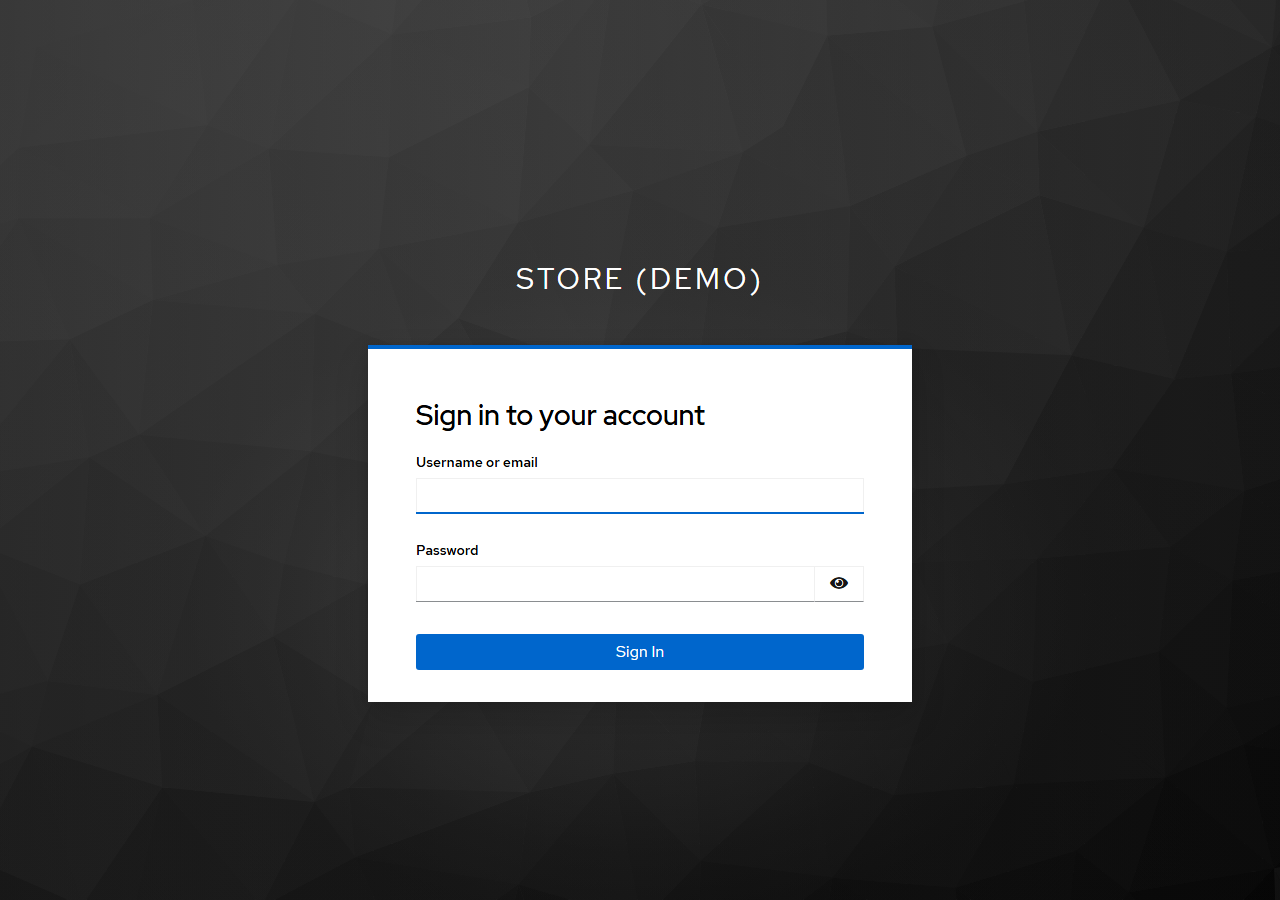
Sign in as alice with the password replaceme. Keycloak sends the browser back to the Storefront with a code, keycloak-js exchanges it (with the PKCE verifier) for tokens, and the header shows "Signed in as Alice Customer". The cart is still there. Click Place order: the order goes to the Order API with alice's access token, and Your orders lists her orders, and only hers.
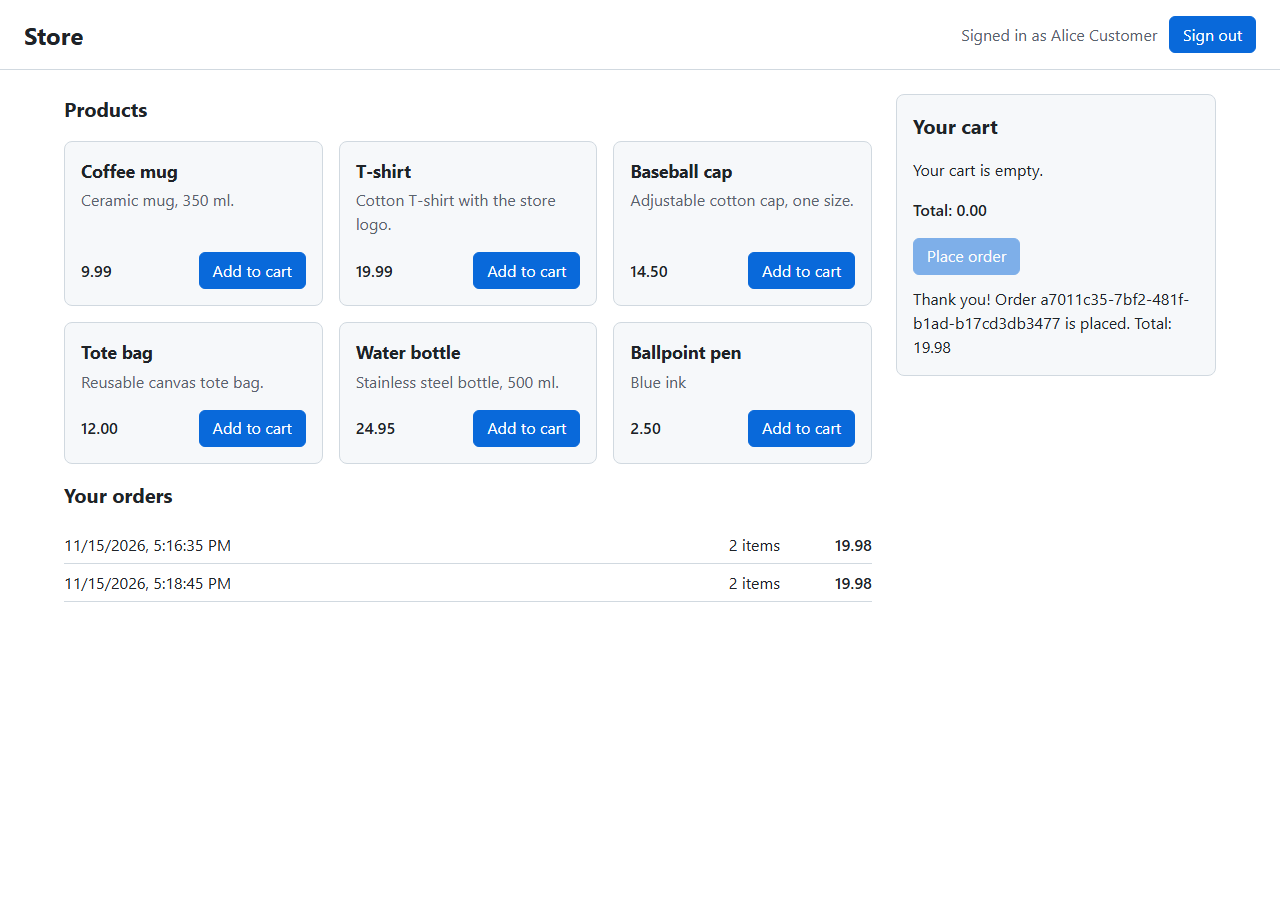
Reload the page: alice stays signed in, without seeing Keycloak again. That's the silent check-sso from Step-9. Sign out ends the session at Keycloak too, so after a reload the header shows Sign in again.
Now open http://localhost:8080/admin/. The fallback policy wants a signed-in admin, so the site sends the browser straight to Keycloak. Look at the address of that redirect:
curl -s -i http://localhost:8080/admin/ | grep -i "^location"

# output (trimmed)
Location: http://localhost:8081/realms/store/protocol/openid-connect/auth?client_id=admin&request_uri=urn%3Aietf%3Aparams%3Aoauth%3Arequest_ur...&x-client-SKU=ID_NET10_0&x-client-ver=8.19.2.0
The browser is sent to localhost:8081 (the front-channel address), and the sign-in parameters, including the PKCE challenge, aren't in the address at all: the Admin site pushed them to Keycloak over the back-channel first (PAR), and the address carries only the request_uri reference.
If you are still signed in to Keycloak as alice from the Storefront, you won't even see the sign-in page: single sign-on signs you in to the Admin site as alice right away. Either way, alice is a customer, not staff, so the site shows its access denied page:
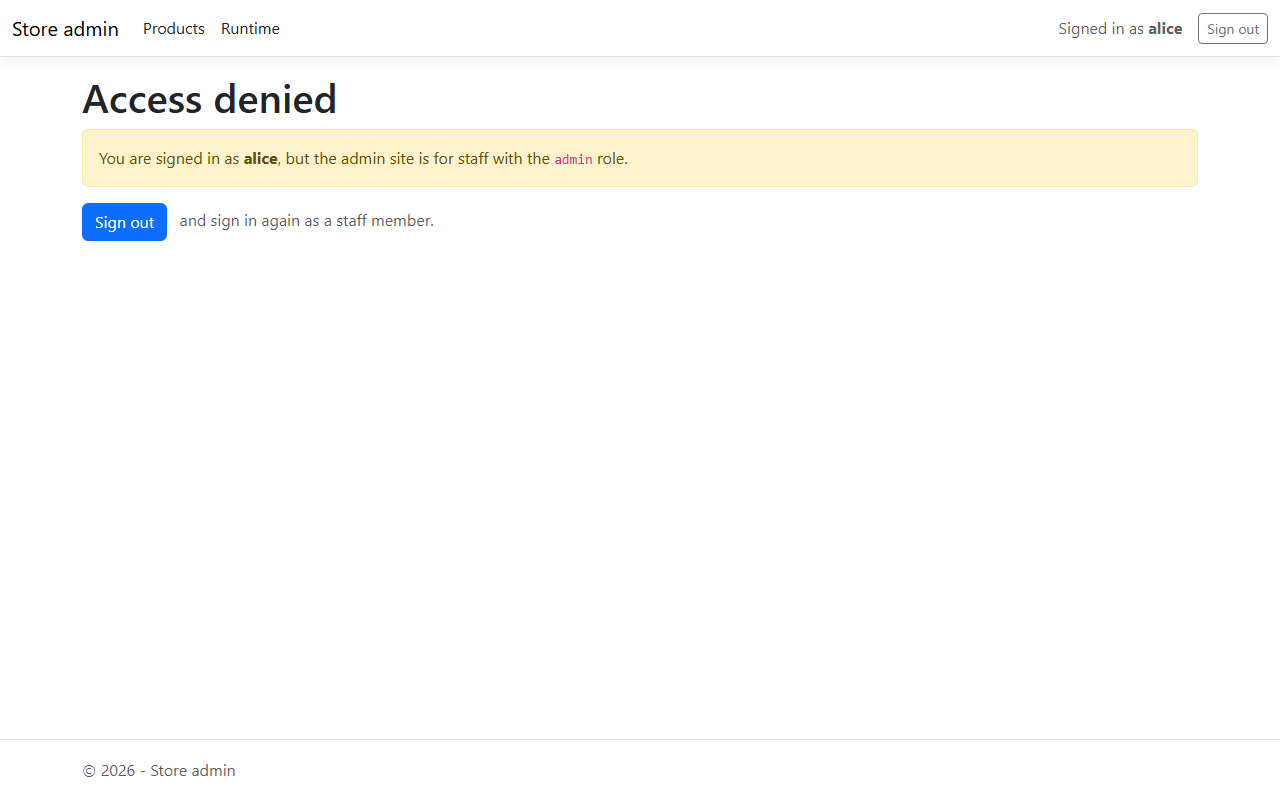
Click Sign out, then Sign in again, and sign in as bob. Now the product list appears with "Signed in as bob" in the menu. Add a product with New product: the Admin site sends bob's access token to the Product API, which checks the admin role once more and creates it.
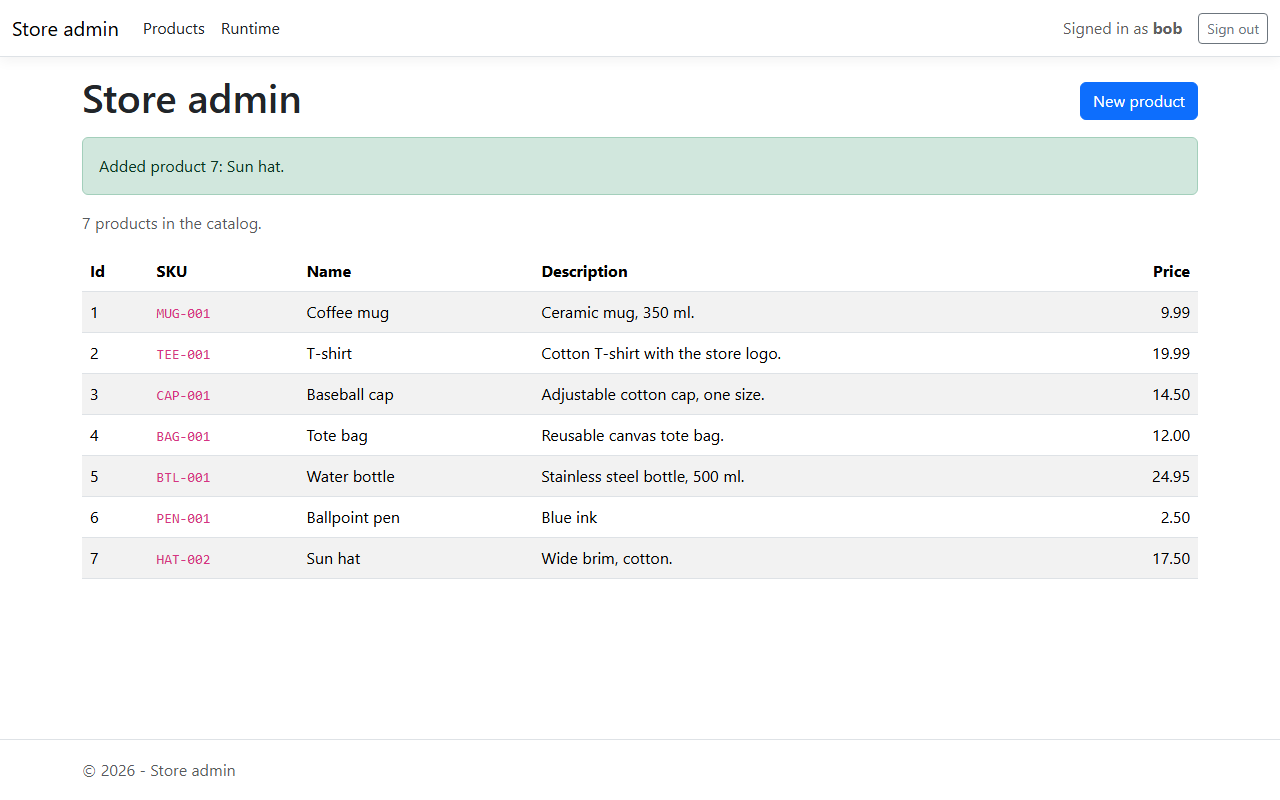
Two clients, two very different kinds of app, one sign-in. When you are done, stop the store with docker compose down, or docker compose down -v to also delete the data and the imported realm.
Going to production
The demo realm is built for learning on one machine. Before anything like it goes live:
- Never ship the demo realm. No
smoke-testclient, no password grant, no demo users, noreplacemesecrets. Real users sign up or come from your company directory; real secrets come from a secret store such as Azure Key Vault. - HTTPS everywhere. Tokens and session cookies are credentials: anyone who reads them can use them. Run Keycloak with
start(notstart-dev), a real hostname and a TLS certificate, keepRequireHttpsMetadataon, and serve the store over HTTPS. OpenID Connect requires the issuer to be anhttpsURL. - Short-lived access tokens. Keep access tokens to minutes and use refresh tokens (rotated, as in our realm) to get new ones. A stolen access token is then useful only briefly.
- Rotate secrets and keys. Change client secrets regularly (Keycloak's client secret rotation, still experimental in Keycloak 26.4, can keep the old secret valid for a while during the switch), and let Keycloak rotate its signing keys;
createRemoteJWKSetand the JWT bearer handler pick up new keys automatically. - A BFF for the Storefront. As Step-9 explained, current advice is to keep tokens out of the browser for apps that handle personal data.
- Fail closed. Remove the "no settings, no sign-in" fallback from the services, so a missing setting stops the service instead of opening it.
- Consider a managed identity provider. Running Keycloak yourself means patching, scaling and backing it up. Managed services such as Microsoft Entra ID (for staff) and Microsoft Entra External ID (for customers; Azure AD B2C is no longer sold to new customers since May 2025) speak the same OpenID Connect and OAuth 2.0, so the APIs' token checks change only in their settings: authority, issuer and audience.
Troubleshooting
| Problem | What to do |
|---|---|
401 with The issuer '...' is invalid (Product API) or unexpected "iss" claim value (Order API log) |
The token's issuer differs from Auth__ValidIssuer / AUTH_ISSUER. Check that KC_HOSTNAME is http://localhost:8081 and that you get tokens from localhost:8081, not from keycloak:8080 |
401 with The audience ... is invalid or unexpected "aud" claim value |
The token isn't meant for this API: an ID token, or a token from a client without the audience mappers |
401 right after a token was issued |
Look at the reason in the API's log or the WWW-Authenticate header. An expired test token (30 seconds) is the most common one |
403 for bob |
bob lacks the admin role in the token. If you changed the realm file, the import is skipped while the realm exists: docker compose down -v, then start again |
502 Bad Gateway on /admin/signin-oidc and upstream sent too big header in the gateway log |
The gateway's buffers are too small for the sign-in cookie: add proxy_buffer_size and proxy_buffers to the /admin location (Step-8) |
Keycloak: Invalid parameter: redirect_uri |
The address the client sent isn't one of the client's exact redirect URIs. Compare it with the realm file |
| Keycloak isn't healthy, or the import fails | docker compose logs keycloak. The realm file must be named store-realm.json; Referenced client scope ... doesn't exist means a clientScopes list replaced the built-in scopes (Step-3) |
| The Storefront shows Sign in, but signing in does nothing | Open the browser's developer tools: keycloak-js logs why. Keycloak must be reachable at http://localhost:8081, and PKCE needs a secure context, which http://localhost is, but http://<your-ip> is not |
Orders return 503 "Sign-in can not be checked right now" |
The Order API can't fetch Keycloak's keys. Is the keycloak service healthy? |
test-token.sh or a sign-in fails with curl: (52) Empty reply from server |
Keycloak is still starting: the published port takes the connection, but nothing answers yet. Wait until docker compose ps keycloak shows (healthy) and try again. Right after a start, the first token and the first order also take a second or two longer than later ones |
| The Admin site sends you to Keycloak every few minutes | Expected: the session ends with the 5-minute access token (Step-8). While your Keycloak session lasts, Keycloak sends you straight back without asking for the password |
Conclusion
In this chapter, we secured the store with Keycloak. The store realm, imported from a small JSON file, has two roles, two demo users and three clients: the Storefront as a public client and the Admin site as a confidential client, both using the authorization code flow with PKCE and exact redirect URIs, and a test-only client whose password grant exists only for scripts. Keycloak's hostname settings give tokens one issuer, http://localhost:8081/realms/store, whether the browser or a container asks, which removes the most common source of 401s in a Docker setup. The Product API checks tokens with ASP.NET Core's JWT bearer handler and requires the admin role for changes; the Order API checks them with jose, takes the customer from the token's sub and shows customers only their own orders. The Admin site signs staff in with OpenID Connect and calls the Product API with the user's token; the Storefront signs customers in with keycloak-js. The gateway simply passes the Authorization header on, because every service checks for itself.
The store is now a small but complete system: separate services with their own data, calling each other, behind one entry point, with real sign-in. So far, though, every interaction is a synchronous request that waits for an answer. In the next chapter, events and messaging let the Order API announce OrderPlaced to other services without waiting for them, and the customer's email from the token goes into that event.
References
- Keycloak - Configuring the hostname (v2)
- Keycloak - Importing and exporting realms
- Keycloak - Tracking instance status with health checks
- Keycloak - Configuring the Management Interface
- Keycloak - Server Administration Guide (OIDC clients, audience support, sessions)
- Keycloak - Securing applications: JavaScript adapter (keycloak-js)
- Microsoft Learn - Configure JWT bearer authentication in ASP.NET Core
- Microsoft Learn - Configure OpenID Connect Web (UI) authentication in ASP.NET Core
- Microsoft Learn - Map, customize, and transform claims in ASP.NET Core
- jose - JWT verification for JavaScript (createRemoteJWKSet, jwtVerify)
- RFC 6749 - The OAuth 2.0 Authorization Framework
- RFC 7636 - Proof Key for Code Exchange (PKCE)
- RFC 7519 - JSON Web Token (JWT)
- OpenID Connect Core 1.0
- RFC 9700 - Best Current Practice for OAuth 2.0 Security
- RFC 10017 - OAuth 2.0 for Browser-Based Applications
- RFC 9126 - OAuth 2.0 Pushed Authorization Requests