Chapter-14: Service Communication
Sample code
The complete, tested code for this chapter is in samples/microservices: the Product API call in order-api/src/catalog.js, the typed client in admin/Services/ProductApiClient.cs, the storefront in storefront, compose.yaml and scripts/demo-order.sh. Use it to compare against your own work.
Introduction
In Chapter-13, the whole store started with one command, but the services still lived side by side without talking to each other. The Order API priced orders from its own little price list, and the Admin site and the Storefront showed product lists that were written into their code. Change a price in the Product API, and nobody else would notice.
In this lab, I will guide you through connecting the services. The Order API asks the Product API for the name and price of every product in an order, the Admin site reads and adds products through the Product API, and the Storefront loads the products and places real orders. Along the way we look at what a call over the network really costs, how a service finds another one by name, what an order should do when the Product API is down, and how to follow one request through the logs of two services.
Technical Scenario
As a Backend (BE) developer, you have been asked to make the Product API the single source of truth for products. The team agreed on these rules:
- The owner answers. Only the Product API knows the products. Every other service asks it over HTTP, by its service name on the store network. No copies of the catalog in code, and no reading the Product DB directly (see Chapter-12).
- An order keeps a snapshot. The Order API copies the name and price of each product into the order when it is placed, so a later price change never alters an order a customer already paid for.
- Fail fast and say why. If the Product API doesn't answer within 2 seconds, the Order API stops waiting and answers
503 Service Unavailable. A product that doesn't exist is a422. The websites turn both into a friendly message, never a stack trace. - Every request has an id. The id travels with every call from one service to the next and appears in every log line, so you can follow one order across services.
Objective
In this exercise, our objective is to accomplish and learn the following tasks:
- Step-1: Understand synchronous calls and what they cost.
- Step-2: Call the Product API from the Order API.
- Step-3: Pass a request id from service to service.
- Step-4: Configure the calls in the compose file.
- Step-5: Read and add products in the Admin site.
- Step-6: Connect the Storefront to the APIs.
- Step-7: Try it: place an order and see the snapshot.
- Step-8: Try it: order a product that doesn't exist.
- Step-9: Try it: stop the Product API.
Prerequisites
Before starting this lab, ensure you have the following prerequisites in place:
- The store from Chapter-13:
compose.yaml,compose.dev-ports.yamland your.envfile in the folder that holds the service folders (samples/microservicesin the sample code). - The services from Chapter-4 to Chapter-7, connected to their databases as in Chapter-12.
- Docker Desktop (or Docker Engine 25 or later) with Docker Compose v2 or later.
curland abashshell (on Windows, Git Bash or WSL) for the demo script.
Architecture Diagram
The following diagram shows the calls this chapter adds. The solid arrows between services are new: three services now depend on the Product API at run time.
flowchart LR
  you([You: curl or browser])
  subgraph store ["compose.yaml: network store"]
    sf["storefront<br/>nginx :8080<br/>(temporary /api/ proxy)"]
    adm["admin<br/>.NET 10 MVC :8080"]
    prod["product-api<br/>.NET 10 :8080"]
    ord["order-api<br/>Node 24 :3000"]
    sf -->|"/api/products/"| prod
    sf -->|"/api/orders/"| ord
    adm -->|"GET, POST /products<br/>PRODUCT_API_URL"| prod
    ord -->|"GET /products/id<br/>PRODUCT_API_URL, 2 s timeout<br/>X-Request-Id"| prod
    prod --> pdb[("product-db<br/>SQL Server")]
    ord --> odb[("order-db<br/>PostgreSQL")]
  end
  you -.->|"localhost:5001 to 5004"| store
The storefront's /api/ proxy is a temporary stand-in: in the next chapter, the API gateway takes over those routes.
Step-1: Understand synchronous calls and what they cost
When the Order API needs a price, the simplest thing it can do is ask the Product API and wait for the answer. This is synchronous request/response: one service sends an HTTP request to another and waits for the response before it carries on. It's easy to write, easy to read and easy to debug, so it's how most services start talking to each other.
It is not free, though. Compared with calling a function inside one program, a call over the network adds real costs:
- Latency. Every call travels over the network, and the caller waits for it. One order with three products means three calls before the order can be saved. (We send them at the same time, so the order waits for the slowest one, not for all three in a row.)
- Availability coupling. If the Product API is down, the Order API can't price an order, so customers can't place orders, even though the Order API and its database are fine. The Order API is now only as available as the Product API.
- Partial failure. A function call either returns or throws. A network call can also hang, time out, or succeed on the other side while the answer gets lost. The caller has to decide how long to wait and what to do when no answer comes.
We accept these costs here because the Order API really needs the current price at the moment of the order, and it needs it now. The rest of this chapter is about keeping the costs small: a short timeout, clear errors and a way to trace each call.
When to use events instead
A synchronous call fits when the caller needs an answer to carry on, like the price of a product. When a service only needs to tell others that something happened, for example "an order was placed, send a confirmation email", it should not wait for them. It publishes an event to a message broker and moves on, and the other services react in their own time. If the email service is down, orders still work. The chapter on events and messaging (Chapter-17, being added) does this with RabbitMQ.
Snapshot or live lookup? The Order API looks the price up live when the order is placed, and then stores a snapshot of the name and price in the order. That way an order is a record of what the customer actually agreed to pay. If it stored only the product id and looked the price up every time someone reads the order, a price change next week would quietly change last week's orders, and an order would fail to show at all while the Product API is down. Copying a little data at the right moment is how services stay independent.
Step-2: Call the Product API from the Order API
In Chapter-5, src/catalog.js held a small price list, and findProduct was async on purpose, because we knew it would become a network call. Now it does. Replace the contents of src/catalog.js with:
// Looks up products in the Product API, which owns the product catalog (Chapter-14).
// The base URL comes from the environment: http://product-api:8080 in compose.
const baseUrl = process.env.PRODUCT_API_URL?.replace(/\/+$/, '');

// How long to wait for the Product API before giving up on a lookup.
const TIMEOUT_MS = 2000;

// The Product API could not answer: not configured, not reachable, too slow,
// or it returned an error. The order can't be priced, so POST /orders sends 503.
export class ProductServiceUnavailableError extends Error {}

export function productApiUrl() {
  return baseUrl;
}

// Returns { id, name, price }, or undefined when the Product API answers 404.
// requestId is passed on in the X-Request-Id header, so the Product API's log
// line for this call can be matched with the Order API's.
export async function findProduct(id, { requestId } = {}) {
  if (!baseUrl) {
    throw new ProductServiceUnavailableError('PRODUCT_API_URL is not set');
  }
  const url = `${baseUrl}/products/${id}`;
  let response;
  let product;
  try {
    response = await fetch(url, {
      headers: { Accept: 'application/json', ...(requestId && { 'X-Request-Id': requestId }) },
      // Abort the call (and reading its body) after 2 seconds
      signal: AbortSignal.timeout(TIMEOUT_MS),
    });
    if (response.status === 404) {
      return undefined;
    }
    if (!response.ok) {
      throw new ProductServiceUnavailableError(`GET ${url} returned ${response.status}`);
    }
    product = await response.json();
  } catch (err) {
    if (err instanceof ProductServiceUnavailableError) throw err;
    // TimeoutError after 2 seconds; TypeError "fetch failed" when the
    // connection fails, with the reason (such as ECONNREFUSED) in err.cause
    const reason = err.name === 'TimeoutError'
      ? `no answer within ${TIMEOUT_MS} ms`
      : (err.cause?.code ?? err.message);
    throw new ProductServiceUnavailableError(`GET ${url} failed: ${reason}`, { cause: err });
  }
  // Keep only what an order needs
  return { id: product.id, name: product.name, price: product.price };
}
Here is what matters in this file:
- The address comes from the environment.
PRODUCT_API_URLishttp://product-api:8080in compose: the Product API's service name and the port inside its container, exactly what you tried withwgetin Chapter-13. Docker's DNS server on thestorenetwork turns the name into the container's current IP address. In another environment, the same image gets a different URL and no code changes. fetchis built into Node.js, so the call needs no extra package.AbortSignal.timeout(2000)is the timeout. Without one,fetchcan wait for a very long time on a service that accepts the connection but never answers, and every waiting order holds memory and a connection. Two seconds is plenty for a lookup by id on the same network, and short enough that a customer gets an answer quickly.- Three kinds of answer, kept apart.
404means "this product doesn't exist", a normal business answer, so the function returnsundefined. Everything else that goes wrong (no address, no connection, no answer in time, a5xxstatus) means "I can't find out right now", and becomes one error type,ProductServiceUnavailableError. The caller only has to tell those two cases apart. - Copy only what you need. The function returns the id, name and price, nothing else. The Order API doesn't depend on the rest of the Product API's JSON, so the Product API can add fields without breaking it.
Now use it in POST /orders in src/orders.js. Import the error type next to findProduct:
and replace the loop that priced the items with:
  // Ask the Product API for every product at the same time, then copy each
  // name and price into the order (a snapshot), so later price changes don't
  // alter orders that were already placed.
  let products;
  try {
    products = await Promise.all(
      req.body.items.map(({ productId }) => findProduct(productId, { requestId: req.id })));
  } catch (err) {
    if (!(err instanceof ProductServiceUnavailableError)) throw err;
    console.warn(`product service unavailable: ${err.message} requestId=${req.id}`);
    return sendProblem(res, 503, 'The product service is unavailable. Try again in a moment.');
  }

  const items = [];
  for (const [i, { productId, quantity }] of req.body.items.entries()) {
    const product = products[i];
    if (!product) {
      return sendProblem(res, 422, `Product ${productId} does not exist.`, { productId });
    }
    items.push({ productId, name: product.name, unitPrice: product.price, quantity });
  }
The rest of the handler (the total in cents, saving the order, the 201 response) stays as it was. Promise.all starts all the lookups at once and waits for all of them; if one of them throws, it stops waiting straight away.
Designing the error answers. The Order API turns what happened downstream into an answer that makes sense to its caller. It doesn't pass on the Product API's response, because the Storefront shouldn't need to know that a Product API exists:
| What happened at the Product API | Order API answers | Why |
|---|---|---|
200 for every product |
201 Created with the order |
Normal case |
404 for one product |
422 Unprocessable Content, with the productId |
The request is well-formed, but it asks for something that doesn't exist. Sending it again won't help |
No address, no connection, no answer within 2 s, or a 5xx status |
503 Service Unavailable |
Not the caller's fault, and trying again later may work |
| Anything else unexpected | 500 Internal Server Error (the error handler from Chapter-5) |
A bug: logged, with a general message |
Both errors use the same problem details format (RFC 9457) as every other error of the store. productId is an extra field, which problem details allow, so a client can show which product is the problem. The Order API also logs the technical reason of a 503 (which URL, and why it failed), but doesn't put it in the response: callers get a clear message, and the details stay in the logs.
What if PRODUCT_API_URL is not set? The Order API still starts, logs product api: PRODUCT_API_URL is not set, so orders cannot be priced, and answers every order with 503. Add the log line at the top of src/server.js, before connect():
import { productApiUrl } from './catalog.js';

// Orders are priced by the Product API (Chapter-14). Without its address,
// the API still starts, but POST /orders answers 503.
console.log(productApiUrl()
  ? `product api: ${productApiUrl()}`
  : 'product api: PRODUCT_API_URL is not set, so orders cannot be priced');
Readiness doesn't include the Product API
The Order API's /health/ready still checks only its own database. That's deliberate: readiness answers "can this service do its own job?". If it also checked the Product API, a Product API outage would mark the Order API unhealthy too, and a platform such as Kubernetes would stop sending it traffic, so even GET /orders would fail. One service's outage would spread to every service that calls it. You'll see in Step-9 that the Order API stays healthy and keeps serving what it can.
Step-3: Pass a request id from service to service
With one service, its log tells you what happened to a request. With two, a failed order leaves one line in the Order API's log and one in the Product API's, and you need a way to match them. The simple answer is a request id: a unique value that comes with the request, is passed on with every call it causes, and is written in every log line.
Add two small middleware functions to src/app.js, right after app.disable('x-powered-by') (and add import { randomUUID } from 'node:crypto'; at the top):
// A request id lets you follow one request through the logs of every service
// it touches (Chapter-14). Keep the caller's X-Request-Id if it looks sane,
// otherwise make a new one, and send it back in the response.
const REQUEST_ID = /^[A-Za-z0-9._-]{1,100}$/;
app.use((req, res, next) => {
  const incoming = req.get('X-Request-Id');
  req.id = incoming && REQUEST_ID.test(incoming) ? incoming : randomUUID();
  res.set('X-Request-Id', req.id);
  next();
});

// One log line per request, except the health checks compose runs every few seconds
app.use((req, res, next) => {
  if (req.path.startsWith('/health/')) return next();
  const start = performance.now();
  res.on('finish', () => {
    const ms = Math.round(performance.now() - start);
    console.log(`${req.method} ${req.originalUrl} ${res.statusCode} ${ms}ms requestId=${req.id}`);
  });
  next();
});
- If the caller sends an
X-Request-Idheader, the Order API keeps it; otherwise it creates a new UUID. The check on the incoming value stops anyone from writing odd characters or very long text into your logs. - The id goes back in the response header, so a client (or you, with
curl -i) can quote it when reporting a problem. findProduct(productId, { requestId: req.id })passes it on to the Product API, as you saw in Step-2.
The Product API needs to log the id too. Add this middleware to its Program.cs, just before app.UseExceptionHandler():
// One log line per request with the caller's X-Request-Id (Chapter-14), so a call
// from the Order API can be matched with the Order API's own log line.
// Health checks run every few seconds, so they are left out.
var requestLog = app.Services.GetRequiredService<ILoggerFactory>().CreateLogger("Requests");
app.Use(async (context, next) =>
{
    var started = System.Diagnostics.Stopwatch.GetTimestamp();
    await next(context);
    if (context.Request.Path.StartsWithSegments("/health")) return;
    var requestId = context.Request.Headers["X-Request-Id"].ToString();
    requestLog.LogInformation("{Method} {Path} {StatusCode} {Elapsed:0}ms requestId={RequestId}",
        context.Request.Method, context.Request.Path, context.Response.StatusCode,
        System.Diagnostics.Stopwatch.GetElapsedTime(started).TotalMilliseconds,
        string.IsNullOrEmpty(requestId) ? "-" : requestId);
});
This is the simplest form of tracing, and it already answers the most common question: "what happened to this request?". The chapter on resilience and observability (Chapter-18, being added) replaces these plain lines with structured JSON logs and OpenTelemetry traces, which do the same job across every service automatically.
Step-4: Configure the calls in the compose file
The services find each other by name, but they still need to be told which name to use. Add PRODUCT_API_URL to the order-api and admin services in compose.yaml, and make the Order API start after the Product API is healthy:
  order-api:
    build: ./order-api
    image: sample/order-api
    environment:
      DATABASE_URL: "postgres://orders:${POSTGRES_PASSWORD:?copy .env.example to .env and set it}@order-db:5432/orderdb"
      # The Order API prices every order with the Product API (chapter 14)
      PRODUCT_API_URL: http://product-api:8080
    depends_on:
      order-db:
        condition: service_healthy
      product-api:
        condition: service_healthy
    # healthcheck, restart and networks as before

  admin:
    build: ./admin
    image: sample/admin
    environment:
      # The admin site reads and adds products through the Product API (chapter 14)
      PRODUCT_API_URL: http://product-api:8080
    # healthcheck, restart and networks as before
PRODUCT_API_URLis not a secret, so it goes straight into the compose file, not into.env.depends_onwithservice_healthyonly affects start-up: compose starts the Order API once the Product API answers its readiness check. It does nothing when the Product API stops later; that's what the timeout and the503are for.- The Admin site doesn't get a
depends_onon purpose. It can start without the Product API and shows a banner until it's back (Step-5).
The Chapter-12 lab
The Order API lab from Chapter-12 (order-api/docker-compose.yml) now also starts the Product API with its in-memory product list and sets PRODUCT_API_URL, so the lab keeps working on its own.
Rebuild and start the store with the development ports from Chapter-13:
docker compose -f compose.yaml -f compose.dev-ports.yaml up -d --build --wait
docker compose ps --format 'table {{.Service}}\t{{.Status}}\t{{.Ports}}'

# output
SERVICE       STATUS                    PORTS
admin         Up 22 seconds (healthy)   127.0.0.1:5003->8080/tcp
order-api     Up 3 seconds (healthy)    127.0.0.1:5002->3000/tcp
order-db      Up 22 seconds (healthy)   5432/tcp
product-api   Up 6 seconds (healthy)    127.0.0.1:5001->8080/tcp
product-db    Up 22 seconds (healthy)   1433/tcp
storefront    Up 22 seconds (healthy)   127.0.0.1:5004->8080/tcp
The Order API started last, a few seconds after the Product API became healthy. Its log shows where it sends the lookups:
docker compose logs order-api

# output
order-api-1  | product api: http://product-api:8080
order-api-1  | order store: PostgreSQL
order-api-1  | order-api listening on port 3000
Step-5: Read and add products in the Admin site
The Admin site from Chapter-6 showed a fixed list from HomeController. Now it reads the products from the Product API, and staff can add new ones.
In .NET, the recommended way to call another service is a typed client created by IHttpClientFactory: a small class that receives a ready-made HttpClient in its constructor and offers methods such as GetProductsAsync. The factory sets the base address and timeout in one place and reuses network connections between requests, which avoids the classic mistakes of creating a new HttpClient per request (running out of sockets) or keeping one forever (missing DNS changes).
Create Services/ProductApiClient.cs:
using System.Net.Http.Json;
using admin.Models;

namespace admin.Services;

// The Product API could not answer: PRODUCT_API_URL is not set, the service
// is not reachable, it was too slow, or it failed with a 5xx status.
public class ProductApiUnavailableException(string message, Exception? inner = null)
    : Exception(message, inner);

// Calls the Product API, the owner of the product catalog (Chapter-14).
// IHttpClientFactory creates the HttpClient with the base address and timeout
// from Program.cs, and reuses the connections behind it.
public class ProductApiClient(HttpClient http, ILogger<ProductApiClient> logger)
{
    // GET /products
    public async Task<IReadOnlyList<Product>> GetProductsAsync(CancellationToken cancellationToken)
    {
        using var response = await SendAsync(new HttpRequestMessage(HttpMethod.Get, "products"), cancellationToken);
        return await response.Content.ReadFromJsonAsync<List<Product>>(cancellationToken) ?? [];
    }

    // POST /products. Returns the new product, or the API's problem details
    // when it refuses the input (400 invalid, 409 duplicate SKU).
    public async Task<(Product? Created, HttpValidationProblemDetails? Problem)> CreateProductAsync(
        ProductInput input, CancellationToken cancellationToken)
    {
        var body = new { input.Sku, input.Name, Description = input.Description ?? string.Empty, input.Price };
        var request = new HttpRequestMessage(HttpMethod.Post, "products") { Content = JsonContent.Create(body) };
        using var response = await SendAsync(request, cancellationToken);
        if (response.IsSuccessStatusCode)
        {
            return (await response.Content.ReadFromJsonAsync<Product>(cancellationToken), null);
        }
        var problem = await response.Content.ReadFromJsonAsync<HttpValidationProblemDetails>(cancellationToken);
        return (null, problem ?? new HttpValidationProblemDetails { Title = $"The Product API answered {(int)response.StatusCode}." });
    }

    // Sends a request and turns every way the call can fail into one exception,
    // so the pages show a banner instead of an error page.
    private async Task<HttpResponseMessage> SendAsync(HttpRequestMessage request, CancellationToken cancellationToken)
    {
        if (http.BaseAddress is null)
        {
            throw Unavailable(request, "PRODUCT_API_URL is not set");
        }

        HttpResponseMessage response;
        try
        {
            response = await http.SendAsync(request, cancellationToken);
        }
        catch (HttpRequestException ex)
        {
            throw Unavailable(request, ex.Message, ex);
        }
        catch (TaskCanceledException ex) when (!cancellationToken.IsCancellationRequested)
        {
            // HttpClient reports its own timeout as a cancelled task
            throw Unavailable(request, $"no answer within {http.Timeout.TotalSeconds:0} s", ex);
        }

        if ((int)response.StatusCode >= 500)
        {
            response.Dispose();
            throw Unavailable(request, $"status {(int)response.StatusCode}");
        }
        return response;
    }

    private ProductApiUnavailableException Unavailable(HttpRequestMessage request, string reason, Exception? inner = null)
    {
        logger.LogWarning("Product API unavailable: {Method} {Path} failed: {Reason}",
            request.Method, request.RequestUri, reason);
        return new ProductApiUnavailableException(reason, inner);
    }
}
It follows the same idea as the Order API's catalog.js: the normal answers (200, and 400 or 409 for a new product) come back to the caller, and every way the call can fail becomes one exception, ProductApiUnavailableException, with the technical reason in the log.
Register the client in Program.cs, after builder.Services.AddHealthChecks(); (and add using admin.Services; at the top):
// The Product API owns the products; the site reads and adds them through it
// (Chapter-14). PRODUCT_API_URL is its address, for example http://product-api:8080.
// Without it the site still starts and shows an error banner instead of the list.
var productApiUrl = builder.Configuration["PRODUCT_API_URL"];
builder.Services.AddHttpClient<ProductApiClient>(client =>
{
    if (!string.IsNullOrWhiteSpace(productApiUrl))
    {
        client.BaseAddress = new Uri(productApiUrl.TrimEnd('/') + "/");
    }
    // Someone is waiting for the page: give up after 5 seconds and show the banner
    client.Timeout = TimeSpan.FromSeconds(5);
});
ASP.NET Core reads environment variables into its configuration, so builder.Configuration["PRODUCT_API_URL"] returns the value from compose.
In Models/Product.cs, keep the Product record and add the form's input model and a model for the home page:
using System.ComponentModel.DataAnnotations;

// The "New product" form. The rules match the Product API's own, so most
// mistakes are caught before the request is sent; the API still checks again.
public class ProductInput
{
    [Required, StringLength(32), Display(Name = "SKU")]
    public string Sku { get; set; } = string.Empty;

    [Required, StringLength(100)]
    public string Name { get; set; } = string.Empty;

    // Optional: string? because MVC treats a non-nullable string as required
    [StringLength(500)]
    public string? Description { get; set; }

    [Range(0.01, 99_999_999.99)]
    public decimal Price { get; set; }
}

// The home page: the products, or an error banner when the Product API is down.
public record ProductListPage(IReadOnlyList<Product> Products, bool ApiUnavailable);
The controller now gets the client through its constructor, and the temporary list is gone. The Index action catches the exception and shows the page with a banner; the Create actions show and handle the form:
public class HomeController(ProductApiClient productApi) : Controller
{
    // GET / : the product list, from the Product API
    public async Task<IActionResult> Index(CancellationToken cancellationToken)
    {
        try
        {
            var products = await productApi.GetProductsAsync(cancellationToken);
            return View(new ProductListPage(products, ApiUnavailable: false));
        }
        catch (ProductApiUnavailableException)
        {
            return View(new ProductListPage([], ApiUnavailable: true));
        }
    }

    // GET /Home/Create : the "New product" form
    public IActionResult Create()
    {
        return View(new ProductInput());
    }

    // POST /Home/Create : send the new product to the Product API
    [HttpPost]
    [ValidateAntiForgeryToken]
    public async Task<IActionResult> Create(ProductInput input, CancellationToken cancellationToken)
    {
        if (!ModelState.IsValid)
        {
            return View(input);
        }

        try
        {
            var (created, problem) = await productApi.CreateProductAsync(input, cancellationToken);
            if (created is not null)
            {
                TempData["Message"] = $"Added product {created.Id}: {created.Name}.";
                return RedirectToAction(nameof(Index));
            }

            // The API refused the product: show its reasons next to the fields
            // (400 validation errors) or above the form (409 duplicate SKU).
            foreach (var (field, messages) in problem!.Errors)
            {
                foreach (var message in messages)
                {
                    ModelState.AddModelError(field, message);
                }
            }
            if (problem.Errors.Count == 0)
            {
                ModelState.AddModelError(string.Empty, problem.Title ?? "The Product API refused the product.");
            }
        }
        catch (ProductApiUnavailableException)
        {
            ViewData["ApiUnavailable"] = true;
        }
        return View(input);
    }

    // Runtime and Error actions as in Chapter-6
}
[ValidateAntiForgeryToken]checks the hidden token that the form tag helper adds to every form, so another website can't post the form on behalf of a signed-in user.- After a successful
POST, the action redirects to the list (the Post/Redirect/Get pattern), so reloading the page doesn't add the product twice.TempDatacarries the success message across the redirect. - Errors from the API land next to the field they belong to, so a duplicate SKU reads like any other validation message.
The banner is a small partial view, Views/Shared/_ApiUnavailable.cshtml, that both pages use:
@* Shown instead of an error page when the Product API can't be reached *@
<div class="alert alert-danger" role="alert">
    <strong>The Product API is not available right now.</strong>
    Products can't be shown or changed until it is back. Try again in a moment.
</div>
Views/Home/Index.cshtml now uses @model ProductListPage, shows the success message and a New product button, and renders the banner or the table:
<div class="d-flex justify-content-between align-items-center mb-2">
    <h1>Store admin</h1>
    <a class="btn btn-primary" asp-action="Create">New product</a>
</div>

@if (TempData["Message"] is string message)
{
    <div class="alert alert-success" role="status">@message</div>
}

@if (Model.ApiUnavailable)
{
    <partial name="_ApiUnavailable" />
}
else
{
    <p class="text-muted">@Model.Products.Count products in the catalog.</p>
    @* the same table as in Chapter-6, looping over Model.Products *@
}
The form in Views/Home/Create.cshtml uses the tag helpers asp-for and asp-validation-for with Bootstrap classes, and the _ValidationScriptsPartial from the template, so the rules on ProductInput are checked in the browser too. See the sample code for the complete view.
Open http://localhost:5003 and click New product:
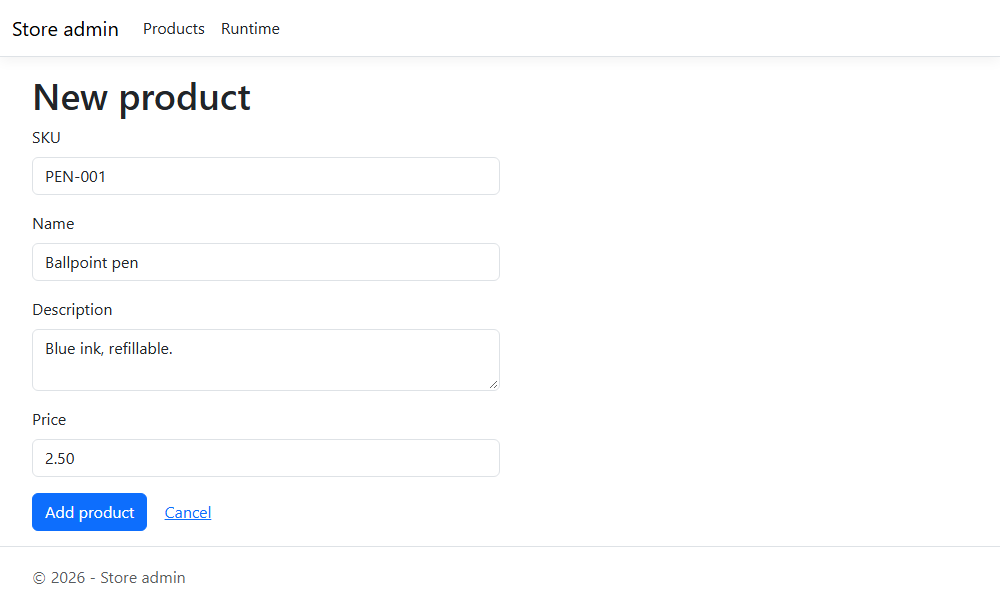
Click Add product, and the list shows the message Added product 6: Ballpoint pen. with the pen in the table, now stored in the Product DB. Try the same SKU again, and the form shows the Product API's answer: A product with SKU 'PEN-001' already exists.
No sign-in yet
Anyone who can reach the Admin site, or the Product API itself, can add, change and delete products. The dev ports listen on 127.0.0.1 only, so that's just you for now. The chapter on securing services (Chapter-16, being added) protects these endpoints with Keycloak.
Step-6: Connect the Storefront to the APIs
The Storefront from Chapter-7 loaded /products.json, a static file. Delete public/products.json and change the fetch in src/App.jsx to:
    // The Product API, on the site's own origin: in the container, nginx
    // forwards /api/ to the services; with `npm run dev`, Vite does (Chapter-14)
    fetch('/api/products/')
The URL is relative: the browser sends the request to the same address the page came from. That keeps the app free of configuration (no API URL baked into the JavaScript at build time) and avoids cross-origin requests, which browsers block unless the API allows them with CORS headers. It works once something on that same address forwards /api/... to the APIs. In the finished store that's the API gateway; until then, two temporary stand-ins do it.
Temporary stand-in 1: nginx in the Storefront container. Add these lines inside the server block of nginx.conf, after location /:
    # TEMPORARY (chapter 14): forward the app's API calls to the services, so the
    # browser calls /api/... on the site's own origin. The API gateway (chapter 15)
    # takes over these routes; delete the resolver lines and both /api/ locations then.
    #
    # Docker's DNS server (127.0.0.11) looks up the service names when a request
    # arrives, not when nginx starts, so the site also starts without the APIs.
    resolver 127.0.0.11 valid=10s ipv6=off;
    resolver_timeout 2s;

    # /api/products/1 -> http://product-api:8080/products/1
    location /api/products/ {
        set $product_api http://product-api:8080;
        rewrite ^/api(/.*)$ $1 break;
        proxy_pass $product_api;
        proxy_connect_timeout 2s;
    }

    # /api/orders/ -> http://order-api:3000/orders/
    location /api/orders/ {
        set $order_api http://order-api:3000;
        rewrite ^/api(/.*)$ $1 break;
        proxy_pass $order_api;
        proxy_connect_timeout 2s;
    }
rewrite ^/api(/.*)$ $1 break;removes the/apiprefix, so/api/products/1reaches the Product API as/products/1.- The address is in a variable (
$product_api) on purpose. With a plainproxy_pass http://product-api:8080;, nginx looks the name up once at start-up and refuses to start if it can't, for example when you run the Storefront alone as in Chapter-7. With a variable, nginx asks Docker's DNS server,127.0.0.11, for every request (caching the answer for 10 seconds) and answers502 Bad Gatewayif the service isn't there.
Temporary stand-in 2: the Vite development server. When you run the app with npm run dev, Vite serves it on port 5173, and Vite can forward requests too. Add a server.proxy section to vite.config.js that sends the calls to the store's development ports:
import react from '@vitejs/plugin-react'
import { defineConfig } from 'vite'

// https://vite.dev/config/
export default defineConfig({
  plugins: [react()],
  server: {
    // TEMPORARY (chapter 14): with `npm run dev`, forward the app's API calls to the
    // store's temporary development ports (compose.dev-ports.yaml). The API gateway
    // chapter (chapter 15) replaces both with one address.
    proxy: {
      '/api/products/': {
        target: 'http://localhost:5001',
        rewrite: (path) => path.replace(/^\/api/, ''),
      },
      '/api/orders/': {
        target: 'http://localhost:5002',
        rewrite: (path) => path.replace(/^\/api/, ''),
      },
    },
  },
})
With the store running, npm run dev now shows the products from the Product API, and you still get instant reloads while you change the React code.
Placing the order. The Place order button was disabled in Chapter-7. Now it sends the cart to the Order API. In App, add the state and a placeOrder function:
  const [placing, setPlacing] = useState(false)
  // The outcome of the last order: { ok, text }
  const [result, setResult] = useState(null)

  // Sends the cart to the Order API. The Order API looks up the names and
  // prices itself; the browser sends only product ids and quantities.
  async function placeOrder() {
    setPlacing(true)
    setResult(null)
    try {
      const items = Object.entries(cart).map(([id, quantity]) => ({ productId: Number(id), quantity }))
      const response = await fetch('/api/orders/', {
        method: 'POST',
        headers: { 'Content-Type': 'application/json' },
        body: JSON.stringify({ items }),
      })
      setResult(await orderResult(response))
      if (response.ok) setCart({})
    } catch {
      setResult({ ok: false, text: 'We could not reach the store. Check your connection and try again.' })
    } finally {
      setPlacing(false)
    }
  }
and a function, outside App, that turns each answer into a message a customer understands:
// Turns the Order API's answer into a message for the customer.
// Errors arrive as problem details (RFC 9457), for example { status: 422, productId: 9 }.
async function orderResult(response) {
  if (response.status === 201) {
    const order = await response.json()
    return { ok: true, text: `Thank you! Order ${order.id} is placed. Total: ${formatPrice(order.total)}` }
  }
  if (response.status === 422) {
    return { ok: false, text: 'A product in your cart is no longer sold. Remove it and try again.' }
  }
  if (response.status === 503 || response.status === 502 || response.status === 504) {
    return { ok: false, text: 'We cannot take orders right now. Your cart is kept; please try again in a moment.' }
  }
  return { ok: false, text: `Your order could not be placed (HTTP ${response.status}).` }
}
The Cart component gets three new props, onPlaceOrder, placing and result, enables the button while the cart has items, and shows the message under it. The cart is emptied only when the order was placed; after an error, the customer keeps the cart and can try again. 502 and 504 are treated like 503, because they are what a proxy answers when the service behind it is down or too slow. Two CSS classes, message and message error, style the messages; see the sample code for the complete App.jsx and index.css.
Rebuild the Storefront (docker compose -f compose.yaml -f compose.dev-ports.yaml up -d --build --wait), open http://localhost:5004, add two coffee mugs and a baseball cap to the cart and click Place order:
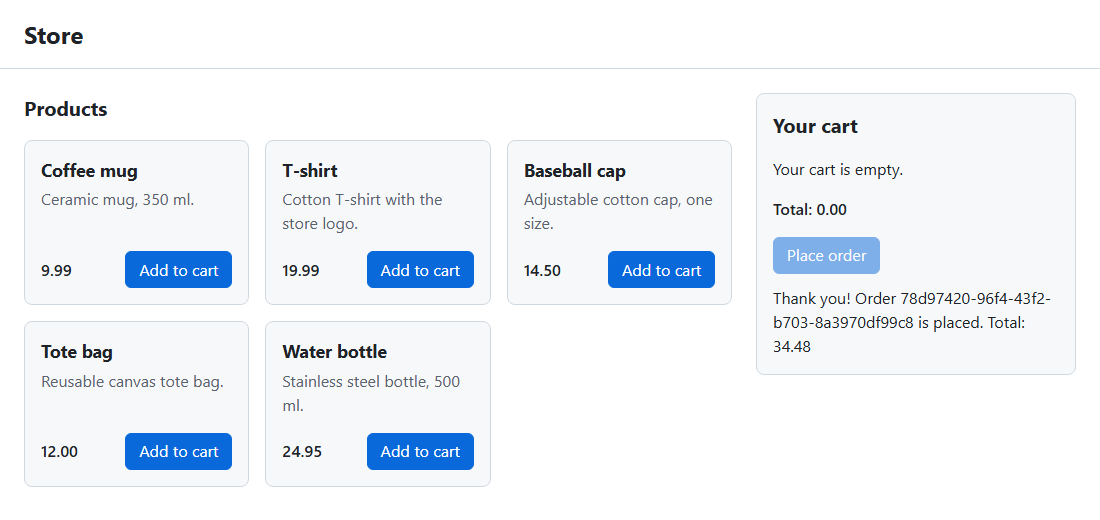
The Storefront sent only ids and quantities; the Order API asked the Product API for the names and prices and worked out the total of 34.48.
Step-7: Try it: place an order and see the snapshot
The sample code has a small script, scripts/demo-order.sh, that shows the product and then orders two of it through the dev ports, with its own request id:
#!/usr/bin/env bash
# Places one order through the store's temporary development ports (chapter 14):
# shows the product the Order API will ask for, places an order for two of it
# with your own request id, and prints the order. Start the store first:
#
#   docker compose -f compose.yaml -f compose.dev-ports.yaml up -d --build --wait
#   bash scripts/demo-order.sh         # product 1, quantity 2
#   bash scripts/demo-order.sh 3 1     # product 3, quantity 1
#
# Then find the request id in both services' logs:
#   docker compose logs order-api product-api | grep <request id>
set -euo pipefail

product_api=${PRODUCT_API:-http://localhost:5001}
order_api=${ORDER_API:-http://localhost:5002}
product_id=${1:-1}
quantity=${2:-2}
request_id="demo-$(date +%s)"

echo "Product API: GET /products/$product_id"
curl -sS -w '\n' "$product_api/products/$product_id"

echo
echo "Order API: POST /orders (X-Request-Id: $request_id)"
curl -sS -w '\nHTTP %{http_code}\n' -X POST "$order_api/orders" \
  -H "Content-Type: application/json" \
  -H "X-Request-Id: $request_id" \
  -d "{\"items\":[{\"productId\":$product_id,\"quantity\":$quantity}]}"
Run it from the folder with compose.yaml (on Windows, in Git Bash or WSL):
bash scripts/demo-order.sh

# output
Product API: GET /products/1
{"id":1,"sku":"MUG-001","name":"Coffee mug","description":"Ceramic mug, 350 ml.","price":9.99}

Order API: POST /orders (X-Request-Id: demo-1794785563)
{"id":"295f7847-3a75-46cc-ba09-8a30adfa79e1","customerId":"anonymous","status":"Placed","total":19.98,"createdAt":"2026-11-15T23:32:43.693Z","items":[{"productId":1,"name":"Coffee mug","unitPrice":9.99,"quantity":2}]}
HTTP 201
The name and price in the order are the ones the Product API returned, and the total is 2 x 9.99. Now follow the request id through both services:
docker compose logs order-api product-api | grep demo-1794785563

# output
product-api-1  |       GET /products/1 200 50ms requestId=demo-1794785563
order-api-1    | POST /orders 201 117ms requestId=demo-1794785563
One order, two services, one id. The Product API's line comes first, because the Order API logs its line only when its own response is finished. Your ids and times will be different.
The snapshot. Raise the price of the coffee mug in the Product API (in the Admin site, or with curl):
curl -i -X PUT http://localhost:5001/products/1 \
  -H "Content-Type: application/json" \
  -d '{"sku":"MUG-001","name":"Coffee mug","description":"Ceramic mug, 350 ml.","price":11.50}'

# output (trimmed)
HTTP/1.1 204 No Content
A new order uses the new price at once, because the Order API asks the Product API every time:
curl -X POST http://localhost:5002/orders \
  -H "Content-Type: application/json" \
  -d '{"items":[{"productId":1,"quantity":2}]}'

# output
{"id":"94b49f8c-18a8-4ff7-885b-57ce02030729","customerId":"anonymous","status":"Placed","total":23,"createdAt":"2026-11-15T23:32:50.792Z","items":[{"productId":1,"name":"Coffee mug","unitPrice":11.5,"quantity":2}]}
But the order from the demo script keeps the price the customer agreed to:
curl http://localhost:5002/orders/295f7847-3a75-46cc-ba09-8a30adfa79e1

# output
{"id":"295f7847-3a75-46cc-ba09-8a30adfa79e1","customerId":"anonymous","status":"Placed","total":19.98,"createdAt":"2026-11-15T23:32:43.693Z","items":[{"productId":1,"name":"Coffee mug","unitPrice":9.99,"quantity":2}]}
The Order DB shows the same: every order item has its own copy of the name and price.
docker compose exec order-db psql -U orders -d orderdb \
  -c "SELECT o.total, i.name, i.unit_price, i.quantity FROM orders o JOIN order_items i ON i.order_id = o.id WHERE i.product_id = 1 ORDER BY o.created_at;"

# output
 total |    name    | unit_price | quantity
-------+------------+------------+----------
 34.48 | Coffee mug |       9.99 |        2
 19.98 | Coffee mug |       9.99 |        2
 23.00 | Coffee mug |      11.50 |        2
(3 rows)
The first row is the example order from 002-seed.sql. Put the price back to 9.99 with the same PUT command when you're done.
Step-8: Try it: order a product that doesn't exist
Order a mug and a product with id 42:
curl -i -X POST http://localhost:5002/orders \
  -H "Content-Type: application/json" \
  -d '{"items":[{"productId":1,"quantity":1},{"productId":42,"quantity":1}]}'

# output (trimmed)
HTTP/1.1 422 Unprocessable Entity
X-Request-Id: 7fdce5ad-e26b-4164-b8ec-e1292475046b
Content-Type: application/problem+json; charset=utf-8

{"type":"about:blank","title":"Unprocessable Entity","status":422,"detail":"Product 42 does not exist.","productId":42}
The Product API answered 404 for product 42, and the Order API turned that into a 422 that names the product. Nothing was saved: the order is checked completely before it is stored. You didn't send an X-Request-Id this time, so the Order API created one and returned it in the response header.
Step-9: Try it: stop the Product API
Now the interesting part. Stop the Product API and place an order:
docker compose stop product-api

curl -i -w '\ntime: %{time_total}s\n' -X POST http://localhost:5002/orders \
  -H "Content-Type: application/json" \
  -d '{"items":[{"productId":1,"quantity":1}]}'

# output (trimmed)
HTTP/1.1 503 Service Unavailable
X-Request-Id: 8b7d9052-60fc-4508-a0cf-861b47896f73
Content-Type: application/problem+json; charset=utf-8

{"type":"about:blank","title":"Service Unavailable","status":503,"detail":"The product service is unavailable. Try again in a moment."}
time: 2.104292s
The order failed after about 2 seconds, with a 503 that tells the caller to try again later. The Order API's log has the reason:
docker compose logs order-api --tail 2

# output
order-api-1  | product service unavailable: GET http://product-api:8080/products/1 failed: no answer within 2000 ms requestId=8b7d9052-60fc-4508-a0cf-861b47896f73
order-api-1  | POST /orders 503 2003ms requestId=8b7d9052-60fc-4508-a0cf-861b47896f73
Why the full 2 seconds, and not an instant "connection refused"? With the container stopped, the name product-api no longer exists on the store network, so Docker's DNS server asks your machine's DNS servers instead, and that can take a few seconds to fail. Without the timeout, every order would wait for that, however long it takes. A timeout puts an upper limit on how long one service's problem can slow down another.
The Order API itself is fine. It is still ready, and it still serves what doesn't need the Product API, such as the order history:
curl -i http://localhost:5002/health/ready

# output (trimmed)
HTTP/1.1 200 OK
Healthy

docker compose ps --format 'table {{.Service}}\t{{.Status}}'

# output
SERVICE      STATUS
admin        Up About a minute (healthy)
order-api    Up 47 seconds (healthy)
order-db     Up About a minute (healthy)
product-db   Up About a minute (healthy)
storefront   Up About a minute (healthy)
curl http://localhost:5002/orders still lists your orders, because each order carries its own snapshot of names and prices.
The websites degrade gracefully too. The Admin site shows its banner instead of the list (the log has Product API unavailable: GET http://product-api:8080/products failed: ...):
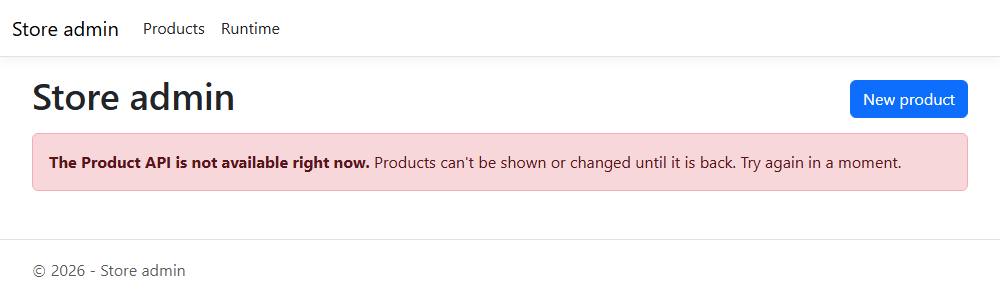
If the Storefront already shows the products when the Product API goes down, a customer can still fill the cart, but Place order answers with a friendly message and keeps the cart:
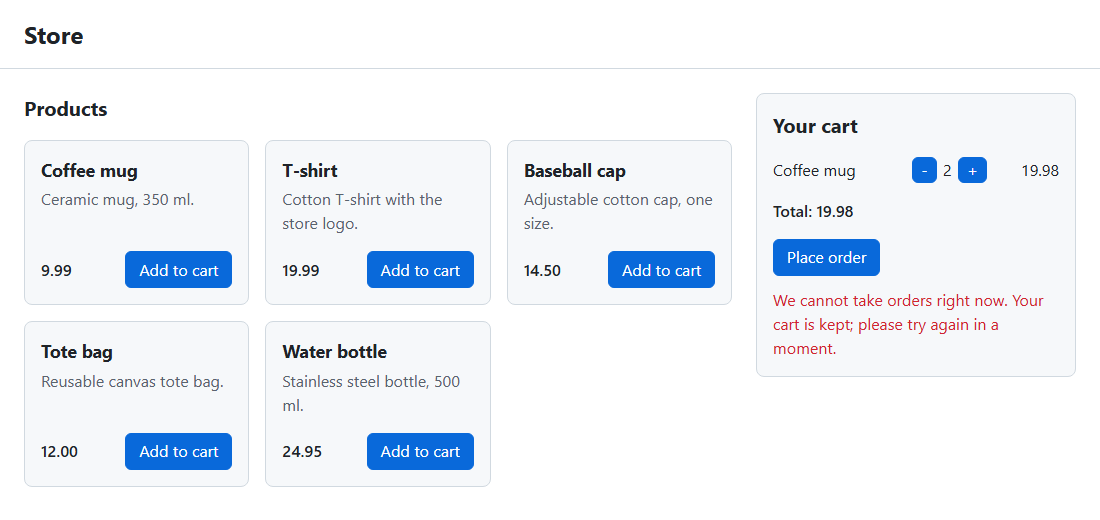
A page loaded while the Product API is down shows The products could not be loaded (HTTP 502). Please try again in a moment., because the Storefront's nginx proxy answers 502 Bad Gateway.
Start the Product API again:
Within a few seconds orders work again; the Storefront's nginx may need up to 10 seconds more, until its cached DNS answer expires. Nothing had to be restarted, because the services look each other up for every call.
This is the honest trade-off of a synchronous call: while the Product API is down, nobody can place an order. We kept the damage small (a fast, clear failure, no stuck requests, and every other part of the store still working), but we didn't remove it. Retries for short glitches, circuit breakers that stop calling a service that is clearly down, and other resilience patterns are the subject of the chapter on resilience and observability (Chapter-18, being added).
Troubleshooting
| Problem | What to do |
|---|---|
Every order returns 503 and the Order API log says PRODUCT_API_URL is not set |
Add PRODUCT_API_URL: http://product-api:8080 to the order-api service and run up -d again |
Every order returns 503 with no answer within 2000 ms or ENOTFOUND |
The Product API is down or not on the store network: docker compose ps product-api and docker compose logs product-api |
| The Admin site always shows the banner | Check PRODUCT_API_URL on the admin service; docker compose logs admin shows the reason after Product API unavailable |
The Storefront shows The products could not be loaded (HTTP 502) |
The Product API is down, or you run the Storefront alone with docker run, where the service names don't exist. Run it with the store's compose file |
npm run dev shows the error message, and the Vite terminal reports a proxy error |
Start the store with compose.dev-ports.yaml, so ports 5001 and 5002 are published |
| You can't find a request id in the Product API's log | Rebuild the Product API (up -d --build); health checks are not logged, only API calls |
Conclusion
In this chapter, the services started talking to each other. The Order API now asks the Product API for the name and price of every product, by its service name on the store network, with a 2-second timeout, and stores a snapshot of both in the order. It maps the Product API's answers to clear errors for its own callers: 422 for a product that doesn't exist and 503 when the Product API can't answer. A request id travels with every call and appears in the logs of both services. The Admin site reads and adds products through a typed HttpClient and shows a banner instead of an error page when the Product API is down, and the Storefront loads the products and places real orders through relative /api/ URLs.
We also saw the price of synchronous calls: while the Product API is down, nobody can place an order. The timeout keeps that failure fast and contained, and readiness that checks only a service's own dependencies keeps it from spreading.
The Storefront still reaches the APIs through a temporary proxy in its own nginx, and every service still has its own port on your machine. In the next chapter, we put an API gateway in front of the store: one public address that routes /api/products/ and /api/orders/ to the right service, and replaces both the temporary proxy and the development ports.
References
- MDN - Using the Fetch API
- MDN - AbortSignal.timeout()
- Microsoft Learn - Make HTTP requests using IHttpClientFactory in ASP.NET Core
- Microsoft Learn - Prevent Cross-Site Request Forgery (XSRF/CSRF) attacks in ASP.NET Core
- RFC 9457 - Problem Details for HTTP APIs
- Docker Docs - Networking in Compose
- nginx - proxy_pass
- nginx - resolver
- Vite - Server options: server.proxy
- microservices.io - Pattern: Remote Procedure Invocation
- microservices.io - Pattern: Messaging